
MCP server · Security
Intruder MCP server
by intruder-io
Lets your AI check your Intruder security scans and explain the vulnerabilities it finds.
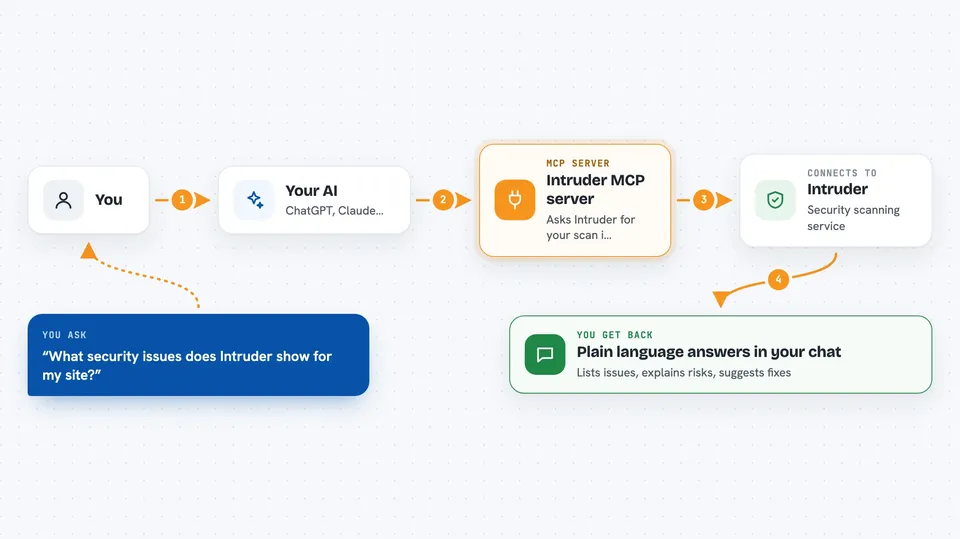
This is a small helper that connects your AI assistant to Intruder, a service that scans your computers and websites for security weaknesses. Once it is set up, you can just ask your AI in normal words what is wrong and what to fix first. It is handy for anyone who looks after a company's systems but is not a security expert.
What is an MCP server? The 30-second version
On its own, your AI can only chat with you. An MCP server is a small helper program that gives your AI one new skill, in this case a connection to Intruder. When you ask a question, your AI passes it to this helper, the helper talks to Intruder for you, and the answer comes back into your chat. You do not have to learn any new app; you just keep talking to your AI.
What this MCP server does
You ask your AI something about your security, like which issues are still open. The AI sends that request to this helper program. The helper logs in to Intruder with your API key and asks Intruder for the information. Intruder replies, and the helper hands the reply back to your AI. Your AI then explains it to you in plain language in the chat window.
 Click to zoom
What you can do with it
- List the security issues Intruder found in your systems
- Explain what a specific vulnerability means in plain words
- Tell you which issues are most urgent to fix
- Summarise the results of your latest scans
- Look up details about a target or scan you set up in Intruder
- Help you write a short report of open issues for your team
Try asking your AI
- “What security issues does Intruder show for my main website?”
- “Which of my open vulnerabilities are the most serious?”
- “Explain the top issue in simple terms and how to fix it”
- “Give me a short summary of my latest scan results”
What it gives back to you
You get answers in your normal chat, written in everyday words. That can be a list of issues, a short summary of a scan, or an explanation of one problem and how to fix it. The AI can also point out which items look most urgent. You read it right there, no extra dashboard needed.
Before you start
What you need
- An Intruder account
- An Intruder API key (a kind of password for apps; you create it in your Intruder account settings)
- Python with uv installed, or Docker, depending on which setup you pick
Good to know
This helper can read your Intruder account data with your API key, so keep that key private and only share it with people you trust.
Install it with your AI
Add Intruder MCP server to your AI, no technical skills needed
You don't install anything by hand. You copy one prompt, paste it into an AI that can work on your computer, and it checks, installs and connects the server for you, asking you when it needs something.
Sign in to get the install prompt
Members get a ready-made prompt that lets the Claude desktop app check Intruder MCP server, install it and connect it for them, step by step. You don't need any technical skills: you copy, paste and answer a few questions. Your connected AI can also find and install any of the 4,609 MCP servers here for you.
Who it's for
IT managers, system administrators, and small teams who run Intruder scans and want quick, plain-language answers about their security findings.



