
MCP server · Notes
MemoryGuard MCP server
by irisxc4
Give your coding AI a shared memory that stays tidy, with old notes replaced instead of piling up.
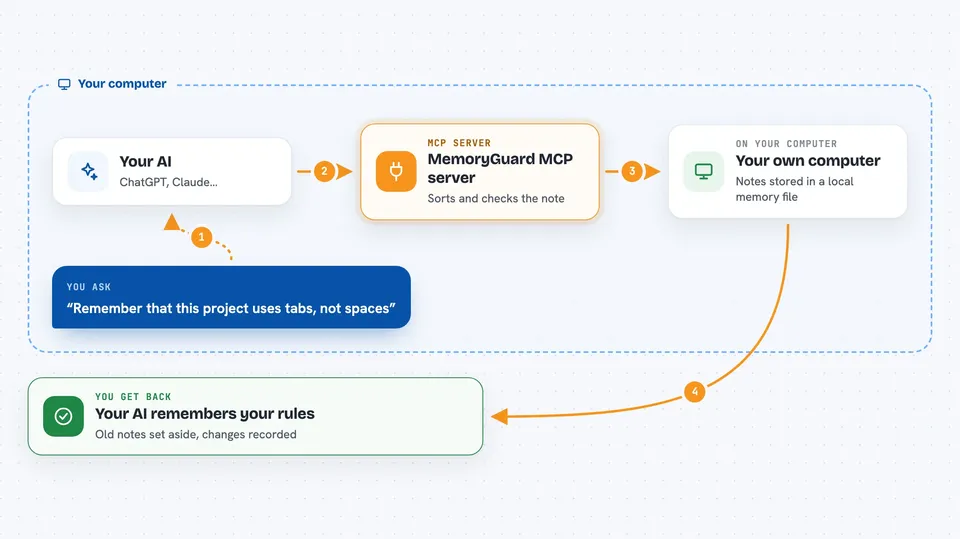
MemoryGuard is a helper that gives your coding AI a shared memory it can write to and read from, without that memory turning into a messy pile of old notes. It runs on your own computer, so nothing goes to a company server. It is handy if you use coding assistants like Claude Code, Codex, Cursor or TRAE and want them to remember useful things about your project.
What is an MCP server? The 30-second version
On its own, your AI can only chat. It forgets everything once the conversation ends. An MCP server is a small helper program that gives your AI a new skill or a connection to something. MemoryGuard is that helper here: it gives your AI a shared memory for your project, so the AI can save notes, look them up later, and keep them organised when you ask.
What this MCP server does
You ask your AI to remember something about your project, like a rule or a decision. The AI passes that note to MemoryGuard. MemoryGuard checks the note, sorts it into a category, and compares it with what is already stored. If the new note replaces an old one, the old one is set aside instead of deleted, and the change is recorded. Later, when you ask a question, your AI can pull the relevant notes back out and use them in its answer.
 Click to zoom
What you can do with it
- Save project rules and notes so your AI remembers them next time
- Replace an outdated note with a newer one while keeping a record of the change
- Spot duplicate or conflicting notes and flag them for you to review
- Quarantine notes that look like they contain passwords or secret keys
- Search past conversations and notes for something you discussed earlier
- Roll back a memory change if you decide it was wrong
- Browse and manage memories through a desktop console
Try asking your AI
- “Remember that this project uses tabs, not spaces, for indentation”
- “What rules have we saved for this project so far?”
- “That earlier note about the old database name is outdated, please replace it”
- “Show me any memories that were quarantined recently”
What it gives back to you
You get back plain answers in the chat: lists of saved notes, the current rules for your project, or a short summary of what changed. When MemoryGuard replaces or quarantines something, it tells you what it did and why. You can also open the desktop console to see the full picture, including past versions and the evidence behind each change.
Before you start
What you need
- Python installed on your computer
- The MemoryGuard package installed with pip
- Your coding assistant (Claude Code, Codex, Cursor or TRAE) set up on the same machine
Good to know
MemoryGuard can change, replace or quarantine the notes your AI has saved, so review the changes it reports before trusting them.
Install it with your AI
Add MemoryGuard MCP server to your AI, no technical skills needed
You don't install anything by hand. You copy one prompt, paste it into an AI that can work on your computer, and it checks, installs and connects the server for you, asking you when it needs something.
Sign in to get the install prompt
Members get a ready-made prompt that lets the Claude desktop app check MemoryGuard MCP server, install it and connect it for them, step by step. You don't need any technical skills: you copy, paste and answer a few questions. Your connected AI can also find and install any of the 4,609 MCP servers here for you.
Who it's for
Developers and technical teams who use several coding assistants on the same project and want their shared notes to stay clean and reviewable.





