
MCP server · Developer tools
TNL MCP server
by janaraj
Lets your coding AI write, check and follow a plain English plan for each feature before it writes code.
TNL stands for Typed Natural Language. It is a way to write a short English plan for each feature, approve it once, and have your coding AI stick to it. This MCP server is the part that lets your AI look up those plans, suggest changes to them, and check the code against them.
What is an MCP server? The 30-second version
On its own, your AI can only chat with you. An MCP server is a small helper program that gives your AI a new skill or a connection to something, and here it connects your AI to your project's TNL plan files. Once it is connected, your AI can ask the helper to fetch a plan, suggest an edit, or check that the code still matches what you approved. You do not run anything by hand each time. You just ask your AI, and it uses this helper behind the scenes.
What this MCP server does
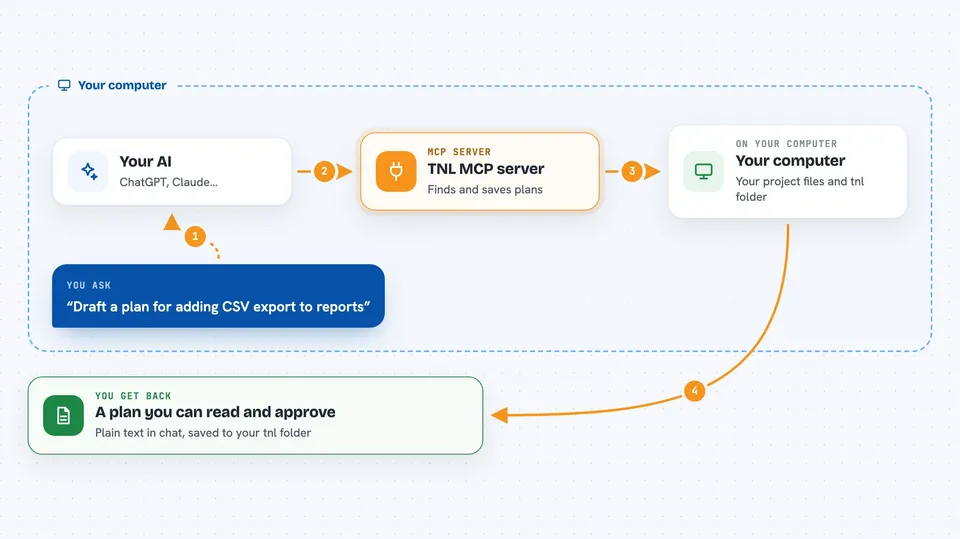
You ask your AI to build or change a feature. The AI uses this helper to look through your tnl folder and find any plan whose file list overlaps with your request. It shows you a draft plan in the chat and waits for your yes. After you approve, the helper saves the plan to disk and the AI writes code against it. Later, the helper can check that the files and tests named in the plan still exist, and tell you what plans are affected by a change.
 Click to zoom
What you can do with it
- Find which saved plans are touched by a set of files
- Read back the full text of one or more plans by name
- Draft a new plan or an edit to an existing one for your review
- Save an approved plan to your project
- Check that the files and tests named in a plan still exist
- Keep a short log of what the AI did during a session
Try asking your AI
- “Which TNL plans cover the files I am about to change?”
- “Show me the plan for user-rate-limiter”
- “Draft a TNL for adding CSV export to the reports page”
- “Run the verifier on the tnl folder and tell me what fails”
What it gives back to you
You get back plain text in the chat: a list of plan names, the full text of a plan, a draft plan for you to read, or a short report of what passed and what failed. When a plan is saved, the helper writes a file into your tnl folder. Nothing is written until you approve it.
Before you start
What you need
- Node.js 20 or newer
- A project folder where you want the tnl directory to live
- A coding agent that reads a Markdown instruction file, such as Claude Code, Codex, Gemini or Cursor
Good to know
The helper can write new plan files into your project once you approve a draft, so read the draft before saying yes.
Install it with your AI
Add TNL MCP server to your AI, no technical skills needed
You don't install anything by hand. You copy one prompt, paste it into an AI that can work on your computer, and it checks, installs and connects the server for you, asking you when it needs something.
Sign in to get the install prompt
Members get a ready-made prompt that lets the Claude desktop app check TNL MCP server, install it and connect it for them, step by step. You don't need any technical skills: you copy, paste and answer a few questions. Your connected AI can also find and install any of the 4,361 MCP servers here for you.
Who it's for
Developers and technical leads who use a coding AI on a real project and want the AI to follow an agreed plan instead of guessing.





