
MCP server · Notes
md-vision MCP server
by japlete
Let your AI read your Markdown notes and see the pictures inside them.
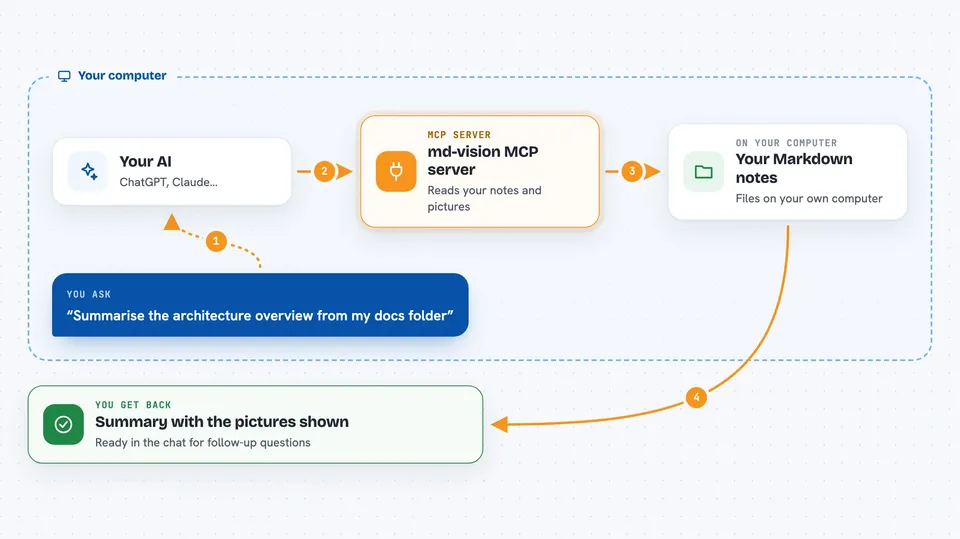
This is a small helper that lets your AI assistant open Markdown documents stored on your computer, including the images sitting next to the text. It was built mostly for developers building search-over-docs setups, but anyone whose work lives in .md files can find it useful. If your team keeps guides, specs or release notes as Markdown folders, this makes those readable to your AI.
What is an MCP server? The 30-second version
On its own, your AI can only talk based on what it learned during training plus whatever you paste into the chat window. An MCP server is a little companion program running quietly behind the scenes that hands your AI a brand-new ability. This particular one connects your AI to your Markdown files on disk, so whenever you mention a doc, the AI goes off through this helper, opens the right part, sees the embedded pictures too, and brings everything back into the conversation.
What this MCP server does
When you give your AI a request involving a Markdown document, the AI calls this helper automatically. The helper checks whether the requested file sits within the safe set of folders you pre-approved. Then either lists just the table-of-contents style outline so the AI knows how big the document really is, or pulls out the actual paragraphs together with the illustrations pasted alongside them. Everything lands straight in the reply box, ready for follow-up questions.
 Click to zoom
What you can do with it
- Ask your AI to summarise a whole folder of internal wiki-style Markdown pages
- Have diagrams and screenshots shown directly in the answer instead of being skipped
- Get just the 'Deployment' chapter extracted while ignoring hundreds of unrelated lines above and below
- Compare instructions across several version-controlled spec documents side-by-side
- Pull raw GitHub-hosted project READMEs into chat without leaving the editor
- Check quickly whether some old note actually contains the paragraph someone claims it has
Try asking your AI
- “Summarise the architecture overview from ./docs/spec/v2/api-reference.md and include the sequence diagram near the top”
- “What changed between v1 and v2 according to our changelog? Show me both versions' upgrade steps next to each other”
- “Give me the full Troubleshooting section from my personal knowledge-base vault's networking guide”
- “Fetch the contributing guidelines from github.com/acme/widgets/blob/main/CONTRIBUTING.md and tell me whom I should ping for review”
What it gives back to you
For outlines you receive a tidy summary listing each title along with its position in the file, total character count and how many graphics sit underneath it. When asking for real reading material, the response arrives split naturally into prose chunks followed immediately by the corresponding visuals rendered inline. Long reference links remain visible as clickable addresses wherever they were originally written down.
Before you start
What you need
- Node.js installed on your machine, specifically version twenty or higher
- At least one absolute folder path containing the Markdown sources you wish exposed
- Decide beforehand whether external web addresses shall ever reach the reader engine, choosing none, all or explicit domain names such as raw.githubusercontent.com
Install it with your AI
Add md-vision MCP server to your AI, no technical skills needed
You don't install anything by hand. You copy one prompt, paste it into an AI that can work on your computer, and it checks, installs and connects the server for you, asking you when it needs something.
Sign in to get the install prompt
Members get a ready-made prompt that lets the Claude desktop app check md-vision MCP server, install it and connect it for them, step by step. You don't need any technical skills: you copy, paste and answer a few questions. Your connected AI can also find and install any of the 4,609 MCP servers here for you.
Who it's for
Technical writers maintaining large bodies of product documentation, engineers keeping design records beside repository trees, researchers organising literature reviews locally, and anybody else treating collections of annotated Markdown notebooks as primary working assets worth consulting daily via conversational interface.





