
MCP server · Developer tools
agentic-os MCP server
by Jarroslav
Lets your AI look up the agentic-os governance, SDLC and QE docs, plan an install, and check an existing setup.
This is a small helper that gives your AI assistant read-only access to the agentic-os project: a set of rules and templates for running AI coding agents in a safe, governed way. It is handy if you keep hearing about agentic-os and want your AI to explain it, plan an install, or check what is already set up, without you reading the whole repository yourself.
What is an MCP server? The 30-second version
On its own, your AI can only chat with you. An MCP server is a small helper program that gives your AI a new skill or a connection to something outside the chat. This one connects your AI to the agentic-os documentation and its role presets, so the AI can search those docs and answer your questions about them. You do not install agentic-os itself here. You just give your AI a way to read about it.
What this MCP server does
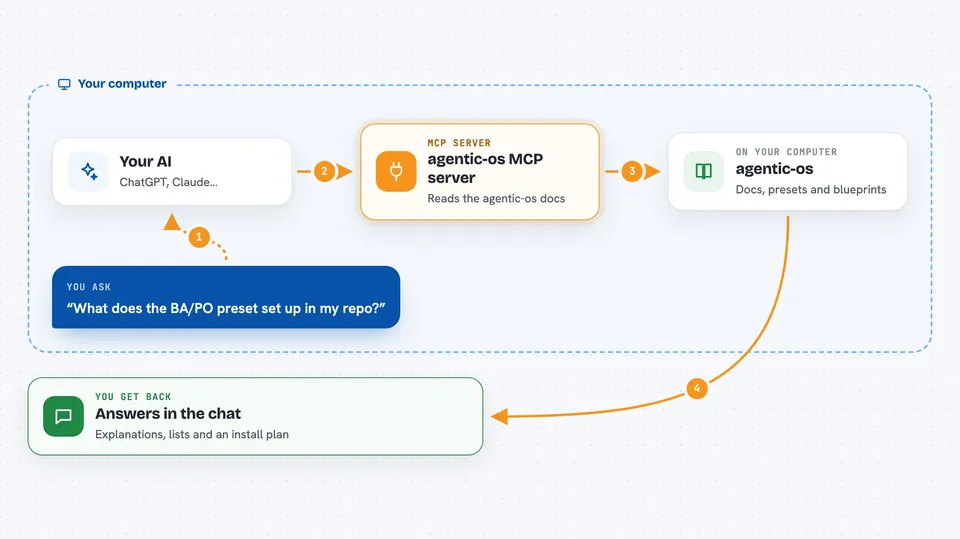
You ask your AI a question about agentic-os, like what a role preset contains or how the SDLC pipeline works. Your AI passes that question to this helper. The helper reads the agentic-os docs and lists of presets and blueprints, then sends the matching text back. Your AI turns that into a normal answer in the chat. It can also build a step-by-step install plan for a role you pick, and check an existing install to see what is there.
 Click to zoom
What you can do with it
- Search the agentic-os documentation for a topic you ask about
- List the role presets, such as developer, QA, BA/PO, architect, DevOps, PM, portfolio, security, data and design
- List the 28 Quality Engineering blueprints by stage
- Turn a role you choose into a step-by-step install plan
- Audit an existing agentic-os install and report what it finds
- Explain terms like HITL, gate or preset in plain words
Try asking your AI
- “What does the BA/PO preset set up in my repo?”
- “Give me an install plan for the QA role in Claude Code”
- “List the QE blueprints for the testing stage”
- “Check my project and tell me what agentic-os files are already there”
What it gives back to you
You get answers in the chat, in normal sentences: explanations, lists of presets or blueprints, and a step-by-step install plan you can follow. If you ask it to audit an install, it reports what it found, such as which files and settings are present. It does not change anything in your project. It only reads and reports.
Before you start
What you need
- An AI assistant that can use MCP servers, like Claude Code or another MCP-capable client
- Node.js installed on your computer (the helper runs through npx)
Good to know
It only reads the agentic-os docs and your project files to answer questions, so it does not change or delete anything, but it can read files in the project you point it at.
Install it with your AI
Add agentic-os MCP server to your AI, no technical skills needed
You don't install anything by hand. You copy one prompt, paste it into an AI that can work on your computer, and it checks, installs and connects the server for you, asking you when it needs something.
Sign in to get the install prompt
Members get a ready-made prompt that lets the Claude desktop app check agentic-os MCP server, install it and connect it for them, step by step. You don't need any technical skills: you copy, paste and answer a few questions. Your connected AI can also find and install any of the 4,609 MCP servers here for you.
Who it's for
People who want their AI to explain or plan an agentic-os setup without reading the whole repository, especially team leads, QA folks and anyone setting up AI coding guardrails.



