
MCP server · Developer tools
ActionD MCP server
by JoeGlenn1213
Lets your AI check, run, and fix your local code checks and tests after each push.
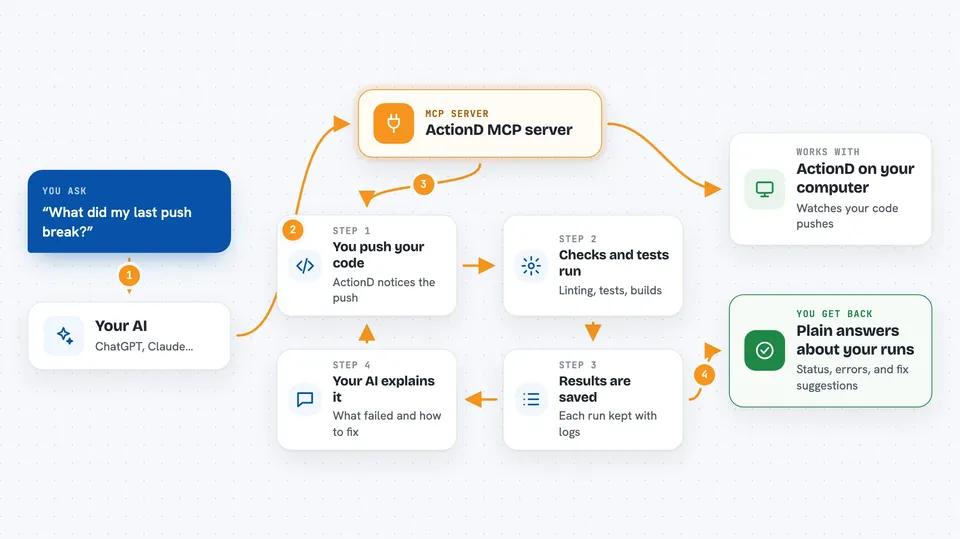
ActionD is a small helper that runs code checks, tests, and builds on your computer whenever you push code to your local Git setup. It comes with an MCP server, which means your AI assistant can look at those runs, explain failures, and even start or stop them for you. It is handy if you keep code on your own machine and want an AI to help you keep it healthy.
What is an MCP server? The 30-second version
On its own, your AI can only chat with you. An MCP server is a small helper program that gives your AI a new skill or a connection to another tool. Here, that helper is ActionD, which watches your local Git events and runs checks on your code. Once connected, your AI can ask ActionD what happened, why something failed, and what to do next.
What this MCP server does
You push code to your local Git setup, and ActionD notices the push. It then runs the plugins you have set up, which are small scripts that do things like lint your code, run tests, or build your project. Each run is saved as a job with logs and results. Through the MCP server, you can ask your AI about those jobs, and it will look them up in ActionD and tell you what happened. If something failed, ActionD can also suggest a likely cause and a fix.
 Click to zoom
What you can do with it
- Check the status of your ActionD service and see recent job counts
- List recent code check and test runs with their results
- Ask why a failed job failed and get fix suggestions
- See which plugins are installed and what they do
- Turn a plugin on or off for your current project
- Change how much checking happens on each push (fast, full, or release)
- Retry a failed job or cancel one that is still running
Try asking your AI
- “What did my last push break?”
- “Show me the most recent failed job and explain the error.”
- “Which plugins are enabled for this project right now?”
- “Switch to the full profile so more checks run on each push.”
What it gives back to you
You get answers in plain chat: a short summary of a job, its status, and any error message. For failures, you get a likely cause and suggested fixes. You can also see lists of recent jobs, plugin names, and current settings. Some tools return live logs or the final result of a job you asked it to wait for.
Before you start
What you need
- ActionD installed on your computer
- LGH (Local Git Hub) running locally, since ActionD listens to its events
- Python 3.8 or newer for the plugins
- Go 1.25 or newer only if you build ActionD from source
Good to know
ActionD can run commands on your computer and change your project files, including rolling back to a previous commit on failure, so only connect it to projects you are comfortable letting it touch.
Install it with your AI
Add ActionD MCP server to your AI, no technical skills needed
You don't install anything by hand. You copy one prompt, paste it into an AI that can work on your computer, and it checks, installs and connects the server for you, asking you when it needs something.
Sign in to get the install prompt
Members get a ready-made prompt that lets the Claude desktop app check ActionD MCP server, install it and connect it for them, step by step. You don't need any technical skills: you copy, paste and answer a few questions. Your connected AI can also find and install any of the 4,609 MCP servers here for you.
Who it's for
Developers and small teams who keep their code on their own machine and want an AI to help watch and fix their local checks.




