MCP server · Security
Netskope NPA MCP server
by johnneerdael
Ask your AI to set up and manage Netskope Private Access publishers, apps, brokers and policies for you.
This is a connector between your AI assistant and Netskope Private Access (often shortened to NPA), the part of Netskope that lets staff reach company systems privately instead of exposing them to the open internet. Once it is hooked up, you describe what you want changed inside NPA in normal words and the AI carries out those steps against your tenant. It suits IT admins and network teams at companies already using Netskope.
What is an MCP server? The 30-second version
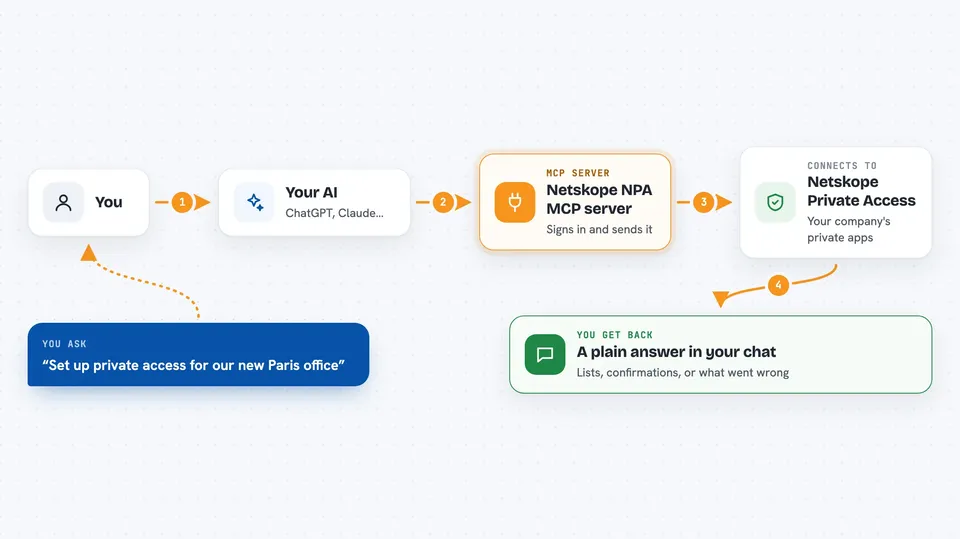
On its own your AI can only talk. An MCP server is a little helper program that sits next to your AI and hands it extra skills. This particular helper connects your AI to your Netskope NPA tenant, so whenever you mention publishers, private apps, local brokers or policies, the AI knows how to look them up and act on them. You never touch any code yourself; the AI calls the right action after reading your message.
What this MCP server does
When you send a request such as adding a new office's applications, your AI picks the matching actions offered by this server rather than guessing. The server then logs in to your Netskope tenant with the web address and secret token you gave it, sends the instruction along, and waits for the answer. Whatever comes back, whether it worked or hit an error, gets handed straight to your AI, which explains it to you in the chat. Because many actions chain together, something like setting up a whole branch office becomes several automatic steps followed by a summary. Nothing happens until you actually ask, since the AI decides based on your wording.
 Click to zoom
What you can do with it
- Create and configure publishers for a new location
- Add or edit private applications and attach them to publishers
- Build access policies tied to groups from your directory
- Check upgrade profiles so devices keep themselves current
- Look up existing resources before changing anything
- Run basic checks that configurations follow your rules
Try asking your AI
- “Show me all publishers whose software version is older than three months”
- “We opened a Paris office last week. List the private apps we have tagged France so I know if they exist yet”
- “Find every policy that still points to someone who left the company according to our directory sync”
- “Which private applications currently have no access policy attached?”
What it gives back to you
Mostly lists and written answers. For example asking about old publishers returns names plus versions and dates, while creating something yields confirmation that it was added along with whatever identifier the system assigned. When a check fails you see why in plain terms rather than a stack trace. Bigger tasks end with a short recap covering each thing done.
Before you start
What you need
- Your Netskope tenant web address ending in goskope.com
- A Netskope API token generated in your admin console
- Either Node.js installed locally or permission to run a provided container image
Good to know
Anything created, edited or deleted takes effect in your live Netskope environment right away, so review carefully before letting the AI confirm destructive commands.
Install it with your AI
Add Netskope NPA MCP server to your AI, no technical skills needed
You don't install anything by hand. You copy one prompt, paste it into an AI that can work on your computer, and it checks, installs and connects the server for you, asking you when it needs something.
Sign in to get the install prompt
Members get a ready-made prompt that lets the Claude desktop app check Netskope NPA MCP server, install it and connect it for them, step by step. You don't need any technical skills: you copy, paste and answer a few questions. Your connected AI can also find and install any of the 4,609 MCP servers here for you.
Who it's for
IT administrators and network engineers responsible for keeping a Netskope Private Access environment tidy.