
MCP server · Developer tools
vs-token-safer MCP server
by JSungMin
Search and edit code by symbol instead of dumping whole files, so your AI keeps its context small.
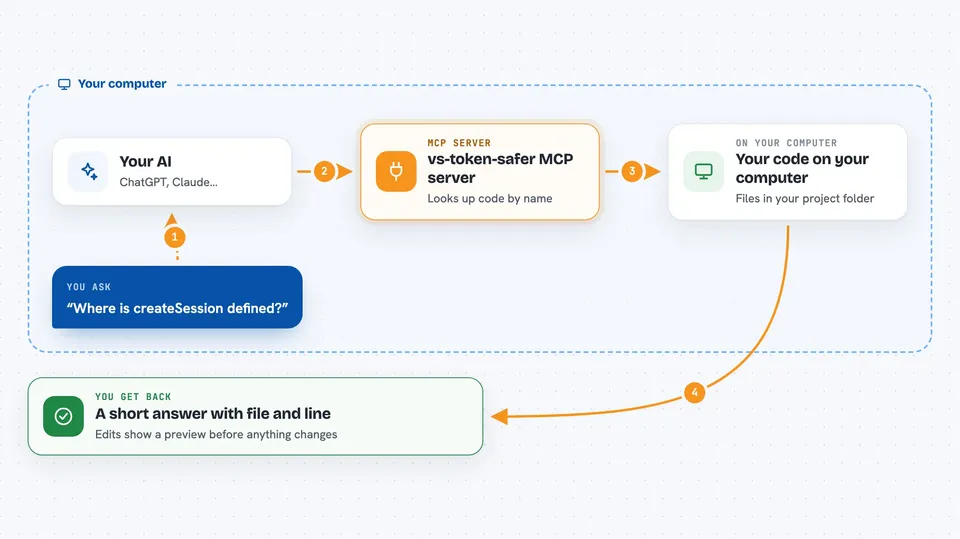
vs-token-safer is a helper for coding assistants like Claude Code. It sits between your AI and your code, so instead of pasting huge chunks of source into the chat, your AI gets short answers like a file and line number. It is handy if you work in a big codebase and keep running out of room in the conversation.
What is an MCP server? The 30-second version
On its own, your AI can only chat with you. An MCP server is a small helper program that gives your AI a new skill or a connection to something else. This one connects your AI to your own code on your computer, using the same kind of index your code editor uses. So when you ask where a function lives or what calls it, the AI can look it up through this helper instead of guessing or reading everything.
What this MCP server does
You ask your AI a question about your code, like where a function is or what uses it. Your AI sends that question to vs-token-safer. The helper looks it up in a code index built by a language server, which is the same engine your editor uses for things like go-to-definition. It sends back a short list of file and line numbers, not the whole source. If you ask it to change something, it can edit just that one function by name, and it shows you a preview before writing anything.
 Click to zoom
What you can do with it
- Find where a function or class is defined by name
- See every place a function is called
- Read just one function instead of a whole file
- Replace or delete one function by naming it
- Rename something everywhere it is used
- Search for a concept when you forgot the exact name
- Look up a section in a Markdown or config file by its heading
Try asking your AI
- “Where is createSession defined?”
- “What calls the AuthService class?”
- “Show me the body of the parseConfig function”
- “Find the code that handles user login, I forgot what it's called”
What it gives back to you
You get short answers in the chat, usually a list of file paths with line numbers. For a search, it might say the function name, which class it belongs to, and the file and line. For an edit, it shows a preview of the change first, then confirms once it is applied. It never dumps whole source files into the chat unless you ask for one specific function.
Before you start
What you need
- Node.js version 18 or newer
- The Claude Code app
- For C# or C++: a language server like Roslyn or clangd installed separately
- JavaScript, TypeScript, and Python work with no extra setup
Good to know
It can change your code, so check the preview before you let it apply an edit, and it reads your project files locally.
Install it with your AI
Add vs-token-safer MCP server to your AI, no technical skills needed
You don't install anything by hand. You copy one prompt, paste it into an AI that can work on your computer, and it checks, installs and connects the server for you, asking you when it needs something.
Sign in to get the install prompt
Members get a ready-made prompt that lets the Claude desktop app check vs-token-safer MCP server, install it and connect it for them, step by step. You don't need any technical skills: you copy, paste and answer a few questions. Your connected AI can also find and install any of the 4,609 MCP servers here for you.
Who it's for
Developers and anyone who uses an AI coding assistant on a medium or large codebase and wants to keep the conversation from filling up with pasted code.




