MCP server · Chat
NeuroLink MCP server
by juspay
Lets your AI talk to many different AI providers and models through one connection, with built-in tools and safety checks.
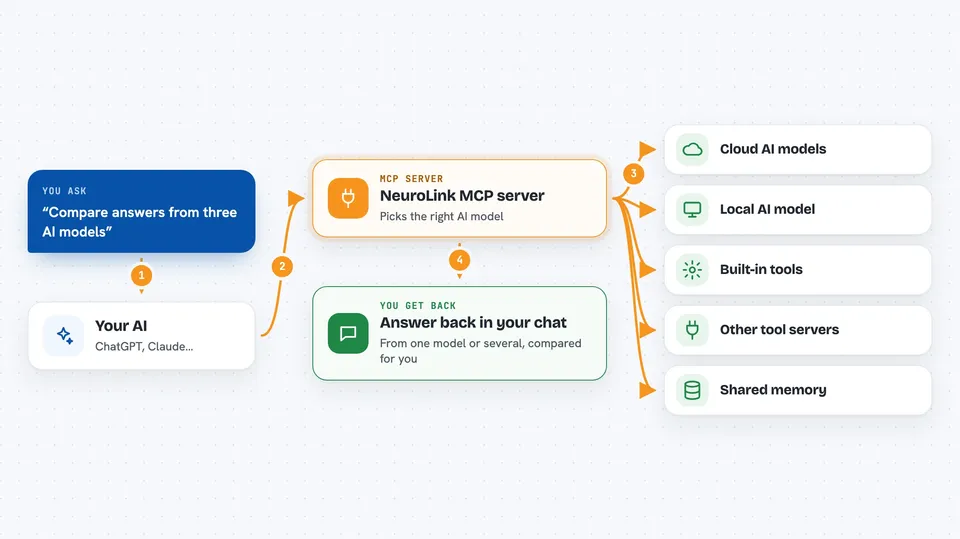
NeuroLink is a helper that sits between your AI assistant and lots of different AI services, like OpenAI, Anthropic, Google, and even models running on your own computer. Instead of setting up each service separately, you connect this one helper and your AI can reach them all. It is handy if you use more than one AI service and want your assistant to pick the best one for each task.
What is an MCP server? The 30-second version
On its own, your AI assistant can only chat with you using the one model it was built with. An MCP server is a small helper program you connect to your AI, and it gives your AI a new skill or a connection to another app or service. This one, NeuroLink, connects your AI to many different AI providers and models at once, plus tools and memory. So when you ask your AI to do something, it can quietly reach out through NeuroLink to the right service and bring the answer back to you.
What this MCP server does
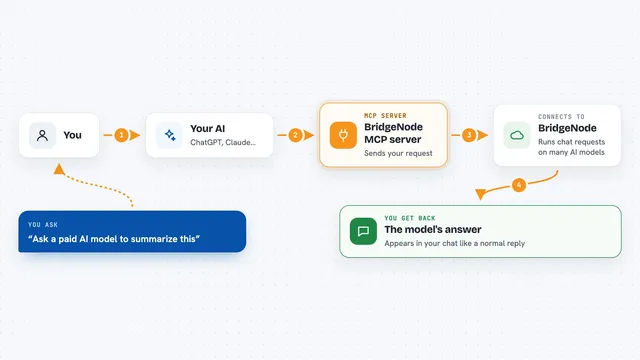
You ask your AI assistant a question or give it a task in plain words. Your AI passes that request to NeuroLink, which acts like a switchboard. NeuroLink picks a suitable AI provider or model, sends the request there, and collects the reply. It can also use built-in tools or connect to other tool servers your AI is allowed to use. Then the answer, or the result of the action, comes back into your chat as if your AI did it all by itself.
 Click to zoom
What you can do with it
- Ask questions and get answers from many different AI models through one connection
- Switch which AI provider answers without changing how you ask
- Use built-in tools and other connected tool servers your AI can reach
- Keep memory of past conversations using a shared store like Redis
- Run some models locally on your own computer instead of in the cloud
- Get simple yes or no style decisions from a fast decision model
- Work with text, images, and documents in the same conversation
Try asking your AI
- “Summarize this report and use whichever AI model is cheapest for the job”
- “Ask three different AI models the same question and compare their answers”
- “Use the local model on my computer to answer this so nothing leaves my machine”
- “Decide whether this refund request should be auto-approved or sent to a person”
What it gives back to you
You get answers, summaries, and results back in your chat, just like talking to your normal AI assistant. If NeuroLink used a tool or another service, the result of that action shows up as part of the reply. Some requests come back as a simple yes, no, or a score instead of a paragraph. You do not see the behind-the-scenes switching between providers unless you ask for it.
Before you start
What you need
- An account and key from at least one AI provider, like OpenAI or Anthropic (a key is a kind of password the provider gives you)
- Node.js installed if you run it yourself (a free program that lets your computer run this kind of helper)
- Optionally, a local AI runtime like Ollama if you want to run models on your own computer
Good to know
It can send your requests to outside AI providers, so do not use it with information you would not share with those services.
Install it with your AI
Add NeuroLink MCP server to your AI, no technical skills needed
You don't install anything by hand. You copy one prompt, paste it into an AI that can work on your computer, and it checks, installs and connects the server for you, asking you when it needs something.
Sign in to get the install prompt
Members get a ready-made prompt that lets the Claude desktop app check NeuroLink MCP server, install it and connect it for them, step by step. You don't need any technical skills: you copy, paste and answer a few questions. Your connected AI can also find and install any of the 4,609 MCP servers here for you.
Who it's for
People who use more than one AI service and want their assistant to reach all of them through a single connection, especially those who care about cost, privacy, or running models locally.