MCP server · Developer tools
Entroly MCP server
Helps your AI pick only the useful parts of your code, with a receipt showing what it left out.
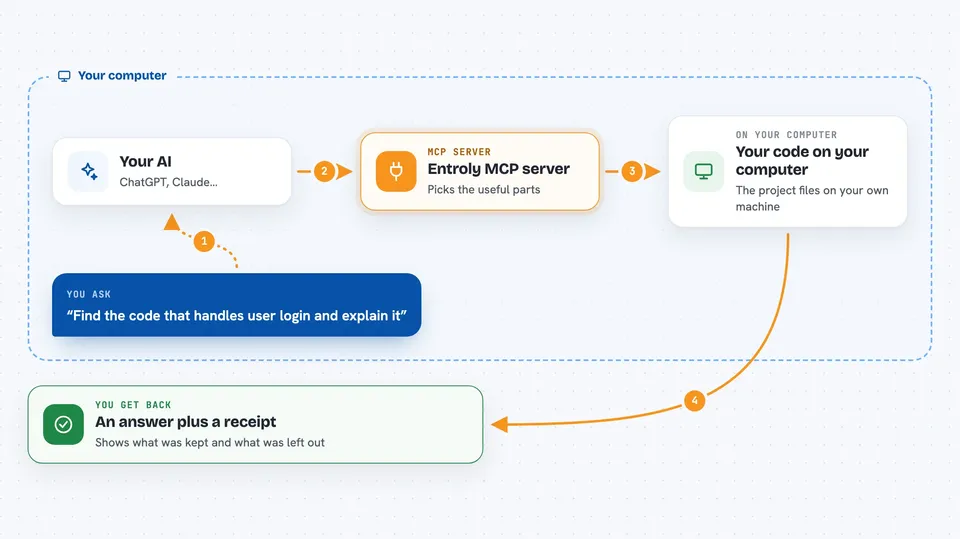
Entroly is a helper that sits between your code and your AI assistant. Instead of handing the AI your whole project, it picks out just the parts that matter for your question. It is handy if you work with a large codebase and your AI keeps getting slow, expensive, or confused.
What is an MCP server? The 30-second version
On its own, your AI can only chat with what you paste into it. An MCP server is a small helper program that gives your AI a new skill or a connection to something else. This one connects your AI to Entroly, which reads your local project files and selects the relevant pieces for each question. When you ask something, the AI calls on Entroly to fetch the right context instead of guessing.
What this MCP server does
You ask your AI a question about your code. The AI asks Entroly for help. Entroly looks through your project on your own machine and picks the fragments that fit your question and a token budget. It hands those pieces back to the AI, along with a receipt that says what was kept and what was left out. You get an answer that is based on the selected parts, and you can check the receipt to see the reasoning.
 Click to zoom
What you can do with it
- Select the most relevant parts of a large codebase for a specific question
- Keep a local receipt of what was included and what was omitted
- Recover the exact original text behind any selected fragment
- Run a local check for hallucinations in the AI's answer
- Route simpler questions to a cheaper model when appropriate
- Reduce the number of tokens sent to the AI to lower costs
- Work with editors like VS Code, Cursor, and Claude Code
Try asking your AI
- “Find the code that handles user login and explain how it works.”
- “Which files are involved in processing payments?”
- “Summarize the rate limiting logic in this project.”
- “Show me the parts of the codebase related to authentication and authorization.”
What it gives back to you
You get a focused answer from your AI, built from the selected parts of your code. Entroly also gives you a receipt that lists what was kept, what was left out, and why. If you want, you can ask for the exact original text behind any fragment. The receipt stays on your machine so you can review it later.
Before you start
What you need
- A local copy of your code project
- Python 3.10 or newer (for the pip install)
- Node.js 18 or newer (if you use the npm install)
- An AI editor or agent that supports MCP, like Claude Code, Cursor, or VS Code
Good to know
Entroly reads your local project files to select context, so be mindful of what is in your codebase if you share receipts or logs.
Install it with your AI
Add Entroly MCP server to your AI, no technical skills needed
You don't install anything by hand. You copy one prompt, paste it into an AI that can work on your computer, and it checks, installs and connects the server for you, asking you when it needs something.
Sign in to get the install prompt
Members get a ready-made prompt that lets the Claude desktop app check Entroly MCP server, install it and connect it for them, step by step. You don't need any technical skills: you copy, paste and answer a few questions. Your connected AI can also find and install any of the 4,609 MCP servers here for you.
Who it's for
Developers and technical teams who work with large codebases and want their AI assistant to be faster, cheaper, and more accurate.