
MCP server · Notes
Project Memory MCP server
by kaaustubh
Give your AI a lasting memory of your projects, bugs, and decisions, saved in plain files.
This is a small helper that gives your AI a long-term memory for the code projects on your computer. It remembers what each project is, the decisions you made, and every bug you ran into, so your AI can recall them later. It is handy if you work with tools like Claude Code, Cursor, or VS Code Copilot and keep forgetting why something was done a certain way.
What is an MCP server? The 30-second version
On its own, your AI can only chat with you and forgets everything when the session ends. An MCP server is a small helper program that gives your AI a new skill or a connection to something. This one connects your AI to a set of plain files stored inside your project folders, so it can look up past bugs, decisions, and notes, and add new ones when you ask. Think of it as a notebook your AI can read and write in for you.
What this MCP server does
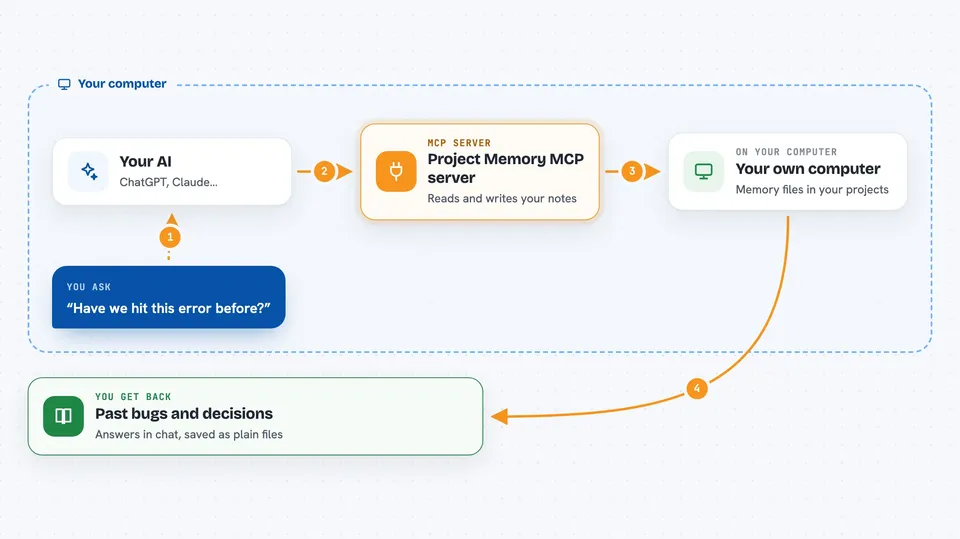
You talk to your AI in normal words, like asking whether you have hit a certain error before. The AI then uses this helper to look through the memory files saved in your projects. The helper reads or writes plain text files on your disk, such as AGENTS.md and issues.jsonl. You get back a short answer, a list of past bugs, or a note that something was saved. Nothing runs in the background; the helper only acts when your AI asks it to.
 Click to zoom
What you can do with it
- Search all your projects for a bug or error you have seen before
- Log a new bug or issue into a project's history file
- Save a decision or a lesson learned as a dated note
- Remember a correction you made, like always run the typecheck before committing
- Find which issues and decisions touch a specific file
- Track a named, multi-session effort with a plan and todo list
- Check in at the start of your day and get a standup summary of what changed
Try asking your AI
- “Have we hit this error before? TypeError: cannot read property of undefined in checkout.js”
- “How did I do Stripe webhook verification in any of my projects?”
- “Why is index.js written like this? Check the memory.”
- “Let's call this HashGate. Track the plan and todos under that name.”
What it gives back to you
You get answers in the chat, like a short list of past bugs that match your error, or a note explaining why a file looks the way it does. When the AI saves something, it tells you in one line what it recorded. You can also ask for a list of open issues across all your projects. Everything is stored as plain files you can open and read yourself.
Before you start
What you need
- Node.js installed on your computer (the install command uses npx)
- A code folder that holds your projects
- One of the supported AI tools, like Claude Code, Cursor, VS Code Copilot, or similar
Good to know
It writes plain files inside your project folders, so it can add notes and change memory files, but it does not delete your code.
Install it with your AI
Add Project Memory MCP server to your AI, no technical skills needed
You don't install anything by hand. You copy one prompt, paste it into an AI that can work on your computer, and it checks, installs and connects the server for you, asking you when it needs something.
Sign in to get the install prompt
Members get a ready-made prompt that lets the Claude desktop app check Project Memory MCP server, install it and connect it for them, step by step. You don't need any technical skills: you copy, paste and answer a few questions. Your connected AI can also find and install any of the 4,609 MCP servers here for you.
Who it's for
Developers and anyone who uses an AI coding assistant and wants it to remember past bugs, decisions, and project details between sessions.


