
MCP server · Social media
Kadenzo MCP server
by Kadenzo
Let your AI schedule and analyze social posts on Instagram, TikTok, X, LinkedIn and more.
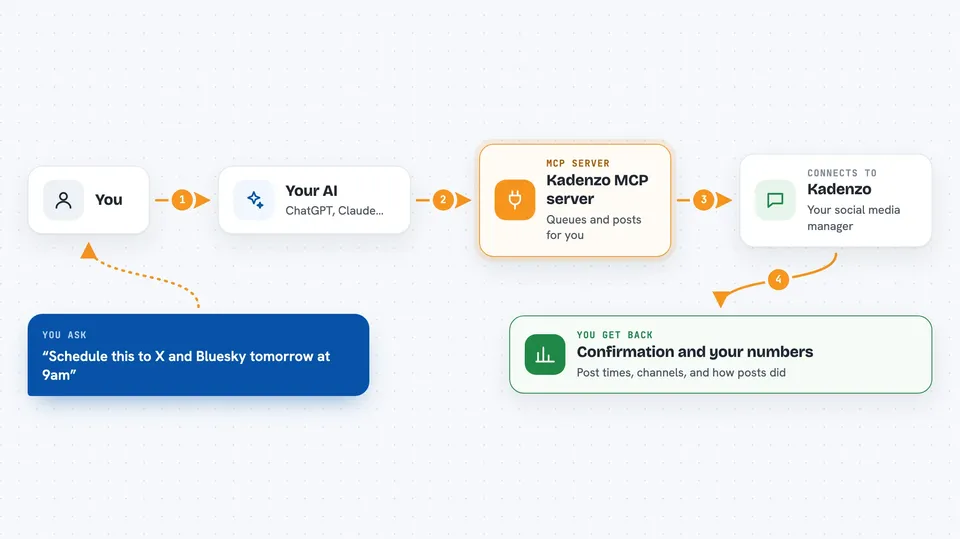
This is a small helper that connects your AI assistant to Kadenzo, a tool for planning and tracking social media posts. Once it is set up, you can ask your AI in plain words to schedule a post, check how your last posts did, or see who is talking about your keywords. It is handy if you manage social accounts and want to skip clicking around a dashboard all day.
What is an MCP server? The 30-second version
On its own, your AI can only chat. An MCP server is a small helper program that gives your AI a new skill or a connection to an app. This one connects your AI to Kadenzo, your social media scheduling and analytics service. So when you ask your AI to schedule something or pull numbers, it can actually go do that in Kadenzo for you.
What this MCP server does
You ask your AI something like schedule this to X and Bluesky tomorrow at 9am. Your AI uses this helper, which talks to Kadenzo on your behalf. Kadenzo then queues the post for that time and publishes it automatically. When you ask about performance, the helper fetches your recent posts and engagement numbers and your AI shows them back to you in the chat. You can also upload a photo or video, generate caption ideas, and manage listening keywords and DM rules.
 Click to zoom
What you can do with it
- List the social accounts you have connected
- Schedule a post to one or more networks for a future time
- Upload an image or video file and get a link to use in a post
- Check how your recent posts performed on each platform
- Generate caption ideas for a topic and platform
- See your best posting times for an account
- Track mentions of your keywords and see sentiment over time
- Create and manage DM automation rules
Try asking your AI
- “List my connected accounts”
- “Schedule this to X and Bluesky tomorrow at 9am”
- “How did my last Instagram posts perform?”
- “What are my best posting times this week?”
- “Show me recent mentions of my brand keyword”
What it gives back to you
You get answers in the chat: lists of accounts or posts, status updates, engagement numbers, and short summaries. If you ask it to schedule something, it confirms the time and channels. If you ask for analytics, it shows the metrics it pulled from Kadenzo. It can also hand back a link to media you uploaded.
Before you start
What you need
- A Kadenzo account on a paid plan
- An API key from Kadenzo (Settings, then API keys; it looks like a long password)
- Node.js 18 or newer on your computer
- An MCP-capable AI app like Claude Desktop or Cursor
Good to know
It can publish, edit, and cancel real posts on your connected accounts, so double-check the wording and time before you say yes.
Install it with your AI
Add Kadenzo MCP server to your AI, no technical skills needed
You don't install anything by hand. You copy one prompt, paste it into an AI that can work on your computer, and it checks, installs and connects the server for you, asking you when it needs something.
Sign in to get the install prompt
Members get a ready-made prompt that lets the Claude desktop app check Kadenzo MCP server, install it and connect it for them, step by step. You don't need any technical skills: you copy, paste and answer a few questions. Your connected AI can also find and install any of the 4,609 MCP servers here for you.
Who it's for
Social media managers, small business owners, and anyone who schedules and tracks posts across several networks.




