
MCP server · Developer tools
kops MCP server
Lets your AI safely look at a Kubernetes cluster: health checks, logs, and full inventory.
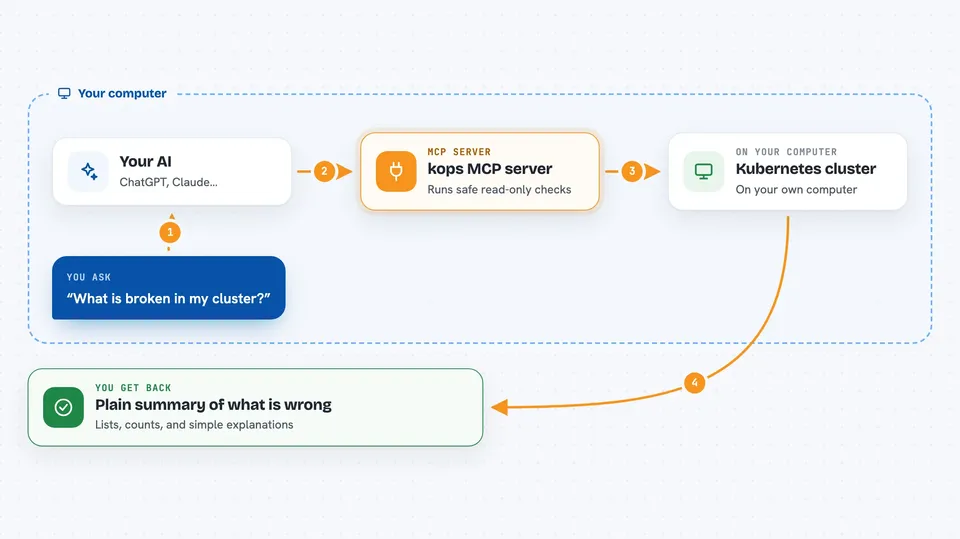
kops is a small helper that connects your AI assistant to a Kubernetes cluster in a strictly read-only way. It is handy for anyone who has to check what is running in a cluster, what is broken, or write up a quick report, without typing kubectl commands by hand. If you have ever stared at a wall of kubectl output, this is for you.
What is an MCP server? The 30-second version
On its own, your AI can only chat with you. An MCP server is a small helper program that gives your AI a new skill or a connection to another system. This one connects your AI to your Kubernetes cluster, so it can look things up there when you ask. It only reads, it never changes anything.
What this MCP server does
You ask your AI something like what is broken in my cluster. The AI calls this helper, which runs safe read-only kubectl commands in the background. The helper collects the results, tidies them into structured data, and hands them back to the AI. The AI then explains what it found in plain words. You never have to type a kubectl command yourself.
 Click to zoom
What you can do with it
- Check the health of your whole cluster in one go
- List pods, deployments, services, and nodes with key details
- Read recent logs from a pod, including the previous run
- Describe a single resource to find the root cause of a problem
- See recent warning events filtered by namespace or resource
- Build a full inventory report grouped by namespace
- Look up what is exposed publicly through services and ingresses
Try asking your AI
- “This cluster has problems, what is wrong?”
- “Give me a full report of this cluster”
- “Show me the logs from the api pod in the payments namespace”
- “Describe the deployment checkout in the shop namespace”
What it gives back to you
You get back a structured summary in the chat: lists of resources with the fields that matter, counts by kind, and short explanations of what is unhealthy. For triage you get problem pods, warning events, unhealthy nodes, and stale deployments. For inventory you get a cluster-wide snapshot grouped by namespace. The AI turns all of that into readable text or a markdown report.
Before you start
What you need
- uv installed on your computer (a tool that runs Python programs)
- kubectl installed and working, with access to a cluster
- A kubeconfig file pointing at the cluster you want to look at
- Claude Code (or another AI app that supports MCP servers)
Good to know
It is read-only by design, but it can still see cluster details like names, labels, and logs, so be careful when sharing its output outside your team.
Install it with your AI
Add kops MCP server to your AI, no technical skills needed
You don't install anything by hand. You copy one prompt, paste it into an AI that can work on your computer, and it checks, installs and connects the server for you, asking you when it needs something.
Sign in to get the install prompt
Members get a ready-made prompt that lets the Claude desktop app check kops MCP server, install it and connect it for them, step by step. You don't need any technical skills: you copy, paste and answer a few questions. Your connected AI can also find and install any of the 4,609 MCP servers here for you.
Who it's for
Developers, SREs, and platform engineers who need quick cluster checks or reports without typing kubectl by hand.



