MCP server · Analytics
Zaturn MCP server
by kdqed
Ask your AI questions about your data and get answers, tables, and charts without writing SQL.
Zaturn is a helper that lets your AI look at your data and answer questions about it. You connect it to a database or a spreadsheet-style file, then just ask in normal words. It is handy for anyone who has data but does not want to write SQL or Python.
What is an MCP server? The 30-second version
On its own, your AI can only chat. An MCP server is a small helper program that gives your AI a new skill or a connection to an app or service. This one connects your AI to your data sources, like a database or a CSV file. Once it is connected, the AI can look things up and run the queries for you when you ask.
What this MCP server does
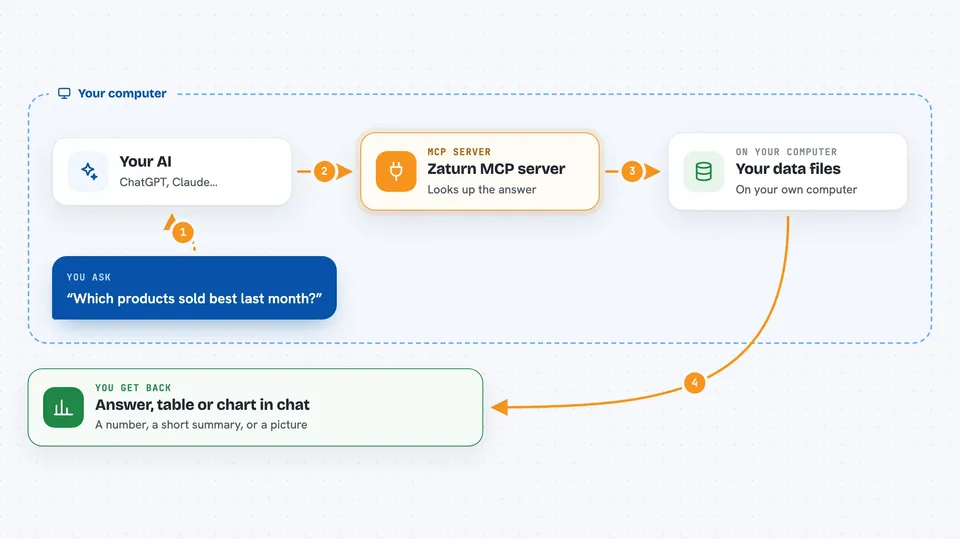
You ask your AI a question about your data, like which products sold best last month. The AI passes that question to Zaturn. Zaturn writes and runs the SQL against your database or file, then sends the result back. You see the answer in the chat, often as a table, a short summary, or a chart.
 Click to zoom
What you can do with it
- Ask questions about a database or a CSV or Parquet file in plain words
- Get tables and short written summaries of your data
- Get charts like bar plots, line plots, and histograms
- Connect more than one data source and compare them
- Explore a dataset you have never seen before
- Check numbers like totals, averages, and counts without writing formulas
Try asking your AI
- “Which 10 customers spent the most money last year?”
- “Show me a bar chart of sales by region.”
- “How many orders were placed each month in 2024?”
- “Compare the average order value between my two databases.”
What it gives back to you
You get answers in the chat, usually as a table of rows and columns, a short written summary, or an image chart. Zaturn can make scatter plots, line plots, histograms, box plots, bar plots, heatmaps, and polar plots. If you asked a simple question, you may just get a number or a sentence back.
Before you start
What you need
- The Zaturn MCP server installed on your computer
- Access details for your data source, such as a database connection or a CSV or Parquet file
- An AI app that supports MCP, like the Claude desktop app
Good to know
Zaturn runs queries against your data, so only connect data sources you are allowed to share with your AI, and be careful with databases that hold private or sensitive information.
Install it with your AI
Add Zaturn MCP server to your AI, no technical skills needed
You don't install anything by hand. You copy one prompt, paste it into an AI that can work on your computer, and it checks, installs and connects the server for you, asking you when it needs something.
Sign in to get the install prompt
Members get a ready-made prompt that lets the Claude desktop app check Zaturn MCP server, install it and connect it for them, step by step. You don't need any technical skills: you copy, paste and answer a few questions. Your connected AI can also find and install any of the 4,361 MCP servers here for you.
Who it's for
Anyone who works with data but does not write SQL, such as analysts, marketers, operations staff, and small business owners.