MCP server · Design tools
OpenTakeoff MCP server
by Kentucky-ai
Measure rooms, walls and finishes on construction plan PDFs and get quantities back in chat.
OpenTakeoff is a free, open-source tool for measuring quantities off construction drawings. It comes in two parts: a browser canvas you can draw on yourself, and this MCP server, which lets your AI assistant do the measuring for you. It is handy for estimators, architects and anyone who has to pull square footage or linear feet out of a plan set.
What is an MCP server? The 30-second version
On its own, your AI can only chat. It cannot open a PDF plan, read a title block or measure a room. An MCP server is a small helper program that gives your AI a new skill, and this one gives it a connection to OpenTakeoff, a takeoff engine for building plans. Once it is connected, you can ask your AI to load a plan, set the scale and trace rooms, and it will use this helper to do the actual measuring.
What this MCP server does
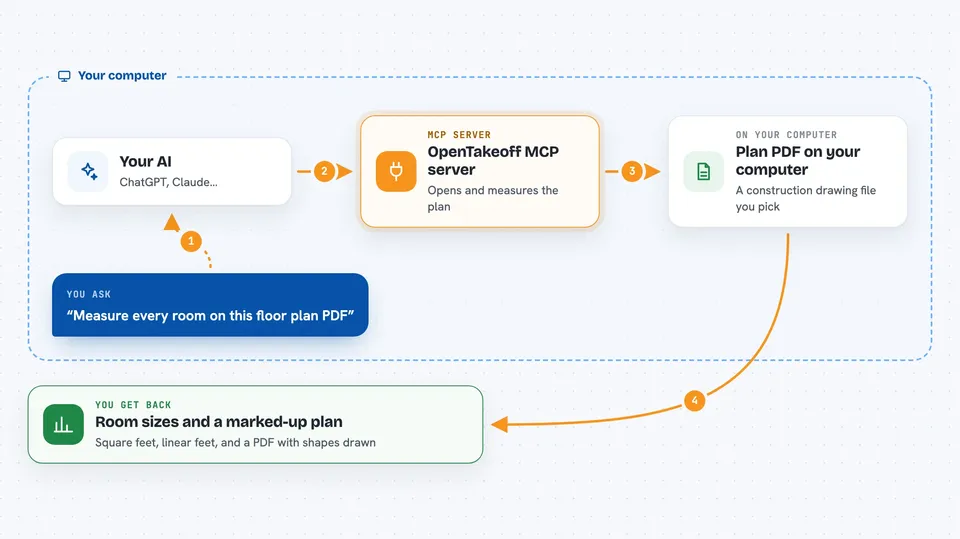
You point your AI at a plan PDF. The AI uses this helper to open the file, read the title block and set the drawing scale. Then it traces the rooms or walls you asked about, using the same measuring engine the browser canvas uses. The helper works out the quantities, like square footage or linear feet, and hands them back to the AI. You see the numbers, and often a marked-up plan, right in your chat.
 Click to zoom
What you can do with it
- Open a construction plan PDF and read its title block
- Set the drawing scale so measurements come out right
- Trace rooms and get square footage for each one
- Measure walls and get linear feet
- Find a finish schedule and look up what is in a given room
- Check the AI's own work on a rendered overlay
- Export a marked-up plan set as a PDF
Try asking your AI
- “Open this floor plan and tell me the square footage of every room”
- “Set the scale from the title block and measure the linear feet of wall in room 134”
- “What finish is in room 134, and how do you know?”
- “Trace the rooms on this sheet and export a marked-up PDF”
What it gives back to you
You get answers in plain text, like a list of rooms with their square footage, or a total in linear feet. You can also get a marked-up plan PDF with the shapes drawn on it, and citations that point back to the sheet and schedule row a number came from. If the AI is unsure, it can flag a measurement for your review instead of guessing.
Before you start
What you need
- Node.js 20 or newer
- An MCP client such as Claude Desktop, Claude Code or Cursor
- A construction plan PDF to work on
Good to know
The AI can add, change or delete measurements on your takeoff, so review its work before you rely on the numbers for a bid.
Install it with your AI
Add OpenTakeoff MCP server to your AI, no technical skills needed
You don't install anything by hand. You copy one prompt, paste it into an AI that can work on your computer, and it checks, installs and connects the server for you, asking you when it needs something.
Sign in to get the install prompt
Members get a ready-made prompt that lets the Claude desktop app check OpenTakeoff MCP server, install it and connect it for them, step by step. You don't need any technical skills: you copy, paste and answer a few questions. Your connected AI can also find and install any of the 4,361 MCP servers here for you.
Who it's for
Estimators, architects, contractors and anyone who regularly pulls quantities off construction drawings.