
MCP server · Developer tools
Spring Nacos MCP server
by kestiny18
Lets your AI read your Spring Cloud project's Nacos config and compare settings between environments.
This is a small helper that connects your AI assistant to Nacos, the config and service registry many Spring Cloud projects use. It reads your own project files to figure out where each environment lives, so you don't have to type in any addresses or passwords. It is handy if you work on a Spring Cloud codebase and often wonder how a setting differs between dev, test, and prod.
What is an MCP server? The 30-second version
On its own, your AI can only chat with you. An MCP server is a small helper program that gives your AI a new skill, in this case a connection to Nacos. Once it is set up, your AI can look up config values and services in Nacos for you when you ask. This particular helper is special because it reads your Spring Cloud repo to find the Nacos details, so you don't have to configure them by hand.
What this MCP server does
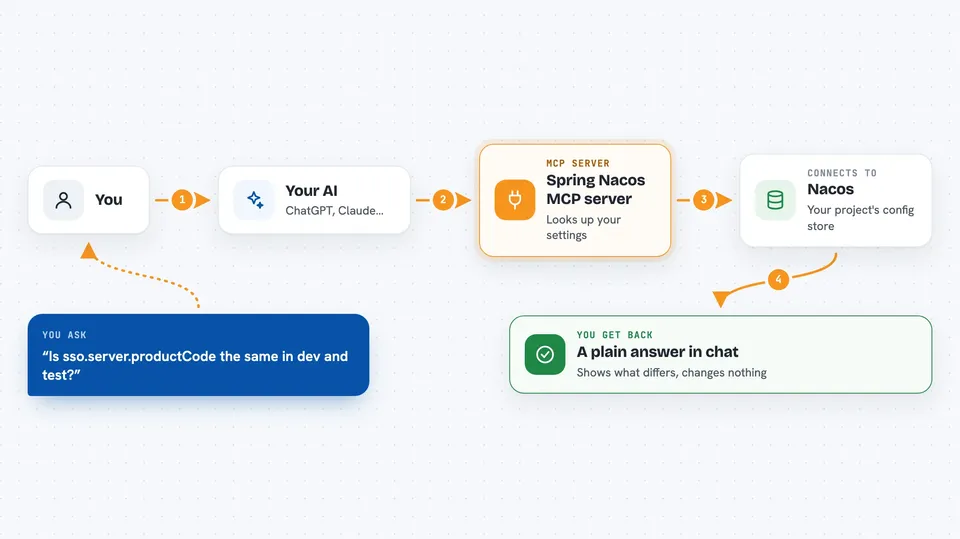
You ask your AI a question about your project's configuration, like whether a value is the same in dev and test. Your AI uses this helper to look up the answer in Nacos. The helper reads your project files to find which Nacos environments exist and how to reach them, then fetches the config or service data you asked about. It can also compare one config file between two environments and show you exactly which keys differ. Everything it does is read-only, so it never changes anything in Nacos.
 Click to zoom
What you can do with it
- List all the environments it found in your project
- Read a specific config file by its data ID
- Search across all config contents for a keyword
- Compare one config file between two environments and see which keys differ
- List services registered in Nacos
- List the online instances of a service with their IPs and health
Try asking your AI
- “Is sso.server.productCode the same in dev and test?”
- “Show me the full content of application.properties in prod.”
- “Search all configs for the key redis.timeout.”
- “Which instances of the order-service are online right now?”
What it gives back to you
You get back plain answers in the chat, like a list of environments, the raw text of a config file, or a summary of which keys differ between two environments. For services, you get a list of instances with their addresses and health status. It never changes anything, so you only ever see information, not edits.
Before you start
What you need
- A Spring Cloud project on your computer that uses Nacos
- Python 3.9 or newer (for the single-file option)
- Access to your Nacos server, usually over your company network or VPN
Good to know
Config content is sent to your AI, so if your configs contain passwords or secrets, turn on masking with SPRING_NACOS_MCP_MASK=1 before you use it.
Install it with your AI
Add Spring Nacos MCP server to your AI, no technical skills needed
You don't install anything by hand. You copy one prompt, paste it into an AI that can work on your computer, and it checks, installs and connects the server for you, asking you when it needs something.
Sign in to get the install prompt
Members get a ready-made prompt that lets the Claude desktop app check Spring Nacos MCP server, install it and connect it for them, step by step. You don't need any technical skills: you copy, paste and answer a few questions. Your connected AI can also find and install any of the 4,609 MCP servers here for you.
Who it's for
Developers and DevOps engineers who work on Spring Cloud projects and need to check or compare Nacos configuration across environments.



