MCP server · Design tools
Colorblind Safety MCP servers
Check if your colors and images are colorblind-safe, and see them the way a colorblind person does.
This is a pair of small helper programs that let your AI check colors for colorblind safety and show you what an image looks like to someone with color vision deficiency. It is handy if you make charts, slides, dashboards or websites and want to be sure everyone can tell your colors apart. You do not need to be a designer or a coder to use it.
What is an MCP server? The 30-second version
On its own, your AI can only chat. It cannot look at your color choices or open your image files. An MCP server is a small helper program you connect once, and it gives your AI a new skill. Here, that skill is color vision checking: the helper does the color math and hands the answer back to your AI, which explains it to you in plain words.
What this MCP server does
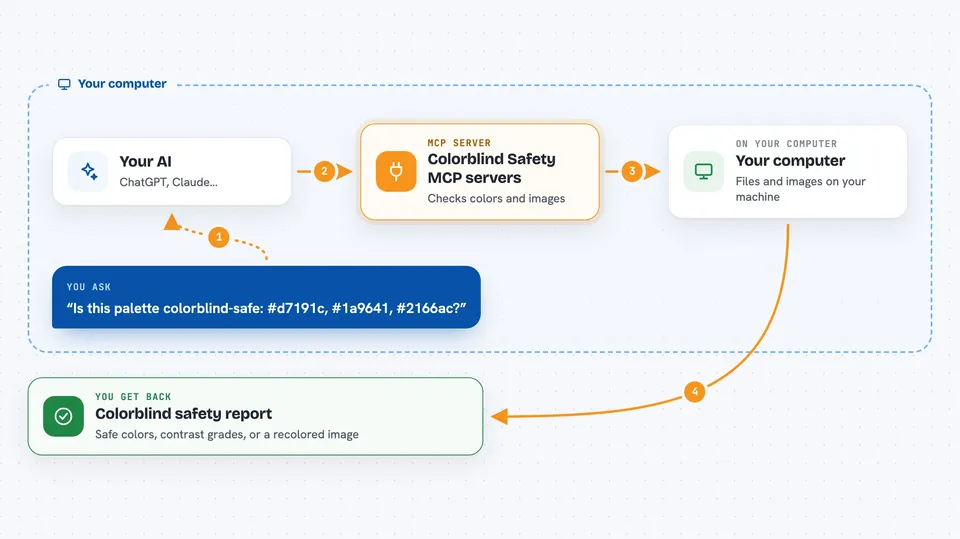
You ask your AI a question about colors, like whether a palette is safe or how an image looks to a colorblind person. Your AI passes that request to this helper program running quietly on your computer. The helper does the color simulation and comparison, then sends the result back. Your AI turns it into a normal answer in the chat, with the problem pairs named or an image attached. Nothing is sent to the internet; your files stay on your machine.
 Click to zoom
What you can do with it
- Check whether a set of colors stays distinguishable for the three main types of color blindness
- Look at a PNG or JPEG and flag the colors that blur together, weighted by how much of the image they cover
- Generate a new colorblind-safe palette, starting from the well-known Okabe-Ito colors
- Repair a palette that fails, keeping it close to your original colors
- Check the contrast ratio between two colors against WCAG AA and AAA levels
- Recolor an image the way a colorblind person sees it and show you the result
- Create an Ishihara-style test plate image
Try asking your AI
- “Is this palette colorblind-safe: #d7191c, #1a9641, #2166ac?”
- “Show me ./dashboard.png the way a deuteranope sees it.”
- “Give me 6 colorblind-safe colors for a bar chart.”
- “Check the contrast between #777777 and white.”
What it gives back to you
You get answers in the chat: a yes or no with the specific color pairs that clash, a contrast ratio with its AA or AAA grade, or a list of suggested safe colors. When you ask about an image, the helper sends back a recolored copy of that image, which your AI shows you right in the conversation. It can also return a generated test plate image.
Before you start
What you need
- The Claude desktop app or another MCP client like Cursor
- Node.js installed on your computer (the free program that runs these helpers)
Good to know
This checks one part of accessibility, whether colors stay distinguishable, but it is not a full WCAG or ADA legal audit, so passing does not mean a product is compliant.
Install it with your AI
Add Colorblind Safety MCP servers to your AI, no technical skills needed
You don't install anything by hand. You copy one prompt, paste it into an AI that can work on your computer, and it checks, installs and connects the server for you, asking you when it needs something.
Sign in to get the install prompt
Members get a ready-made prompt that lets the Claude desktop app check Colorblind Safety MCP servers, install it and connect it for them, step by step. You don't need any technical skills: you copy, paste and answer a few questions. Your connected AI can also find and install any of the 4,361 MCP servers here for you.
Who it's for
Designers, data analysts, accessibility reviewers, and anyone who makes charts, slides or websites and wants to be sure the colors work for colorblind viewers.