MCP server · Customer communication
Trendyol Seller MCP server
by koraynar
Let your AI read your Trendyol shop data and, if you allow it, reply to customers and update prices.
This is a small connector between your AI assistant and your Trendyol seller account. You connect it once, then just talk to your AI in normal words instead of clicking around the seller panel. It is meant for Trendyol sellers who handle orders, listings, customer questions and returns themselves.
What is an MCP server? The 30-second version
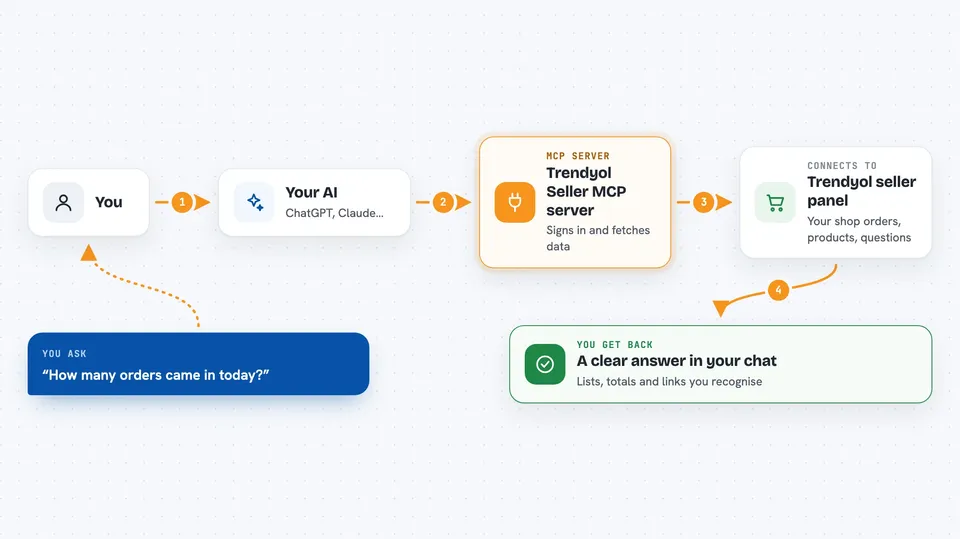
On its own, your AI can only chat with you based on what it already knows. An MCP server is a little helper program running next to your AI that adds a real ability, in this case talking to Trendyol. Here, the helper logs into Trendyol using your own seller details and fetches or sends information when you ask. So your AI gets eyes and hands inside your Trendyol store, while everything still goes through your own account.
What this MCP server does
When you ask something like how many orders came in today, your AI passes that request to this helper. The helper signs in to Trendyol with your seller ID and API key, asks Trendyol for the matching records, cleans out sensitive parts such as buyer names and addresses, and hands the results back to your AI. Then your AI turns them into a readable answer right in the chat window. If you turn writing on, the same path works backwards too: your AI proposes an action, the helper checks it, and sends it to Trendyol.
 Click to zoom
What you can do with it
- See your product list with quantity, sale price and approval state
- Check order packages filtered by date range or shipment status
- Read waiting customer questions together with each product they refer to
- Review returned goods and claim reasons without seeing personal info
- Answer a customer question directly after turning writes on
- Send bulk price and stock updates for up to 1000 items at once
Try asking your AI
- “Show me my last 30 delivered orders and total revenue”
- “Which products have less than five units left in stock?”
- “What unanswered customer questions am I sitting on since yesterday?”
- “Set the sale price of barcode ABC123 to 199 TL and keep three units aside”
What it gives back to you
For reading actions you usually get tidy lists and totals printed straight into the conversation, plus links or IDs you may recognise from the panel. For instance asking about low-stock items comes back as a table-like rundown of titles, quantities and current prices. When you post an answer or send a price update, the response confirms whether it went through and includes a reference number for tracking batches later. Nothing heavy lands anywhere except your chat history.
Before you start
What you need
- Your Trendyol seller (cari) ID
- API key and API secret from Satıcı Paneli > Hesap Bilgilendirmeleri > Entegrasyon Bilgileri
- Python version 3.11 or higher installed on your computer
- The uv package manager, used to launch the server
Install it with your AI
Add Trendyol Seller MCP server to your AI, no technical skills needed
You don't install anything by hand. You copy one prompt, paste it into an AI that can work on your computer, and it checks, installs and connects the server for you, asking you when it needs something.
Sign in to get the install prompt
Members get a ready-made prompt that lets the Claude desktop app check Trendyol Seller MCP server, install it and connect it for them, step by step. You don't need any technical skills: you copy, paste and answer a few questions. Your connected AI can also find and install any of the 4,361 MCP servers here for you.
Who it's for
Turkish online sellers selling on Trendyol who manage their own catalogue and don't mind typing commands into an AI rather than filling forms manually.