
MCP server · Notes
Krimto MCP server
by krimto-labs
Give your AI a lasting memory saved as plain text files in your own git, shared with your team when you want.
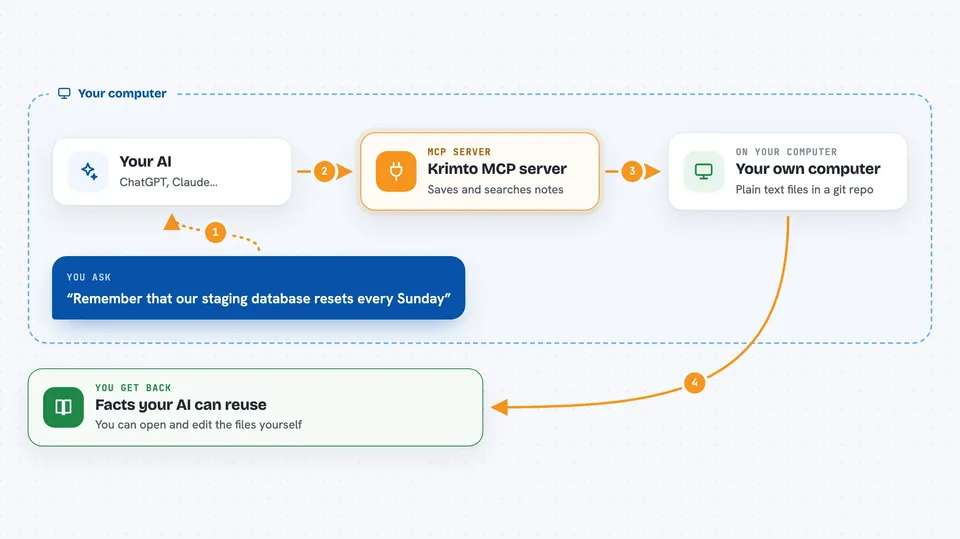
Krimto is a memory helper for AI coding assistants. It lets your AI remember facts you tell it, like "our staging database resets every Sunday", and recall them later in a new chat, a different editor, or on another machine. It is handy for developers and small teams who want their AI to stop forgetting things between sessions.
What is an MCP server? The 30-second version
On its own, your AI can only chat about what is in the current conversation. An MCP server is a small helper program that gives your AI a new skill or a connection to another tool. Krimto is that helper here: it connects your AI to a memory store so it can save and look up facts for you. When you ask your AI to remember or recall something, it quietly uses Krimto behind the scenes.
What this MCP server does
You tell your AI something worth remembering, like a preference or a project detail. Your AI sends that fact to Krimto, which saves it as a plain markdown file in a git repository on your computer. Later, when you ask a question, your AI asks Krimto to search that memory and brings back the most relevant facts. Krimto can also share memory with teammates through a team setup, so facts written by one person can reach others. Everything stays in files you can read and edit yourself.
 Click to zoom
What you can do with it
- Tell your AI to remember a fact and have it saved for later
- Ask your AI what it knows about a topic and get answers from past chats
- Keep the same memory across different editors and machines
- Read and edit your saved memories as plain markdown files
- Share selected memories with teammates through a team setup
- See your notes in a terminal or a simple browser dashboard
- Keep personal notes private while sharing team notes
Try asking your AI
- “Remember that our staging database resets every Sunday.”
- “What do you know about staging?”
- “Save this: the API rate limit is 100 requests per minute.”
- “Do we have any notes about the login flow?”
What it gives back to you
Krimto gives your AI back the facts it finds, usually as short pieces of text or a list of matching notes. Your AI then turns those into a normal answer in the chat. When you save something, you get a quiet confirmation that the fact was stored. You can also open the files yourself to see exactly what was saved.
Before you start
What you need
- Node.js 20 or newer on your computer
- An editor that supports MCP, like Cursor, Claude Code, Codex, or Gemini CLI
- For team mode: a shared git remote or a Krimto server URL and key from your admin
Good to know
Krimto saves what you tell it into files on your computer and can share some of them with teammates, so avoid asking it to remember passwords, keys, or other secrets.
Install it with your AI
Add Krimto MCP server to your AI, no technical skills needed
You don't install anything by hand. You copy one prompt, paste it into an AI that can work on your computer, and it checks, installs and connects the server for you, asking you when it needs something.
Sign in to get the install prompt
Members get a ready-made prompt that lets the Claude desktop app check Krimto MCP server, install it and connect it for them, step by step. You don't need any technical skills: you copy, paste and answer a few questions. Your connected AI can also find and install any of the 4,609 MCP servers here for you.
Who it's for
Developers and small teams who use AI coding assistants and want them to remember project details across chats, editors, and machines.





