
MCP server · Developer tools · official
jscpd MCP server
by kucherenko · official
Let your AI check your code for copy and paste duplication before you commit.
jscpd is a tool that finds duplicated code in your project. It scans your files and points out blocks that look like copies of each other. This page is about the built-in MCP server, which lets your AI assistant run those checks for you while you chat.
What is an MCP server? The 30-second version
On its own, your AI can only chat with you. It cannot look inside your project unless something hands it the information. An MCP server is a small helper program that gives your AI a new skill. Here, that skill is talking to jscpd, so your AI can scan your code for duplicates and tell you what it found.
What this MCP server does
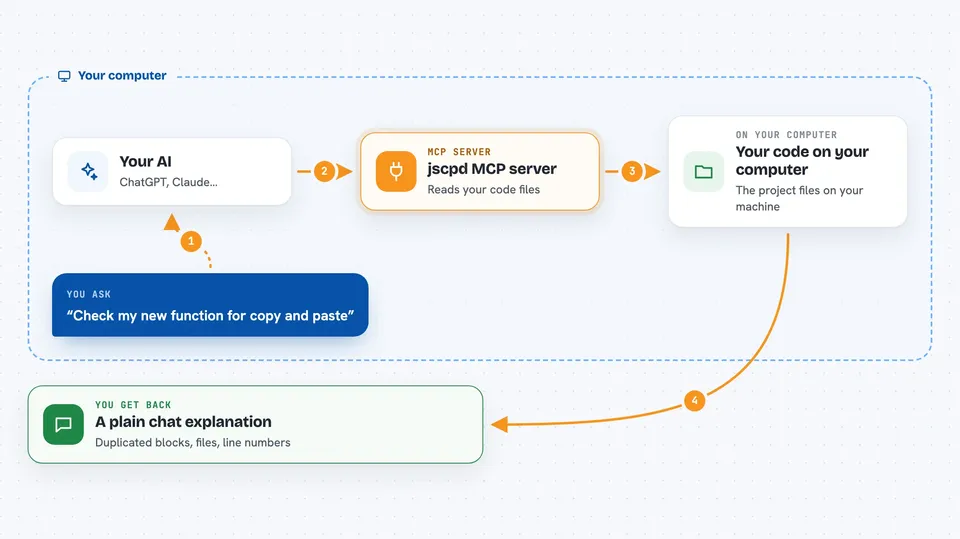
You point your AI assistant at the jscpd program on your computer. When you ask about duplication, your AI calls jscpd through this helper. jscpd reads your code files and looks for repeated blocks. Then it sends the results back, and your AI explains them to you in the chat. You can also ask it to compare a snippet you just wrote against the rest of your project.
 Click to zoom
What you can do with it
- Check a code snippet for duplication against your whole project
- Scan a folder and list the most duplicated files
- Find functions that look structurally similar to each other
- See how much of your code is duplicated, as a percentage
- Spot copies that only differ in names or values
- Ask which files are worth cleaning up first
Try asking your AI
- “Check this function I just wrote against the rest of the project for duplicates”
- “Scan the src folder and tell me which files have the most copy and paste”
- “Are there any functions in this file that look similar to ones elsewhere?”
- “What percentage of this project is duplicated code?”
What it gives back to you
You get answers in plain chat: lists of duplicated blocks, the files and line numbers where they appear, and how similar they are. jscpd can also give a percentage of duplicated code and a short summary of the worst spots. Your AI turns those results into a readable explanation, so you do not have to read raw output.
Before you start
What you need
- The jscpd program installed on your computer (the README shows a one line install for macOS, Linux and Windows)
- An AI assistant that can talk to MCP servers, like the Claude desktop app
- Your project files on the same computer
Good to know
jscpd only reads your code to look for duplicates, but it does read your project files, so avoid pointing it at folders with secrets or private data you would not want an AI to see.
Install it with your AI
Add jscpd MCP server to your AI, no technical skills needed
You don't install anything by hand. You copy one prompt, paste it into an AI that can work on your computer, and it checks, installs and connects the server for you, asking you when it needs something.
Sign in to get the install prompt
Members get a ready-made prompt that lets the Claude desktop app check jscpd MCP server, install it and connect it for them, step by step. You don't need any technical skills: you copy, paste and answer a few questions. Your connected AI can also find and install any of the 4,609 MCP servers here for you.
Who it's for
Developers and anyone who reviews or maintains code and wants a quick duplication check without leaving their AI chat.




