MCP server · Finance and crypto
CryptoPanic MCP server
by kukapay
Lets your AI pull the latest cryptocurrency news headlines from CryptoPanic when you ask.
This is a small helper that connects your AI assistant to CryptoPanic, a site that gathers cryptocurrency news from many sources. Once it is set up, you can ask your AI for the latest crypto headlines and it will fetch them for you. It is handy for anyone who follows crypto prices and news but does not want to open ten tabs every morning.
What is an MCP server? The 30-second version
On its own, your AI can only chat with you using what it already knows. An MCP server is a small helper program that gives your AI one new skill or one new connection. This particular helper connects your AI to CryptoPanic, so it can look up fresh crypto news for you. You stay in the chat, and the helper does the fetching behind the scenes.
What this MCP server does
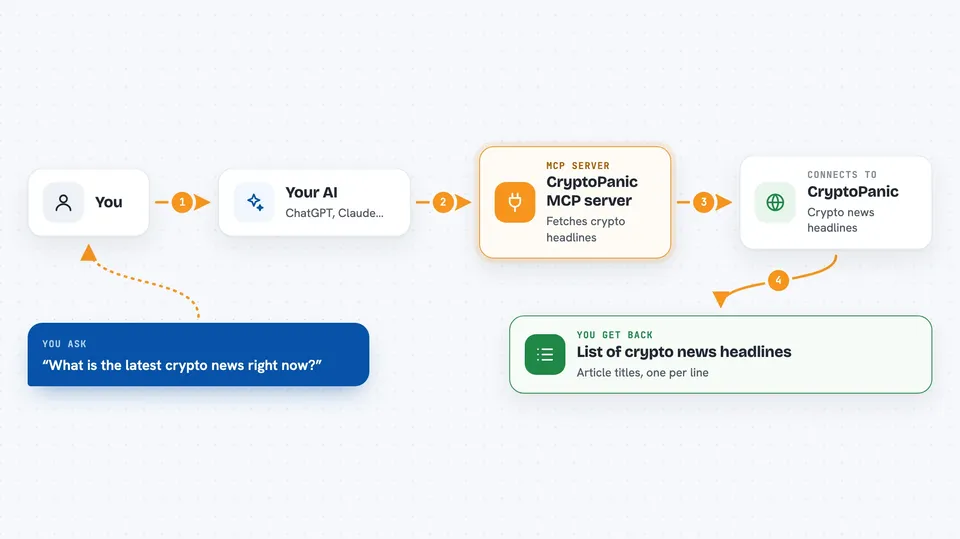
You ask your AI for the latest crypto news. The AI passes your request to this helper program. The helper then asks CryptoPanic for recent headlines, using your own CryptoPanic account key. CryptoPanic sends back a list of article titles, and the helper hands that list to your AI. Your AI then shows you the headlines right in the chat.
 Click to zoom
What you can do with it
- Fetch the latest cryptocurrency news headlines
- Pull news from several pages at once for a wider view
- Ask for media-type content instead of regular news
- Get a quick snapshot of what is being written about crypto today
- Check headlines before you make a trading or reading decision
Try asking your AI
- “What is the latest crypto news right now?”
- “Give me the top crypto headlines from the last few pages.”
- “Show me recent crypto media coverage.”
- “Any big Bitcoin or Ethereum news today?”
What it gives back to you
You get back a list of news headlines, one per line, like a short bulletin. Each line is an article title from CryptoPanic, such as Bitcoin Breaks $60k Resistance Amid ETF Optimism. If you ask for more pages, the list is longer. It does not give you full articles, just the titles.
Before you start
What you need
- A CryptoPanic account and an API key from their developer page (an API key is like a password that lets an app ask CryptoPanic for data)
- A CryptoPanic API plan, which you choose when you sign up for the key
- Python and the uv tool installed on your computer
- The files for this server downloaded to a folder on your computer
Good to know
It only reads news headlines, so nothing on your computer or your accounts gets changed, but it does use your CryptoPanic API key and plan, so keep that key private.
Install it with your AI
Add CryptoPanic MCP server to your AI, no technical skills needed
You don't install anything by hand. You copy one prompt, paste it into an AI that can work on your computer, and it checks, installs and connects the server for you, asking you when it needs something.
Sign in to get the install prompt
Members get a ready-made prompt that lets the Claude desktop app check CryptoPanic MCP server, install it and connect it for them, step by step. You don't need any technical skills: you copy, paste and answer a few questions. Your connected AI can also find and install any of the 4,609 MCP servers here for you.
Who it's for
Crypto traders, investors, and anyone who wants a quick daily read of cryptocurrency headlines without browsing news sites.