MCP server · Analytics
OPC UA MCP server
by kukapay
Let your AI read and change live values on industrial machines that speak OPC UA.
This is a small helper that connects your AI assistant to OPC UA, a common way industrial equipment talks to computers. Once it is set up, you can ask your AI in plain words what a machine is doing, or tell it to change a setting. It is mainly for people who work with factory or plant systems and want to use AI without writing code.
What is an MCP server? The 30-second version
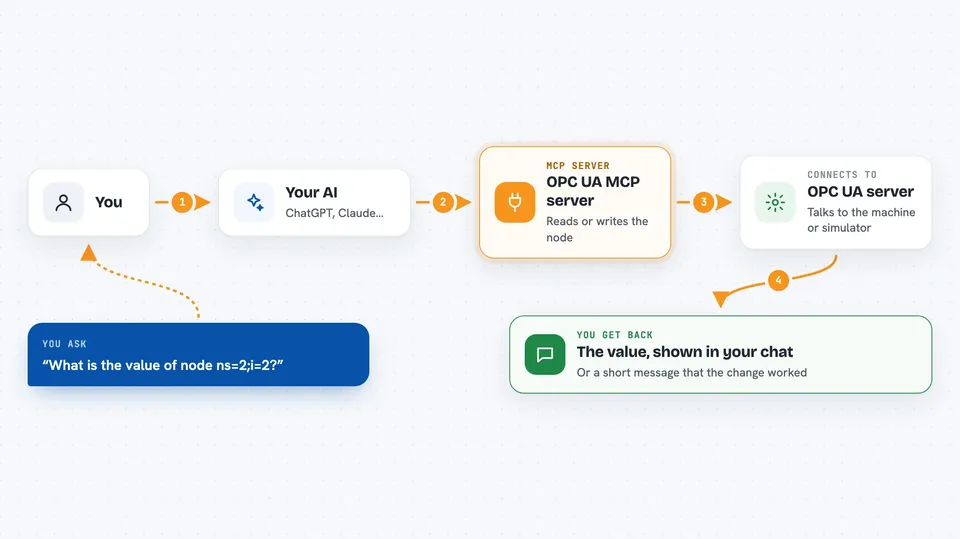
On its own, your AI can only chat with you. An MCP server is a small helper program that gives your AI a new skill or a connection to another system. This one connects your AI to an OPC UA server, which is the software that sits in front of industrial devices. So when you ask about a machine value, your AI passes the question to this helper, and the helper asks the OPC UA server for you.
What this MCP server does
You ask your AI something like what is the value of node ns=2;i=2. Your AI sends that request to this helper program. The helper talks to your OPC UA server, which reads the value from the device or simulator behind it. The value comes back to your AI, and your AI shows it to you in the chat. If you ask it to set a value, the helper writes that value to the node instead.
 Click to zoom
What you can do with it
- Read the current value of a single OPC UA node
- Write a value to a single OPC UA node to change a setting
- Browse the nodes available on the server
- Read several nodes at once
- Write to several nodes at once
- Ask for machine values in plain words instead of using an OPC UA tool
Try asking your AI
- “What's the value of node ns=2;i=2?”
- “Set node ns=2;i=3 to 100.”
- “List the nodes on the server.”
- “Read nodes ns=2;i=2 and ns=2;i=4 for me.”
What it gives back to you
You get short text answers in the chat, like the node ID and its value, or a message saying the write succeeded or failed. When you browse or read several nodes, you get a list of node IDs and their values. If something goes wrong, you get an error message instead.
Before you start
What you need
- Python 3.13 or newer
- An OPC UA server to connect to, such as a simulator or a real device
- The URL of that OPC UA server (a web address that points to it)
Good to know
Writing to a node can change or control real equipment, so be careful what values you ask it to set.
Install it with your AI
Add OPC UA MCP server to your AI, no technical skills needed
You don't install anything by hand. You copy one prompt, paste it into an AI that can work on your computer, and it checks, installs and connects the server for you, asking you when it needs something.
Sign in to get the install prompt
Members get a ready-made prompt that lets the Claude desktop app check OPC UA MCP server, install it and connect it for them, step by step. You don't need any technical skills: you copy, paste and answer a few questions. Your connected AI can also find and install any of the 4,361 MCP servers here for you.
Who it's for
Engineers and developers who work with industrial automation and want to check or adjust machine values through an AI chat.