MCP server · Analytics
Modbus MCP server
by kukapay
Lets your AI read and write values on industrial Modbus devices, like sensors and controllers.
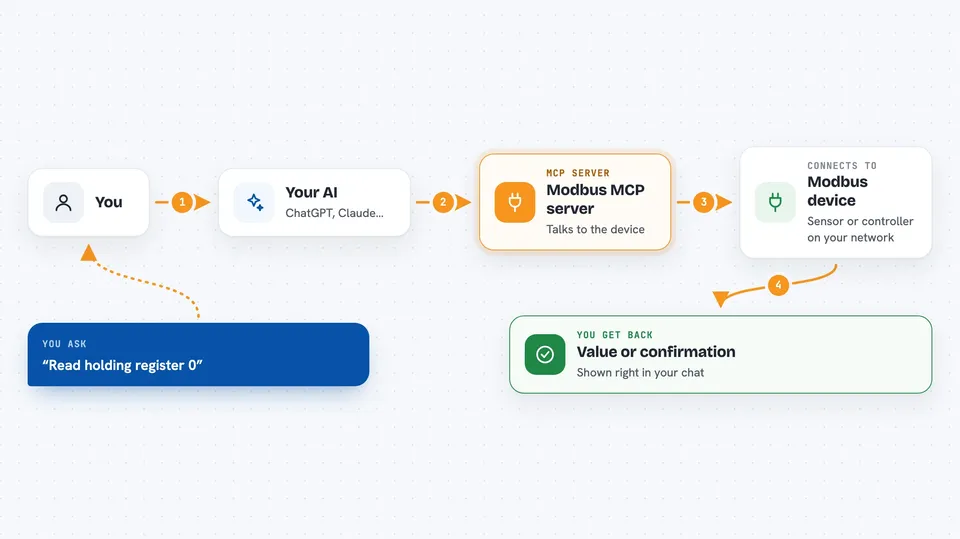
This is a small helper that connects your AI assistant to Modbus, a common way machines and sensors in factories and buildings talk to each other. Once it is set up, you can ask your AI in plain words to read a value or change a setting on a Modbus device. It is handy for people who work with industrial equipment and want to check or adjust things without opening special software.
What is an MCP server? The 30-second version
On its own, your AI can only chat with you. An MCP server is a small helper program that gives your AI a new skill or a connection to another system. This one connects your AI to a Modbus device, so it can look up values or make changes there when you ask. You stay in the chat, and the helper does the talking to the device.
What this MCP server does
You type a request in plain words, like reading a register or turning a coil on. Your AI passes that request to this helper program. The helper then talks to your Modbus device over your network or a serial cable. It sends back the value it read or confirms the change it made. You see the answer right in the chat, no special software needed.
 Click to zoom
What you can do with it
- Read the value of a holding register
- Write a new value to a holding register
- Check whether coils are on or off
- Turn a coil on or off
- Read input registers from a device
- Read several holding registers at once
- Ask the AI to analyze a register value with a prompt
Try asking your AI
- “Please read the value of Modbus holding register 0.”
- “Set Modbus holding register 10 to the value 100.”
- “Check the status of the first 5 Modbus coils starting at address 0.”
- “Read the values of 3 Modbus input registers starting from address 2.”
What it gives back to you
You get short answers in the chat. For a read, it shows the value or a small list of values, like Coils 0 to 4: [False, False, False, False, False]. For a write, it confirms what it changed, like Successfully wrote 100 to register 10. It can also give you a short analysis of a register value if you ask.
Before you start
What you need
- Python 3.10
- The uv tool for Python packages
- The address of your Modbus device (host and port, or a serial port name)
- The slave ID of the device you want to talk to
Good to know
It can change settings on real equipment, so be careful with write commands, since a wrong value could affect a machine or a process.
Install it with your AI
Add Modbus MCP server to your AI, no technical skills needed
You don't install anything by hand. You copy one prompt, paste it into an AI that can work on your computer, and it checks, installs and connects the server for you, asking you when it needs something.
Sign in to get the install prompt
Members get a ready-made prompt that lets the Claude desktop app check Modbus MCP server, install it and connect it for them, step by step. You don't need any technical skills: you copy, paste and answer a few questions. Your connected AI can also find and install any of the 4,361 MCP servers here for you.
Who it's for
People who work with industrial equipment, building systems, or embedded devices and want to check or adjust Modbus values through a chat.