MCP server · Social media
Twitter Username Changes MCP server
by kukapay
Lets your AI look up the past usernames of a Twitter account, so you can spot odd name swaps.
This is a small helper that lets your AI look up the history of a Twitter username. You give it a handle like @Mormonger, and it tells you what names that account used before. It is handy if you follow crypto projects or news accounts and want to see if a name has changed a lot.
What is an MCP server? The 30-second version
On its own, your AI can only chat with you. An MCP server is a small helper program that gives your AI a new skill or a connection to an app or service. This one connects your AI to a lookup of Twitter username history, so when you ask about a handle, the AI can go and check the past names for you. You do not need to understand how it works inside; you just ask in normal words.
What this MCP server does
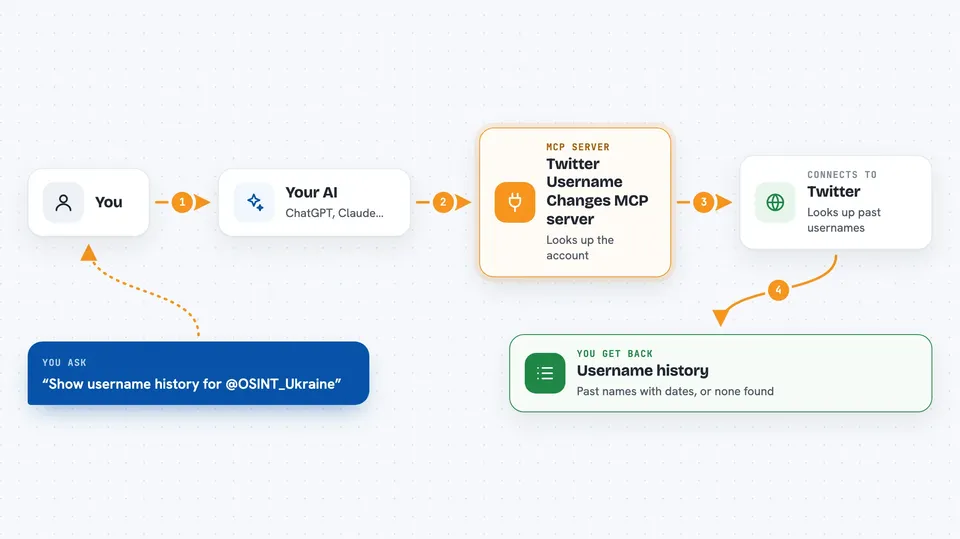
You ask your AI something like "show the username change history for @OSINT_Ukraine". The AI passes that handle to this helper. The helper looks up the account and its past screen names, then sends the list back. Your AI shows it to you in the chat as a short history with dates. If the handle does not exist or has no changes, you get a simple message saying nothing was found.
 Click to zoom
What you can do with it
- Look up the past usernames of a Twitter account
- See the dates when each name was used
- Check if a crypto or news account has changed its name often
- Spot a handle that has no history at all
- Ask follow-up questions about the same account in the same chat
Try asking your AI
- “Show the username change history for Twitter user @OSINT_Ukraine”
- “Has @Mormonger ever used a different name?”
- “What names did this account use before, and when?”
- “Check the username history for @InvalidUser123”
What it gives back to you
You get back a short list in the chat. It shows the account's user ID, then each past username with the dates it was used. If nothing is found, the AI simply tells you there is no username change history for that handle.
Before you start
What you need
- Python 3.10 or newer installed on your computer
- The pip or uv tool to install Python packages
- The Claude desktop app if you want to use it there
Good to know
It only reads public username history, so treat the results as a hint and not as proof that an account is trustworthy or not.
Install it with your AI
Add Twitter Username Changes MCP server to your AI, no technical skills needed
You don't install anything by hand. You copy one prompt, paste it into an AI that can work on your computer, and it checks, installs and connects the server for you, asking you when it needs something.
Sign in to get the install prompt
Members get a ready-made prompt that lets the Claude desktop app check Twitter Username Changes MCP server, install it and connect it for them, step by step. You don't need any technical skills: you copy, paste and answer a few questions. Your connected AI can also find and install any of the 4,609 MCP servers here for you.
Who it's for
People who follow crypto projects, news accounts, or online personalities and want a quick way to check if a Twitter handle has changed names.