
MCP server · Research
Scholar MCP server
by Liyux3
Your AI can search academic papers, read them, map citations, and save them into a personal library.
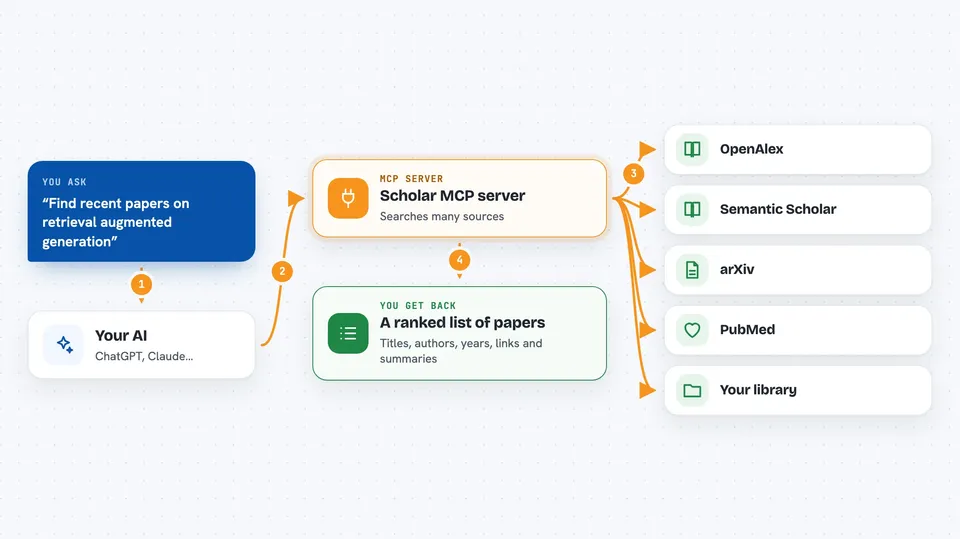
Scholar MCP is a helper that lets your AI assistant look up real research papers instead of guessing. You ask a question in normal words, and it searches many academic sources at once, opens the papers, and keeps the ones you care about in a small library on your computer. It is handy for students, researchers, analysts, and anyone who needs to check facts against actual studies.
What is an MCP server? The 30-second version
On its own, your AI can only chat with you using what it already learned. An MCP server is a small helper program that gives your AI a new skill or a connection to an outside service. This one connects your AI to academic search services like OpenAlex, Semantic Scholar, arXiv, and PubMed. Once it is connected, your AI can look up papers, read them, and save them for you when you ask.
What this MCP server does
You type a research question in plain words, like you would ask a colleague. Your AI sends that question to this helper program. The helper searches many academic sources at the same time, removes duplicates, and ranks the best matches. It can then open a paper, pull out its text, and show you the citations and references around it. Anything you pick can be saved into a local library that grows each time you use it.
 Click to zoom
What you can do with it
- Search for papers across OpenAlex, Semantic Scholar, arXiv, PubMed, and more in one go
- Find related work through citations and semantic similarity
- Read the full text of an open-access paper and get page-aware summaries
- Download a PDF and keep it in a collection on your computer
- Build a citation graph to see which papers are foundations or bridges in a field
- Look up author profiles, affiliations, and h-index
- Export your saved papers to Obsidian, Zotero, or Notion
Try asking your AI
- “Find recent papers about retrieval augmented generation for legal documents”
- “What papers cite the original transformer paper and are most influential?”
- “Read the conclusion of this paper and summarize the main findings”
- “Save these five papers into a collection called rag and export it to my Obsidian vault”
What it gives back to you
You get back a short list of papers with titles, authors, years, and links, plus a plain-text summary of what each one is about. When you ask it to read a paper, it returns page-aware text, and sometimes tables or figure captions. If you build a graph, you get a list of nodes and edges, and a Mermaid diagram you can view. Anything you save shows up in your local library and can be exported to your notes app.
Before you start
What you need
- Python 3.10 or newer
- The uv tool installed (the README links to it)
- An MCP client like Claude Desktop or Claude Code
Good to know
It can download PDFs and write files into folders you point it at, so check the paths and collections before you run exports or syncs.
Install it with your AI
Add Scholar MCP server to your AI, no technical skills needed
You don't install anything by hand. You copy one prompt, paste it into an AI that can work on your computer, and it checks, installs and connects the server for you, asking you when it needs something.
Sign in to get the install prompt
Members get a ready-made prompt that lets the Claude desktop app check Scholar MCP server, install it and connect it for them, step by step. You don't need any technical skills: you copy, paste and answer a few questions. Your connected AI can also find and install any of the 4,361 MCP servers here for you.
Who it's for
Students, researchers, analysts, and anyone who needs to find and check real academic papers without leaving their AI chat.





