
MCP server · Developer tools · official
Lizard MCP server
by lizard-build · official
Ask your AI to deploy and manage apps on Lizard: services, logs, secrets, scaling and domains.
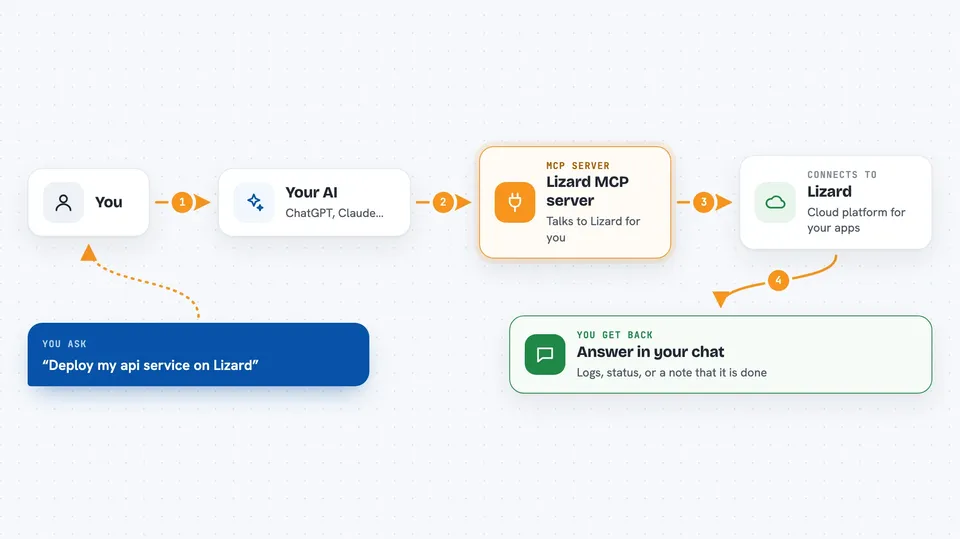
This is a helper that connects your AI assistant to Lizard, a cloud platform where you run apps and databases. Once it is connected, you can ask your assistant in plain words to ship a service, read its logs, change a secret or add a domain. It is handy for developers and small teams who already use Lizard and want to skip clicking around the dashboard.
What is an MCP server? The 30-second version
On its own, your AI can only chat with you. An MCP server is a small helper program that gives your AI a new skill or a connection to an app or service. This one connects your AI to Lizard, so it can look things up and do things there for you when you ask. You connect it once, and after that you just talk to your assistant like normal.
What this MCP server does
You ask your AI something like "deploy my service" or "show me the last errors in the logs". The AI passes that request to this helper. The helper talks to Lizard using your account, does the work, and brings the result back. You see the answer in your chat, in normal words. You never have to open the Lizard dashboard unless you want to.
 Click to zoom
What you can do with it
- Deploy or redeploy a service on Lizard
- Read and tail logs to see what your app is doing
- Set, list or remove secrets your app needs
- Scale a service up or down by changing replicas
- Attach a custom domain and check it
- Check metrics and a billing summary
- Run a command inside your service over SSH
Try asking your AI
- “Deploy my api service on Lizard and tell me when it is live”
- “Show me the last 100 lines of logs for the worker service”
- “Set a secret called STRIPE_KEY with this value and restart the service”
- “Scale the web service to 3 replicas”
- “Attach mydomain.com to the web service and verify it”
What it gives back to you
You get answers in your chat: lists of your services and projects, log lines, metric numbers, a billing summary, or a short note that a change was made. When you ask for a deploy, it tells you the deploy started or finished. When you ask for logs, you see the actual log text. It is all plain text you can read and copy.
Before you start
What you need
- A Lizard account (lizard.build)
- An API key from Lizard, made in the dashboard under Sandboxes, or with the lizard keys create command
- The Claude desktop app, Claude Code, Cursor, ChatGPT with developer mode, or another MCP client
Good to know
Some tools can change or delete things on Lizard, like deleting a service or running a command over SSH, so check with your AI before you say yes to those.
Install it with your AI
Add Lizard MCP server to your AI, no technical skills needed
You don't install anything by hand. You copy one prompt, paste it into an AI that can work on your computer, and it checks, installs and connects the server for you, asking you when it needs something.
Sign in to get the install prompt
Members get a ready-made prompt that lets the Claude desktop app check Lizard MCP server, install it and connect it for them, step by step. You don't need any technical skills: you copy, paste and answer a few questions. Your connected AI can also find and install any of the 4,609 MCP servers here for you.
Who it's for
Developers, indie makers and small teams who run apps on Lizard and want to manage them by chatting instead of clicking.



