
MCP server · Developer tools · official
LocalStack MCP server
by localstack · official
Lets your AI start and manage LocalStack, a pretend cloud on your own computer, for testing and debugging.
This is a helper that connects your AI assistant to LocalStack, a tool that runs a pretend version of cloud services on your own computer. Instead of clicking around or writing scripts, you just tell your AI what you want, and it does it for you. It is handy for developers and testers who want to try cloud setups without touching the real cloud.
What is an MCP server? The 30-second version
On its own, your AI can only chat. An MCP server is a small helper program that gives your AI a new skill or a connection to an app or service. This one connects your AI to LocalStack on your machine, so the AI can start it, deploy things to it, and read its logs when you ask. Think of it as giving your assistant a set of hands for your local cloud playground.
What this MCP server does
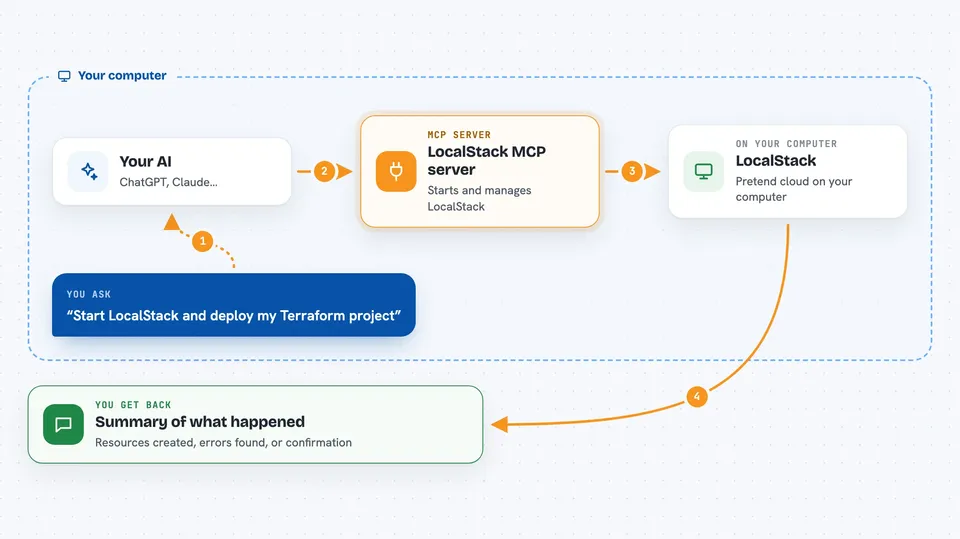
You ask your AI something in plain words, like start LocalStack or deploy my project. The AI uses this helper, which talks to LocalStack running on your computer. LocalStack does the work, like starting services or running a deployment. Then the helper sends the result back, and your AI tells you what happened in the chat.
 Click to zoom
What you can do with it
- Start, stop, restart, and check the status of LocalStack
- Deploy Terraform, CDK, or SAM projects to your local cloud
- Read and analyze LocalStack logs to find errors
- Generate IAM policies from permission errors it finds
- Inject delays or faults to test how your app handles problems
- Save and load snapshots of your LocalStack state
- Run AWS or Azure command line commands against the local emulator
Try asking your AI
- “Start LocalStack and deploy the Terraform project in ./infra, then tell me which resources came up.”
- “My Lambda calls are failing. Read the LocalStack logs, find the permission errors, and generate an IAM policy that fixes them.”
- “Inject 500ms of latency into DynamoDB and confirm my retry logic still works.”
- “Search the LocalStack docs for how to enable S3 event notifications and summarize the steps.”
What it gives back to you
You get answers in the chat, like a summary of what started, a list of resources that were created, or the errors found in the logs. It can also show you generated IAM policies, log excerpts, or state snapshots. Sometimes it just confirms that a change was made, like a service restarted or a fault was cleared.
Before you start
What you need
- LocalStack installed and running on your computer
- A LocalStack Auth Token (a kind of password you get from LocalStack)
- Node.js 18 or newer to run the setup wizard
- An MCP client like Cursor, Claude, or VS Code
Good to know
This server can start, stop, and change things in your LocalStack environment, and some actions like ephemeral instances may use cloud resources, so check what your AI is about to do before saying yes.
Install it with your AI
Add LocalStack MCP server to your AI, no technical skills needed
You don't install anything by hand. You copy one prompt, paste it into an AI that can work on your computer, and it checks, installs and connects the server for you, asking you when it needs something.
Sign in to get the install prompt
Members get a ready-made prompt that lets the Claude desktop app check LocalStack MCP server, install it and connect it for them, step by step. You don't need any technical skills: you copy, paste and answer a few questions. Your connected AI can also find and install any of the 4,609 MCP servers here for you.
Who it's for
Developers, testers, and cloud engineers who use LocalStack to test cloud setups locally and want to control it with plain language.



