
MCP server · Analytics
mureo MCP server
by logly
Let your AI check and improve your Google Ads, Meta Ads and Search Console accounts using your own strategy notes.
mureo is a helper that connects your AI assistant to your advertising accounts, so it can look at your campaigns and suggest what to fix. It keeps everything on your own computer and follows a strategy file you write, so the advice fits your business. It is handy for marketers and small business owners who run ads but are not developers.
What is an MCP server? The 30-second version
On its own, your AI can only chat with you. An MCP server is a small helper program that gives your AI a new skill or a connection to an app. This one connects your AI to your ad accounts, like Google Ads, Meta Ads and Search Console. Once it is set up, you can ask your AI about your ads and it can actually go look things up for you.
What this MCP server does
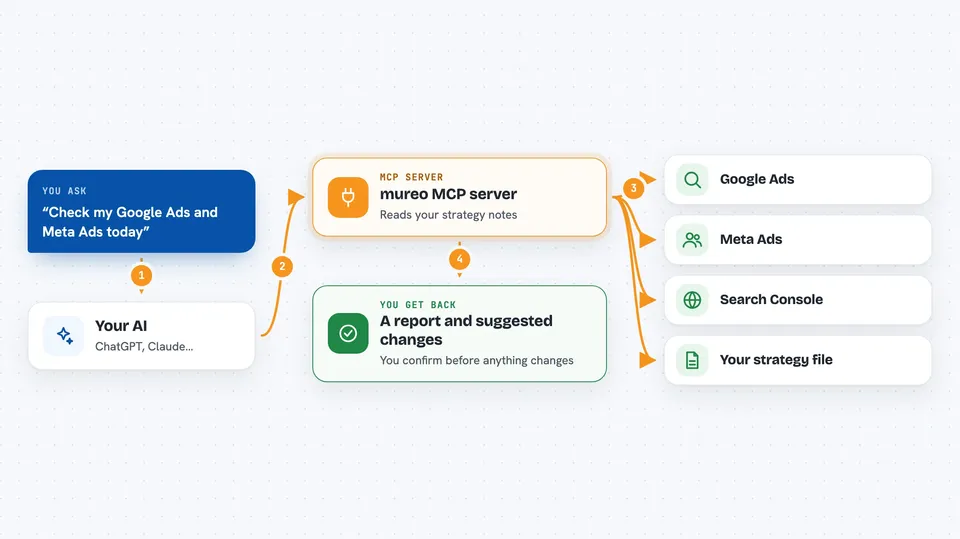
You ask your AI a question about your ads, like how a campaign is doing. Your AI uses mureo as its helper, and mureo talks to your ad accounts or reads a spreadsheet you exported. mureo also reads a strategy file you wrote, so the answer matches your goals and brand. Then you get back a plain report or a list of suggested changes in your chat. If you connect live accounts, it can also make the changes for you, but only after you confirm.
 Click to zoom
What you can do with it
- Run a daily health check across your ad platforms
- Find wasted spend and overlapping keywords
- Compare your paid ads against your organic search results
- Suggest budget shifts between campaigns
- Draft new ad headlines that match your brand voice
- Keep a log of every change so you can undo it
- Learn from your corrections and remember them next time
Try asking your AI
- “Run a daily check on my Google Ads account”
- “Which search terms are wasting money and overlapping with my organic results”
- “Look at my campaign performance and suggest a budget rebalance”
- “Draft three new headlines for my top campaign using my strategy file”
What it gives back to you
You get answers in your chat, usually as a short report or a list. That can include campaign health summaries, flagged problems, suggested changes, and new ad copy ideas. If it makes a change, it records what it did so you can review or undo it later. You can also ask it to show the log of everything it has done.
Before you start
What you need
- Python 3.10 or newer
- An AI app that supports MCP, like Claude Code, Cursor, Codex or Gemini CLI
- For demo mode: nothing else, it uses sample data
- For your own data: an exported spreadsheet from Google Ads or Meta Ads, or live account access set up through the setup wizard
Good to know
If you connect live accounts, mureo can change your real ad campaigns, so review its suggestions before confirming anything.
Install it with your AI
Add mureo MCP server to your AI, no technical skills needed
You don't install anything by hand. You copy one prompt, paste it into an AI that can work on your computer, and it checks, installs and connects the server for you, asking you when it needs something.
Sign in to get the install prompt
Members get a ready-made prompt that lets the Claude desktop app check mureo MCP server, install it and connect it for them, step by step. You don't need any technical skills: you copy, paste and answer a few questions. Your connected AI can also find and install any of the 4,361 MCP servers here for you.
Who it's for
Marketers, small business owners and agency staff who run paid ads and want an AI to help watch and improve them without touching code.





