
MCP server · Productivity
dowse MCP server
by ltspace
Lets your AI search your Windows files by name, document text, and text inside screenshots.
dowse is a free search tool for Windows that keeps an index of your files, including what is written inside documents and inside screenshots. This page is about its MCP server, which lets your AI assistant search that index for you. It is handy if you often know a file exists somewhere but cannot remember where.
What is an MCP server? The 30-second version
On its own, your AI can only chat with you. It cannot see your computer. An MCP server is a small helper program that gives your AI one new skill. Here, that skill is searching the dowse index on your PC, so your AI can look up your own files when you ask it to.
What this MCP server does
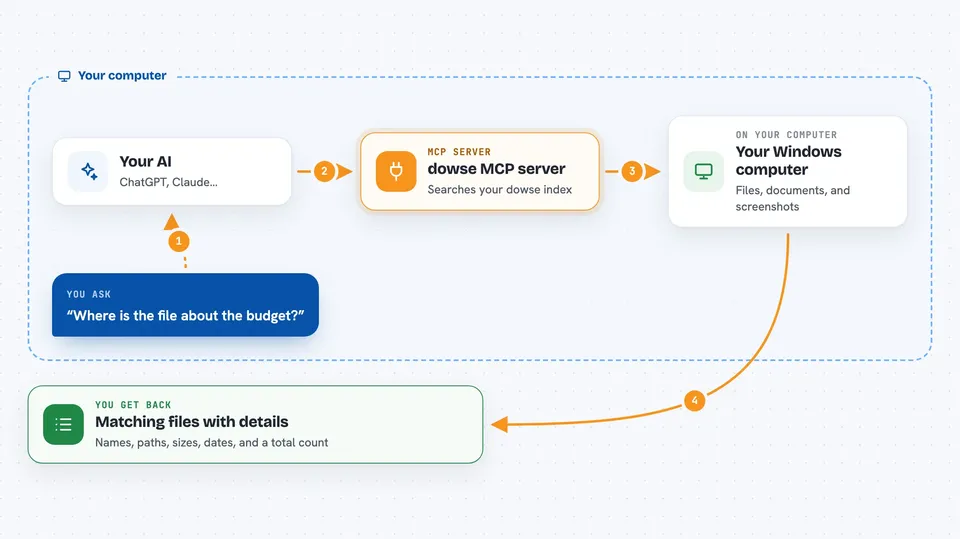
You ask your AI something like where is the file about the budget. Your AI passes that question to the dowse helper running on your computer. The helper looks through the local dowse index, which already contains file names, text from documents, and text read from images. It sends back the matching files with details like path, size, and date. Your AI then explains the results to you in the chat.
 Click to zoom
What you can do with it
- Search your whole disk by file name or by words inside documents
- Find text that appears inside screenshots and images
- Filter results by file type, date, or size
- Preview a file's content without opening it yourself
- Read a chunk of a file's indexed text, page by page
- Check how many documents are in the index and whether it is healthy
Try asking your AI
- “Find files on my computer that mention the Q3 budget”
- “Search my screenshots for the word invoice”
- “Show me PDFs I changed this year about the contract”
- “What is in the file called meeting-notes.docx, show me the first part”
What it gives back to you
You get a list of matching files with their names, paths, sizes, and dates, plus a total count. You can ask for a preview of one result to see more of its text and details. If you ask for a chunk of a file, you get a piece of its indexed text. Everything appears as normal text in your chat.
Before you start
What you need
- A Windows PC
- The dowse app or command-line tool installed, with an index already built
- An AI app that supports MCP servers, like the Claude desktop app
Good to know
This server is read-only and never changes or deletes your files, but it can show your AI the contents of your documents and screenshots, so only connect it to an AI you trust.
Install it with your AI
Add dowse MCP server to your AI, no technical skills needed
You don't install anything by hand. You copy one prompt, paste it into an AI that can work on your computer, and it checks, installs and connects the server for you, asking you when it needs something.
Sign in to get the install prompt
Members get a ready-made prompt that lets the Claude desktop app check dowse MCP server, install it and connect it for them, step by step. You don't need any technical skills: you copy, paste and answer a few questions. Your connected AI can also find and install any of the 4,361 MCP servers here for you.
Who it's for
Windows users who deal with lots of documents, screenshots, and notes and want their AI to find things for them.




