MCP server · Developer tools
infrabroker MCP server
by luisgf
Let your AI run commands on your servers and clusters without ever seeing a password or key.
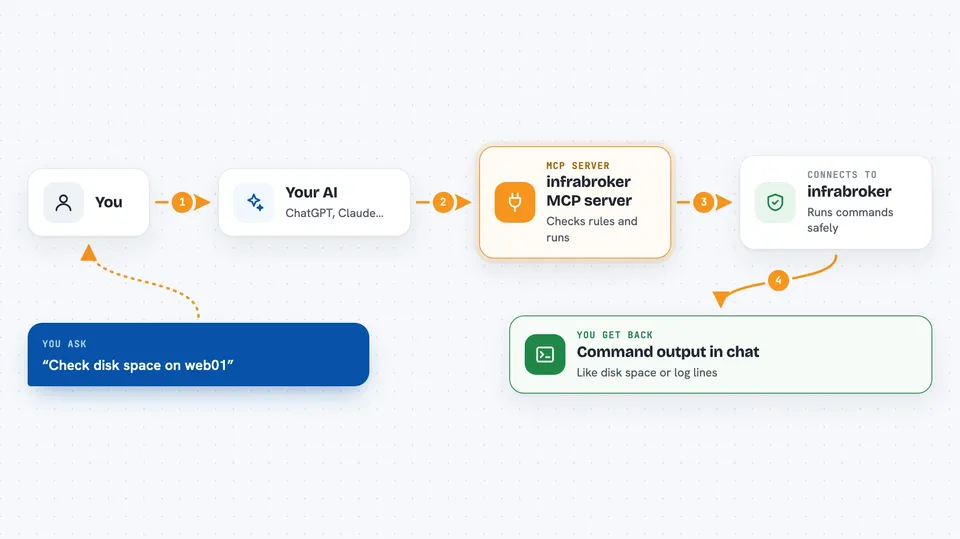
infrabroker is a helper program that sits between your AI assistant and your servers. When you ask your AI to run a command on a machine, infrabroker checks whether that command is allowed, then runs it using a temporary key that is thrown away right after. It is handy for people who want their AI to help with server work but do not want to hand it real passwords or long-lasting keys.
What is an MCP server? The 30-second version
On its own, your AI can only chat. An MCP server is a small helper program that gives your AI a new skill or a connection to another system. This one connects your AI to your servers over SSH and to your Kubernetes clusters, so it can look things up or run commands there when you ask. The important part is that the AI never holds the key: infrabroker keeps it, uses it for one single action, and then forgets it.
What this MCP server does
You ask your AI something like run the disk usage check on web01. Your AI passes that request to infrabroker instead of trying to connect itself. infrabroker looks at its rules, decides whether the command is allowed, and if needed asks a human to approve it. Then it creates a short-lived key just for that one command, connects to the server, runs it, and hands the output back to your AI. The key is deleted right after, so nothing secret ever lands in your chat.
 Click to zoom
What you can do with it
- Run a command on one of your servers and read the output
- Open a session on a host and run several commands in a row
- Copy a file to or from a server
- List which servers your AI is allowed to reach
- Look up or list things in a Kubernetes cluster
- Read logs from a pod in a cluster
- Apply or delete Kubernetes resources, if your rules allow it
Try asking your AI
- “Check how much disk space is left on web01”
- “Show me the last 50 lines of the nginx log on web01”
- “List the pods running in the production namespace”
- “Copy the file /tmp/report.csv from web01 to my machine”
What it gives back to you
You get back what the command printed: text output, lists of servers or clusters, log lines, or a short confirmation that an action was done. It shows up in your chat like a normal answer from your AI. If a command needs approval first, your AI will tell you it is waiting. It never shows you keys, certificates, or tokens, because those stay inside infrabroker.
Before you start
What you need
- The infrabroker program installed on your machine (a single file you download or build)
- A config file that lists your servers and your rules
- SSH access details for the servers you want to reach
- The Claude desktop app or another AI app that supports MCP servers
Good to know
This tool can run commands and change or delete things on your real servers and clusters, so set your rules carefully and keep approvals switched on for anything risky.
Install it with your AI
Add infrabroker MCP server to your AI, no technical skills needed
You don't install anything by hand. You copy one prompt, paste it into an AI that can work on your computer, and it checks, installs and connects the server for you, asking you when it needs something.
Sign in to get the install prompt
Members get a ready-made prompt that lets the Claude desktop app check infrabroker MCP server, install it and connect it for them, step by step. You don't need any technical skills: you copy, paste and answer a few questions. Your connected AI can also find and install any of the 4,609 MCP servers here for you.
Who it's for
System administrators, DevOps engineers, and developers who want their AI to help with server and cluster work without giving it permanent credentials.