
MCP server · Research
Bright Data MCP server
by luminati-io
Lets your AI search the web, read pages, and pull clean data from sites that usually block visitors.
Bright Data MCP is a helper you connect to your AI so it can look things up on the live web instead of guessing from old training data. It can search Google, Bing and Yandex, read a page for you, and pull tidy data from big sites like Amazon, LinkedIn or YouTube. It is handy if you do research, compare prices, or keep an eye on competitors.
What is an MCP server? The 30-second version
On its own, your AI can only chat with what it already knows. An MCP server is a small helper program that gives your AI a new skill or a connection to a service. This one connects your AI to Bright Data, a service that fetches public web pages for you. Once it is connected, you can just ask your AI to look something up online and it will use this helper to go get it.
What this MCP server does
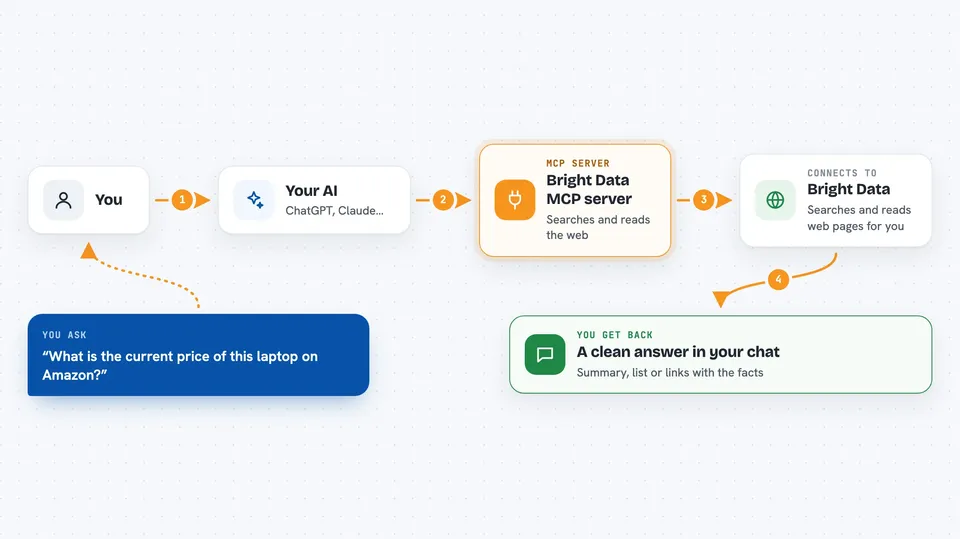
You type a request in plain words, like asking for a product price or the latest news on a topic. Your AI passes that request to the Bright Data helper. The helper goes out to the web, searches or opens the page, and handles the tricky parts like bot blocks and CAPTCHAs along the way. It brings the result back and your AI shows it to you in the chat, usually as a summary or a clean list. You never have to open a browser or copy and paste anything yourself.
 Click to zoom
What you can do with it
- Search the web with Google, Bing or Yandex and get results as a tidy list
- Read any public web page and turn it into clean text
- Pull product details like price, rating and stock from Amazon, Walmart and others
- Gather posts and engagement numbers from LinkedIn, Instagram, TikTok and more
- Look up company funding and hiring info from Crunchbase and LinkedIn
- Check the latest version and README of an npm or PyPI package
- Ask ChatGPT, Grok or Perplexity a question and compare their answers
Try asking your AI
- “What is the current price of this laptop on Amazon, Walmart and Best Buy?”
- “Find the most recent news about electric car sales in Europe and summarize it”
- “Get the last 10 posts from this TikTok account and tell me which got the most likes”
- “What is the latest version of the express package on npm?”
What it gives back to you
You get answers in the chat, usually as a short summary with the key facts pulled out. For products or social posts you often get a clean list with fields like price, rating or likes. For a page you asked it to read, you get the main text in a readable form. If it searched for you, you get a ranked list of results with links.
Before you start
What you need
- A Bright Data account (free tier gives 5,000 requests per month, no credit card needed)
- An API token from your Bright Data account settings (a kind of password for apps)
- An AI app that supports MCP servers, like Claude Desktop, Cursor or VS Code
Good to know
It uses your Bright Data account, so every request counts against your monthly free tier, and once that runs out requests stop unless you have added funds.
Install it with your AI
Add Bright Data MCP server to your AI, no technical skills needed
You don't install anything by hand. You copy one prompt, paste it into an AI that can work on your computer, and it checks, installs and connects the server for you, asking you when it needs something.
Sign in to get the install prompt
Members get a ready-made prompt that lets the Claude desktop app check Bright Data MCP server, install it and connect it for them, step by step. You don't need any technical skills: you copy, paste and answer a few questions. Your connected AI can also find and install any of the 4,609 MCP servers here for you.
Who it's for
People who do research, price checks, competitor tracking or social media monitoring and want their AI to fetch live web data for them.


