
MCP server · Developer tools
VibeRevert MCP server
Let your AI undo risky coding changes and restore your project files to how they were before a session.
VibeRevert is a safety helper for people who let an AI coding tool change their project files. It saves a picture of your files before the AI starts, points out changes that look risky, and can put things back the way they were. It is handy if you use tools like Claude Code or Cursor and want a way to undo a session you did not like.
What is an MCP server? The 30-second version
On its own, your AI can only chat with you. An MCP server is a small helper program that gives your AI a new skill or a connection to something else. This one connects your AI to VibeRevert, a tool that watches over your project files while an AI coding assistant works on them. Once it is connected, you can ask your AI to check what changed, flag risky edits, or restore files, and it will use VibeRevert to do it.
What this MCP server does
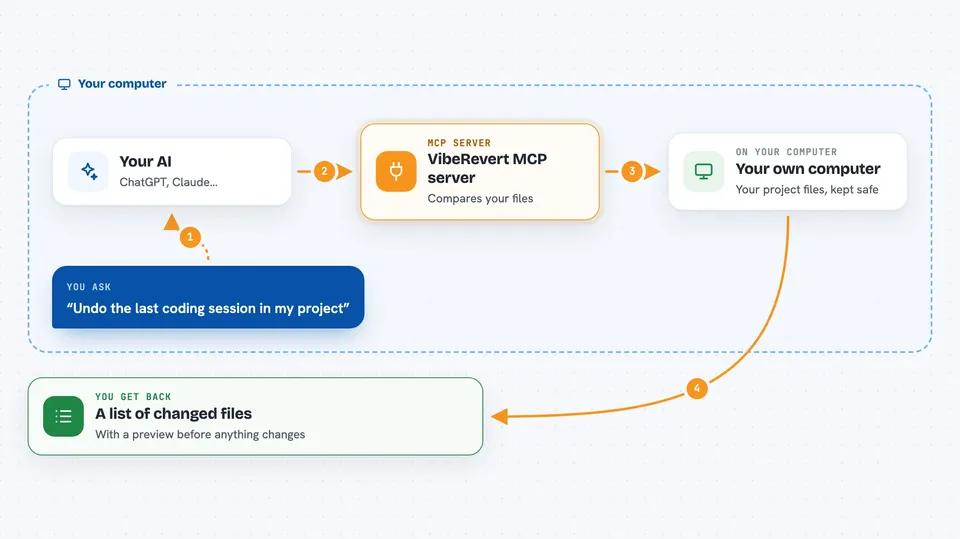
You ask your AI to look at a coding session or to undo one. The AI passes your request to VibeRevert, which has been recording your project files the whole time. VibeRevert compares what your files look like now with how they looked before the session started. It tells your AI which files changed, which changes look risky, and what restoring them would do. Your AI then explains the results to you and, if you want, applies the restore.
 Click to zoom
What you can do with it
- See which files an AI coding session changed
- Flag changes that touch payments, auth, databases, secrets, or deploy files
- Preview a rollback before anything is actually changed
- Restore all files from a session, or only the parts you choose
- Get a ready-to-paste prompt that describes what went wrong
- Keep your uncommitted work safe through a restore
Try asking your AI
- “What did the last coding session change in my project?”
- “Show me any risky changes from that session, especially anything touching payments.”
- “Preview a rollback of the last session but do not apply it yet.”
- “Restore only the files under app/api from that session.”
What it gives back to you
You get back a plain list of files that changed, with a short note about each one and whether it looks risky. For a rollback, you get a preview showing what would be restored, deleted, or left alone, and nothing changes until you say so. When you apply a restore, VibeRevert tells you what it actually did. It also keeps a safety checkpoint in case you want to go back.
Before you start
What you need
- Node.js 22 or newer installed on your computer
- A project folder that is a Git repository
- VibeRevert installed with npm install -g viberevert@beta
Good to know
Rollback only restores your local project files, not things like deployments, database writes, payments, or sent emails, so those still need their own recovery.
Install it with your AI
Add VibeRevert MCP server to your AI, no technical skills needed
You don't install anything by hand. You copy one prompt, paste it into an AI that can work on your computer, and it checks, installs and connects the server for you, asking you when it needs something.
Sign in to get the install prompt
Members get a ready-made prompt that lets the Claude desktop app check VibeRevert MCP server, install it and connect it for them, step by step. You don't need any technical skills: you copy, paste and answer a few questions. Your connected AI can also find and install any of the 4,361 MCP servers here for you.
Who it's for
Developers and anyone who lets an AI coding assistant edit their project files and wants a simple way to undo a bad session.


