
MCP server · Research
Company Contact Details Extractor MCP server
by mambalabsdev
Your AI can find a company's contact page and pull out role emails, a phone number and a postal address.
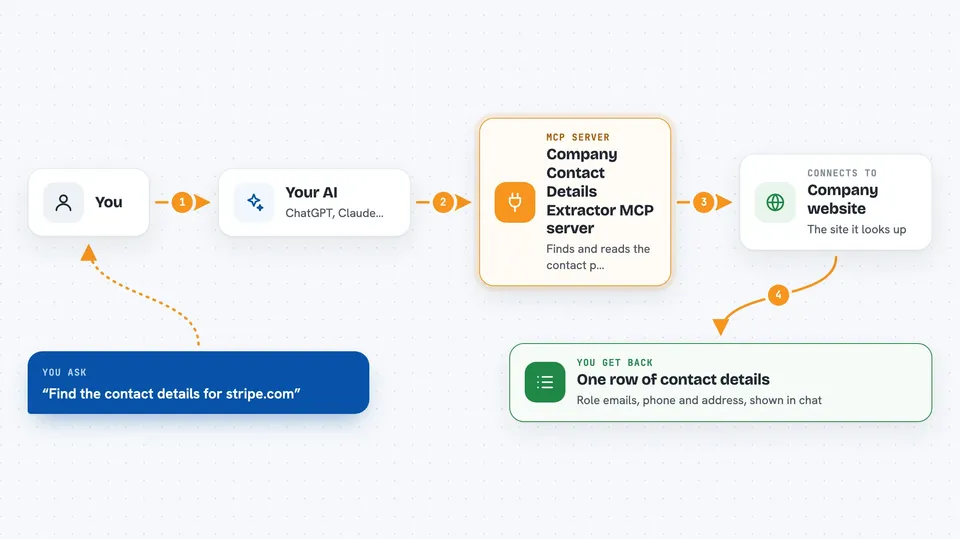
This is a small helper that lets your AI look up the contact details of a company from its website. You give it a web address like stripe.com, and it comes back with the general, support, sales and privacy emails it found, plus a phone number and a postal address when the company publishes them. It is handy if you build lists of companies and need contact info without clicking through each site yourself.
What is an MCP server? The 30-second version
On its own, your AI can only chat with you. An MCP server is a small helper program that gives your AI one new skill or a connection to another service. This helper connects your AI to a contact-finding tool that runs on Apify, so when you ask about a company, the AI can go look it up and bring the answer back into the chat. You do not install anything complicated; you add a few lines to your AI app's settings and it appears as a new ability.
What this MCP server does
You ask your AI something like find the contact details for stripe.com. The AI passes that request to this helper, which sends the company's web address to a tool running on Apify. That tool visits the company's site, finds the contact page, and reads the role email addresses, a main phone number and a postal address from it. The result comes back as one flat row of information, and the AI shows it to you in the chat. It only keeps role addresses like info@ or sales@, never a named person's email.
 Click to zoom
What you can do with it
- Find the contact page for a company from its web address
- Pull out role emails such as info@, support@, sales@ and privacy@
- Get a main phone number when the company publishes one
- Get a postal address when the company publishes one
- Choose which kinds of emails you want, like sales only
- Skip the phone number or the address if you do not need them
- See how many emails were found and how many were left out
Try asking your AI
- “Find the contact details for stripe.com.”
- “Get the sales email for figma.com and skip the phone number.”
- “Pull contact details for this local plumbing company and allow free mailboxes.”
- “Extract the support address for notion.com, reading a second page if the contact page has nothing.”
What it gives back to you
You get one row of information about the company, shown in the chat. It includes the contact page link, any role emails found, a phone number and a postal address when available. It also tells you how many emails were found and how many were left out, and why, so you can tell the difference between a company that publishes nothing and a page that was hard to read.
Before you start
What you need
- Node.js 18 or newer on your computer
- A free Apify account
- An Apify API token (a kind of password for apps; Apify gives you one in your account settings)
- The Claude desktop app or another AI app that supports MCP servers
Good to know
The lookups run on Apify and use your Apify account, so each run may use your Apify credits or cost money.
Install it with your AI
Add Company Contact Details Extractor MCP server to your AI, no technical skills needed
You don't install anything by hand. You copy one prompt, paste it into an AI that can work on your computer, and it checks, installs and connects the server for you, asking you when it needs something.
Sign in to get the install prompt
Members get a ready-made prompt that lets the Claude desktop app check Company Contact Details Extractor MCP server, install it and connect it for them, step by step. You don't need any technical skills: you copy, paste and answer a few questions. Your connected AI can also find and install any of the 4,609 MCP servers here for you.
Who it's for
People who build lists of companies for sales or marketing and need contact details without visiting each site by hand.


