
MCP server · Research
Funding & Press Signal Scanner MCP server
by mambalabsdev
Ask your AI for a company's recent funding, exec moves, launches, and acquisitions, and get back a clean dated list.
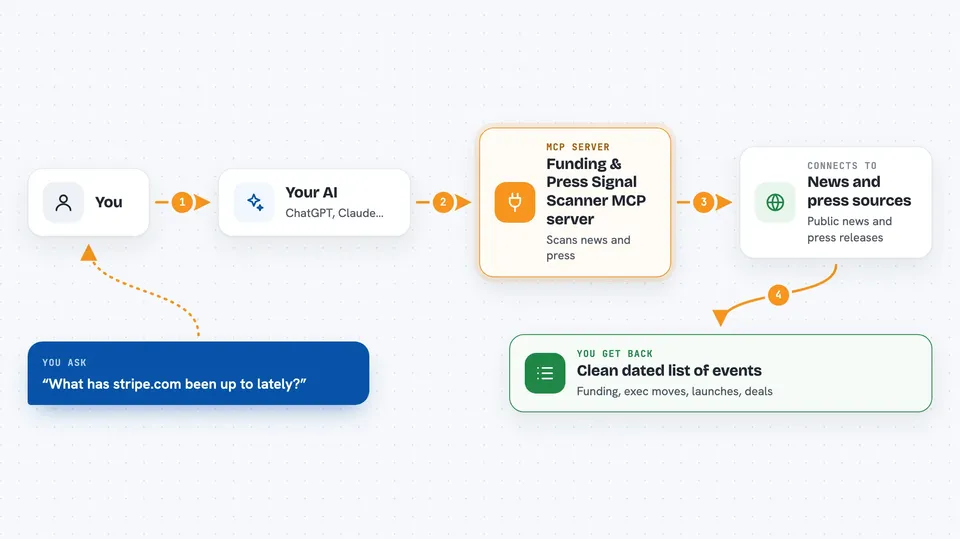
This is a small helper that lets your AI look up recent business news about a company. You give it a company website address, and it comes back with a tidy list of things like funding rounds, new hires, product launches, and buyouts. It is handy if you work in sales, recruiting, or research and want to know what a company has been up to lately.
What is an MCP server? The 30-second version
On its own, your AI can only chat with you using what it already knows. An MCP server is a small helper program that gives your AI a new skill or a connection to an outside service. This one connects your AI to a news scanning service on Apify, so it can go look up a company's recent press and funding news for you. You just ask in normal words, and the helper does the looking.
What this MCP server does
You ask your AI something like what has this company been up to lately. Your AI passes the company website address to this helper. The helper then scans public news and press release sources for that company. It sorts each story into a type, like funding round or product launch, and removes duplicates when the same event shows up in several places. You get back one clean row of events with dates, headlines, amounts, and links.
 Click to zoom
What you can do with it
- Check whether a company raised money recently and roughly how much
- See recent executive moves and new hires in the news
- Spot product launches and partnership announcements
- Find acquisitions and IPO news for a company
- Limit the search to just one kind of event, like funding only
- Set how far back to look, from a few weeks to a year or more
- Get results as plain rows you can paste into a spreadsheet or Clay
Try asking your AI
- “What funding, exec moves, and product launches has stripe.com had recently?”
- “Has ramp.com raised any funding in the last year, and how much?”
- “Scan deel.com for acquisitions and partnerships.”
- “Show me the most recent press events for notion.so as flat JSON.”
What it gives back to you
You get one row per company, with a short summary at the top: whether there was recent funding, an estimated funding total, the latest event date, and the most recent event type. Below that is a list of events, and each one has its type, date, headline, source link, source name, amount, funding stage, names involved, and a short description. There is also a count of how many sources reported the same event, so you can see how solid it is. In the chat it usually shows up as a readable list or a block of text you can copy.
Before you start
What you need
- The Claude desktop app or another AI client that supports MCP servers
- Node.js 18 or newer installed on your computer
- A free Apify account
- An Apify API token (a kind of password for apps; Apify gives you one in your account settings)
Good to know
Each scan runs on Apify and may use up your Apify account credits, so keep an eye on your usage if you run a lot of lookups.
Install it with your AI
Add Funding & Press Signal Scanner MCP server to your AI, no technical skills needed
You don't install anything by hand. You copy one prompt, paste it into an AI that can work on your computer, and it checks, installs and connects the server for you, asking you when it needs something.
Sign in to get the install prompt
Members get a ready-made prompt that lets the Claude desktop app check Funding & Press Signal Scanner MCP server, install it and connect it for them, step by step. You don't need any technical skills: you copy, paste and answer a few questions. Your connected AI can also find and install any of the 4,361 MCP servers here for you.
Who it's for
Sales and revenue teams, outbound agencies, recruiters, and anyone who wants quick company news without paying for a data subscription.


