MCP server · Research
Screaming Frog MCP server
Ask your AI to crawl a website with Screaming Frog and hand you the SEO data back in chat.

This is a small helper that connects your AI assistant to Screaming Frog SEO Spider, a well known tool for checking the technical health of a website. Instead of opening the Screaming Frog window and clicking around, you just type a web address into your AI and it runs the crawl for you. It is handy for anyone who does SEO checks on websites and would rather ask in plain words than learn the tool's menus.
What is an MCP server? The 30-second version
On its own, your AI can only chat. An MCP server is a small helper program that gives your AI a new skill or a connection to another app. This one connects your AI to Screaming Frog SEO Spider on your own computer, so the AI can start a crawl, check on it, and pull the results out. You stay in the chat, and the helper does the clicking in the background.
What this MCP server does
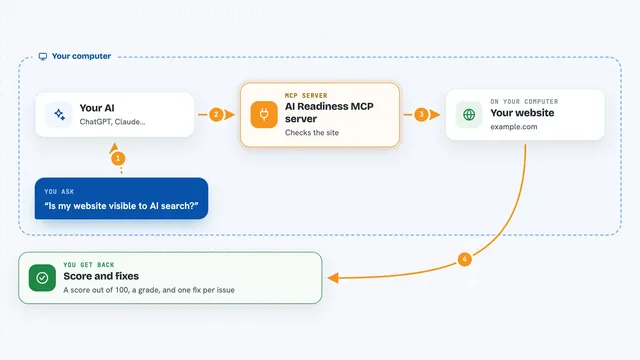
You type a web address and ask your AI to crawl it. The AI passes that request to this helper, which quietly starts Screaming Frog in the background on your machine. When the crawl finishes, the helper exports the findings as a spreadsheet style file and reads it back to the AI. The AI then shows you the results in the chat, such as broken links, missing page titles, or pages that take too long to load. You never have to open the Screaming Frog window yourself.
 Click to zoom
What you can do with it
- Crawl a website and list the pages it found
- Spot broken links and pages that return errors
- Check which pages are missing titles or descriptions
- Export a crawl as a CSV file you can open in a spreadsheet
- List the crawls already saved in Screaming Frog
- Check how much disk space your saved crawls are using
- Delete an old crawl you no longer need
Try asking your AI
- “Crawl https://example.com and tell me which pages have missing titles”
- “Run a crawl on my site and list every broken link you find”
- “Show me the crawls I already have saved and how much space they take”
- “Export the last crawl as a CSV and summarise the main issues”
What it gives back to you
You get answers in the chat: lists of pages, counts of problems, and short summaries of what the crawl found. If you ask for a file, it exports the crawl as a CSV you can open in Excel or Google Sheets. It can also tell you how much space your saved crawls use. Everything shows up as normal text in the conversation, so you can keep asking follow up questions.
Before you start
What you need
- Screaming Frog SEO Spider installed on your computer, with a paid licence (headless crawls need one)
- Python 3.10 or newer
- uv installed (a small tool that runs Python programs; the README shows a one line install)
- The Claude desktop app, with its config file edited and the app restarted
Good to know
The delete tool removes saved crawls from Screaming Frog, so be sure you mean it before asking the AI to delete one.
Install it with your AI
Add Screaming Frog MCP server to your AI, no technical skills needed
You don't install anything by hand. You copy one prompt, paste it into an AI that can work on your computer, and it checks, installs and connects the server for you, asking you when it needs something.
Sign in to get the install prompt
Members get a ready-made prompt that lets the Claude desktop app check Screaming Frog MCP server, install it and connect it for them, step by step. You don't need any technical skills: you copy, paste and answer a few questions. Your connected AI can also find and install any of the 4,609 MCP servers here for you.
Who it's for
SEO specialists, marketers, and website owners who check sites regularly and would rather ask their AI than click through Screaming Frog by hand.