MCP server · Analytics
Swarmia MCP server
by mattjegan
Ask your AI for Swarmia reports like pull request cycle time, DORA metrics and investment balance.
This is a small helper that connects your AI assistant to Swarmia, the tool many teams use to track how software work is going. Once it is set up, you can ask your AI in plain words for Swarmia numbers and reports instead of clicking around the dashboard. It is handy for engineering managers, team leads and anyone who has to put together a quick report.
What is an MCP server? The 30-second version
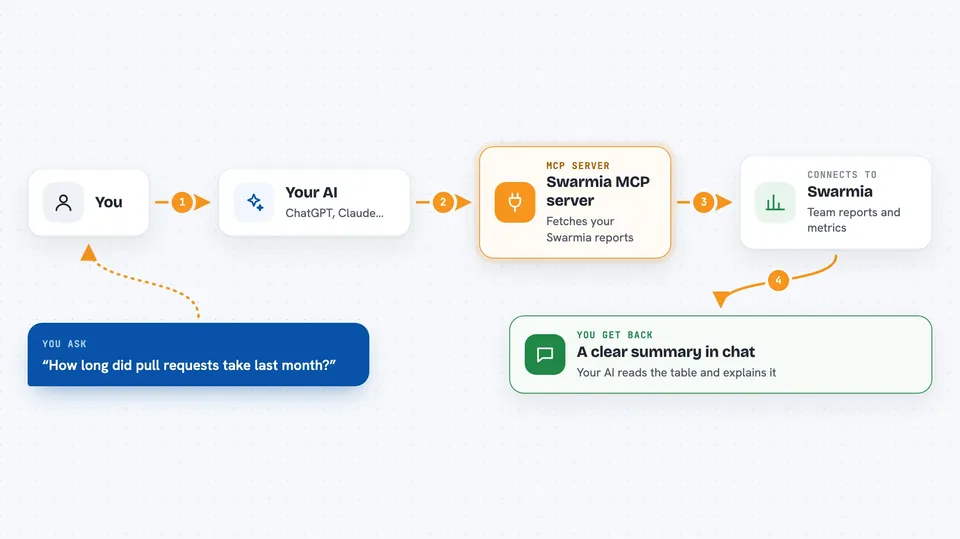
On its own, your AI can only chat with you. An MCP server is a small helper program that gives your AI a new skill or a connection to another app. This one connects your AI to Swarmia, so it can look up your team's metrics and reports for you. You ask a question, and the AI uses this helper behind the scenes to fetch the answer.
What this MCP server does
You ask your AI something like how long pull requests took last month. The AI passes that request to this helper program running on your computer. The helper signs in to Swarmia with your API token and asks Swarmia's export service for the numbers. Swarmia sends back a table of data, and the helper hands it to your AI. Your AI then reads that table and explains it to you in normal words.
 Click to zoom
What you can do with it
- Look up pull request metrics like cycle time, review rate and merge time
- Fetch DORA metrics such as deployment frequency and change failure rate
- Get the investment balance report with FTE months and categories
- Pull the software capitalization report with employee contributions
- See FTE effort broken down by month for each employee
- Get effort reporting for authors and issues in a given month
- Ask for a specific date range or a preset timeframe like last 30 days
Try asking your AI
- “Analyze our team's pull request cycle time trends for the last 30 days”
- “Get the software capitalization report for Q1 2024”
- “Show me effort reporting for last month”
- “What were our DORA metrics for January 2024 in production”
What it gives back to you
You get back a table of data, usually as CSV text, that your AI reads and turns into a summary or answer in the chat. For example, pull request metrics come back with columns like cycle time, review rate and merge time per team. DORA metrics come back with deployment frequency, change lead time and change failure rate. Your AI can then point out trends or compare periods for you.
Before you start
What you need
- A Swarmia account with API access
- A Swarmia API token (you get it from Settings then API tokens in your Swarmia dashboard)
- Python 3.8 or higher installed on your computer
- An MCP client like Claude Desktop or Cursor
Good to know
This server only reads data from Swarmia, so it cannot change or delete anything, but the reports can contain private team and employee information, so be careful who you share the results with.
Install it with your AI
Add Swarmia MCP server to your AI, no technical skills needed
You don't install anything by hand. You copy one prompt, paste it into an AI that can work on your computer, and it checks, installs and connects the server for you, asking you when it needs something.
Sign in to get the install prompt
Members get a ready-made prompt that lets the Claude desktop app check Swarmia MCP server, install it and connect it for them, step by step. You don't need any technical skills: you copy, paste and answer a few questions. Your connected AI can also find and install any of the 4,361 MCP servers here for you.
Who it's for
Engineering managers, team leads and anyone who needs quick Swarmia reports without digging through the dashboard.