MCP server · Research
MaxAEO AI Visibility MCP server
by maxaeo
Check whether a public website is easy for AI tools to find, read, and quote, with scores and a 7-day plan.
This is a small helper that lets your AI check a public website for the things AI search tools look at. You give it a web address, and it tells you what is missing or blocking AI crawlers. It is handy if you run a website and want AI assistants to be able to find and mention it.
What is an MCP server? The 30-second version
On its own, your AI can only chat with you. An MCP server is a small helper program that gives your AI a new skill or a connection to a service. This one connects your AI to a set of website checks, so it can look at a public site and report back. You just ask in plain words, and the helper does the looking.
What this MCP server does
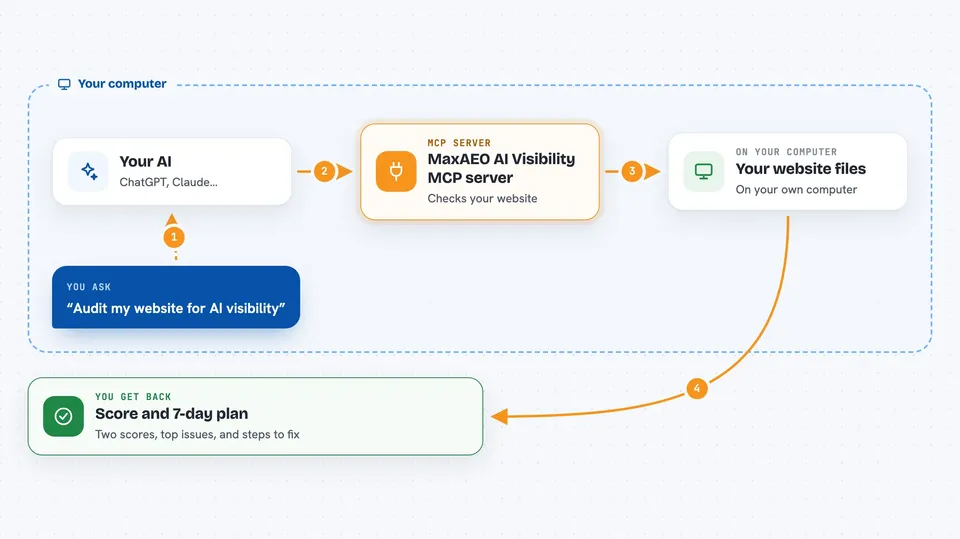
You ask your AI to audit a website address. The AI passes that request to this helper. The helper visits the public pages and checks things like the llms.txt file, the robots rules, the sitemap, the page title and description, the canonical link, and the structured data. It then hands back a score, a list of top issues, and a short action plan you can follow.
 Click to zoom
What you can do with it
- Check whether a site has an llms.txt file and whether the links in it work
- See if AI crawlers like GPTBot or ClaudeBot are allowed or blocked in robots.txt
- Check the sitemap, page title, description, and canonical link on the homepage
- Look for noindex tags that stop pages from showing up
- Check for JSON-LD structured data that helps AI understand the page
- Get a local visibility score and a technical foundation score
- Get a 7-day action plan for fixing what is missing
Try asking your AI
- “Use MaxAEO AI Visibility MCP to audit https://example.com and give me a 7-day action plan.”
- “Check the llms.txt file on my site and tell me if anything is broken.”
- “Are AI crawlers blocked on my homepage? Show me the robots rules.”
- “Audit my site with locale zh-CN and market cn.”
What it gives back to you
You get a short report in the chat. It shows a local visibility score out of 100 and a technical foundation score out of 100. It lists the top issues it found and a 7-day action plan. It also notes what this free local check cannot see, like live AI recommendations or brand mentions.
Before you start
What you need
- Node.js 18 or newer installed on your computer
- An MCP-compatible app like Claude Desktop, Cursor, or Codex
- A public website address you want to check
Good to know
It only looks at public web pages and does not change your site, but the scores are local estimates and do not show how AI engines actually talk about your brand.
Install it with your AI
Add MaxAEO AI Visibility MCP server to your AI, no technical skills needed
You don't install anything by hand. You copy one prompt, paste it into an AI that can work on your computer, and it checks, installs and connects the server for you, asking you when it needs something.
Sign in to get the install prompt
Members get a ready-made prompt that lets the Claude desktop app check MaxAEO AI Visibility MCP server, install it and connect it for them, step by step. You don't need any technical skills: you copy, paste and answer a few questions. Your connected AI can also find and install any of the 4,361 MCP servers here for you.
Who it's for
Website owners, marketers, and SEO or content people who want AI search tools to find and mention their site.