MCP server · Developer tools
npm Package Docs MCP server
by meanands
Your AI can look up the latest documentation for any npm package and show it to you in the chat.
This is a small helper that lets your AI pull the newest documentation for npm packages. npm is the giant public library where JavaScript code packages live, and each package comes with a README file that explains how to use it. If you or your team work with code packages, this saves you from copying and pasting docs by hand.
What is an MCP server? The 30-second version
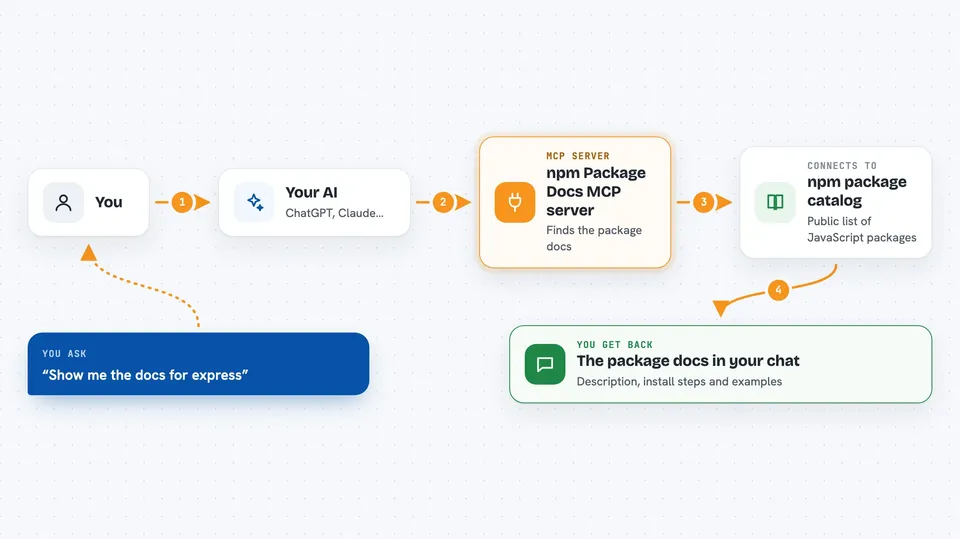
On its own, your AI can only chat with you using what it already learned. An MCP server is a small helper program you connect to your AI, and it gives the AI one new skill. This particular helper gives your AI the skill of fetching fresh documentation for npm packages. So when you ask about a package, the AI calls this helper, the helper goes and gets the README, and the AI shows it to you.
What this MCP server does
You ask your AI something like show me the docs for express. The AI passes the package name to this helper. The helper checks the npm registry, which is the public catalog of JavaScript packages. If the package has a GitHub repository, the helper grabs the README from there; otherwise it downloads the package file and pulls the README out of it. Then the AI reads that text and answers you in the chat.
 Click to zoom
What you can do with it
- Look up the latest README for any npm package by name
- Get current usage examples instead of old ones your AI remembers
- Check what a package does before you install it
- Compare what a package's docs say today with what you thought
- Pull documentation for several packages in one conversation
Try asking your AI
- “Show me the docs for express”
- “What's the latest API for react-router-dom?”
- “Get documentation for axios”
- “Show me the latest react documentation”
What it gives back to you
You get the README text of the package you asked about, right in the chat. It usually includes a description, install steps, and usage examples. The AI can then summarize it or answer follow-up questions about it. Nothing is changed on your computer or online; it only reads and shows.
Before you start
What you need
- Node.js version 16 or newer installed on your computer
- An MCP-compatible editor, such as Cursor
- An internet connection so it can reach npm and GitHub
Good to know
It only reads public documentation from npm and GitHub, so it does not change anything, but the README it returns may still be out of date if the package authors have not updated it.
Install it with your AI
Add npm Package Docs MCP server to your AI, no technical skills needed
You don't install anything by hand. You copy one prompt, paste it into an AI that can work on your computer, and it checks, installs and connects the server for you, asking you when it needs something.
Sign in to get the install prompt
Members get a ready-made prompt that lets the Claude desktop app check npm Package Docs MCP server, install it and connect it for them, step by step. You don't need any technical skills: you copy, paste and answer a few questions. Your connected AI can also find and install any of the 4,609 MCP servers here for you.
Who it's for
Developers and anyone who works with JavaScript or TypeScript packages and wants current documentation without leaving their editor.