
MCP server · Developer tools
Workspace Metabolism MCP server
Your AI can audit messy workspace files, recycle them safely, and undo any cleanup if needed.
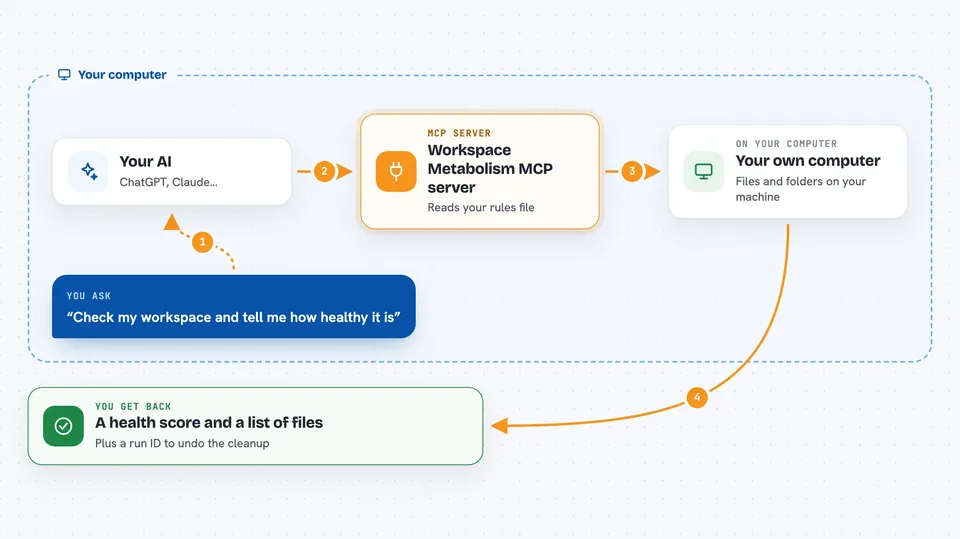
Workspace Metabolism is a helper that keeps the folders your AI coding tools leave behind from turning into a junk pile. It uses a simple rules file to decide which files are safe to clean up, and it never deletes anything for good right away. It is handy if you use AI coding assistants and notice they keep leaving scratch files, caches, and old drafts everywhere.
What is an MCP server? The 30-second version
On its own, your AI can only chat with you. An MCP server is a small helper program that gives your AI a new skill or a connection to something else. This one connects your AI to Workspace Metabolism, so it can look at the files in your workspace and clean them up under rules you set. Once connected, you can just ask your AI to check or tidy things, and it will use this helper to do the work.
What this MCP server does
You ask your AI to look at your workspace or clean up old files. The AI passes that request to this helper. The helper reads your metabolism.json rules file to see what each folder or file is worth, then it moves anything marked for cleanup into a recycle area instead of deleting it. It writes every action into a tamper-evident journal so you can check what happened later. If something was removed by mistake, you can ask it to roll back that run and the files come back exactly as they were.
 Click to zoom
What you can do with it
- Audit your workspace and get a health score
- Recycle old scratch files and caches safely
- Roll back a cleanup run and restore files exactly
- Check the journal to see if any record was changed
- Explain why a specific path is treated the way it is
- Find agent leftovers your rules do not cover yet
- Trim heavy fields inside a SQLite database
Try asking your AI
- “Check my workspace and tell me how healthy it is”
- “Clean up the files marked for automatic removal”
- “Roll back the last cleanup run”
- “Why is the logs folder treated as safe to clean”
What it gives back to you
You get back plain answers in the chat: a health score, a list of files that could be cleaned, or a summary of what a cleanup run did. When it cleans something, it tells you which run ID to use if you want to undo it. It can also show you the journal check result, so you know nothing was tampered with.
Before you start
What you need
- Python 3.11 or newer
- The workspace-metabolism package installed (pip install workspace-metabolism)
- A metabolism.json rules file in your workspace (wm init creates one)
Good to know
It can move files out of your workspace and trim database rows, so review the policy file and use dry runs before confirming any cleanup.
Install it with your AI
Add Workspace Metabolism MCP server to your AI, no technical skills needed
You don't install anything by hand. You copy one prompt, paste it into an AI that can work on your computer, and it checks, installs and connects the server for you, asking you when it needs something.
Sign in to get the install prompt
Members get a ready-made prompt that lets the Claude desktop app check Workspace Metabolism MCP server, install it and connect it for them, step by step. You don't need any technical skills: you copy, paste and answer a few questions. Your connected AI can also find and install any of the 4,361 MCP servers here for you.
Who it's for
Developers and anyone who uses AI coding assistants and wants a safe, reviewable way to keep their workspace from filling up with leftover files.



