
MCP server · Analytics
Firebird MCP server (FlameRobin)
by Michael2150
Lets your AI look at and run queries on your Firebird databases that are already set up in FlameRobin.
This is a small helper program that connects your AI assistant to the Firebird databases you already have listed in FlameRobin. If FlameRobin is set up on your PC with your database connections, this server reads those connections for you, so there is nothing extra to type. It is handy for people who work with Firebird data and want to ask questions or run SQL without switching windows all the time.
What is an MCP server? The 30-second version
On its own, your AI can only chat with you. An MCP server is a small helper program that gives your AI a new skill or a connection to an app or service. This one connects your AI to Firebird databases through FlameRobin's saved connection list, so the AI can look up tables, run queries, or make changes when you ask. You keep working in the chat, and the helper does the database work behind the scenes.
What this MCP server does
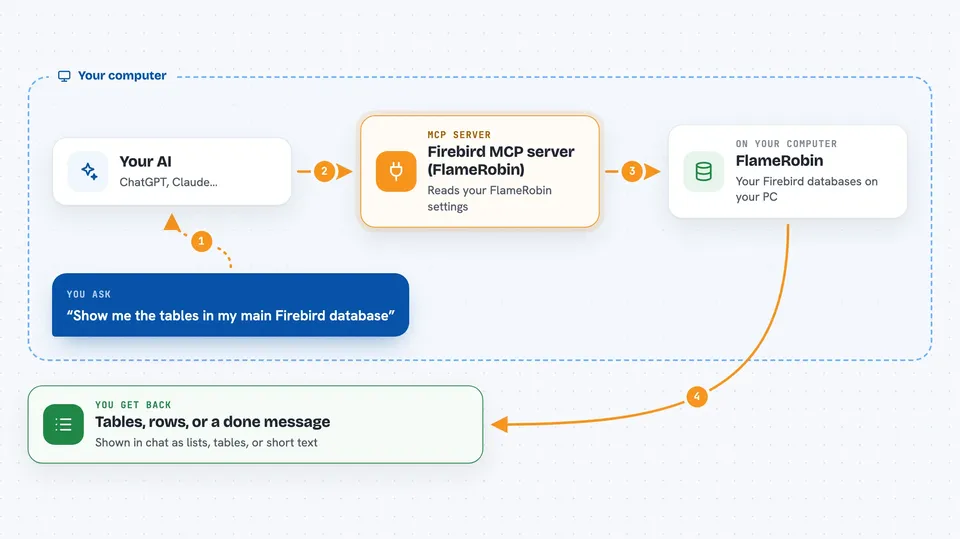
You ask your AI something about your Firebird database, like which tables exist or what a certain table looks like. The AI passes that request to this helper program running on your PC. The helper reads your FlameRobin connection settings, opens the database, and runs the needed SQL or lookup. Then it sends the answer back to the AI, which shows it to you in plain language in the chat. For changes, like creating a table or inserting a row, the helper runs the statement and commits it.
 Click to zoom
What you can do with it
- List all Firebird databases you have registered in FlameRobin
- Show tables, views, procedures, triggers, generators, and roles
- Describe a table's columns, keys, and constraints
- Show the source code of a stored procedure, trigger, or view
- Run a SELECT query and see the results
- Run CREATE, ALTER, or DROP statements and commit them
- Run INSERT, UPDATE, or DELETE statements and commit them
- Check an execution plan or find columns that are missing indexes
Try asking your AI
- “List all the databases I have in FlameRobin.”
- “Show me the tables in my main Firebird database.”
- “Describe the CUSTOMERS table, just the column names and types.”
- “Run this SELECT and show me the first 20 rows: SELECT * FROM INVOICES WHERE TOTAL > 1000”
- “Which columns in the ORDERS table are missing indexes?”
What it gives back to you
You get answers in the chat, usually as lists, tables, or short summaries. For example, a list of databases, a table of column names and types, or the rows from your query. When you run a change, it tells you that the statement ran and was committed. Execution plans and missing index results come back as text you can read.
Before you start
What you need
- A Windows PC with FlameRobin installed and at least one Firebird database set up in it
- The .NET 9 runtime if you do not use the self-contained executable
- The Claude desktop app (or another MCP-compatible AI app)
- The FirebirdMcp.exe file built or published from this project
Good to know
It can run statements that change or delete data in your Firebird databases, so double-check any INSERT, UPDATE, DELETE, or DDL request before you let it run.
Install it with your AI
Add Firebird MCP server (FlameRobin) to your AI, no technical skills needed
You don't install anything by hand. You copy one prompt, paste it into an AI that can work on your computer, and it checks, installs and connects the server for you, asking you when it needs something.
Sign in to get the install prompt
Members get a ready-made prompt that lets the Claude desktop app check Firebird MCP server (FlameRobin), install it and connect it for them, step by step. You don't need any technical skills: you copy, paste and answer a few questions. Your connected AI can also find and install any of the 4,609 MCP servers here for you.
Who it's for
People who already use FlameRobin and Firebird databases, like database administrators, developers, or analysts who want to ask questions and run SQL through their AI chat.


