MCP server · Research
Met Museum MCP server
by mikechao
Lets your AI search The Met's art collection and show you artwork details and pictures.
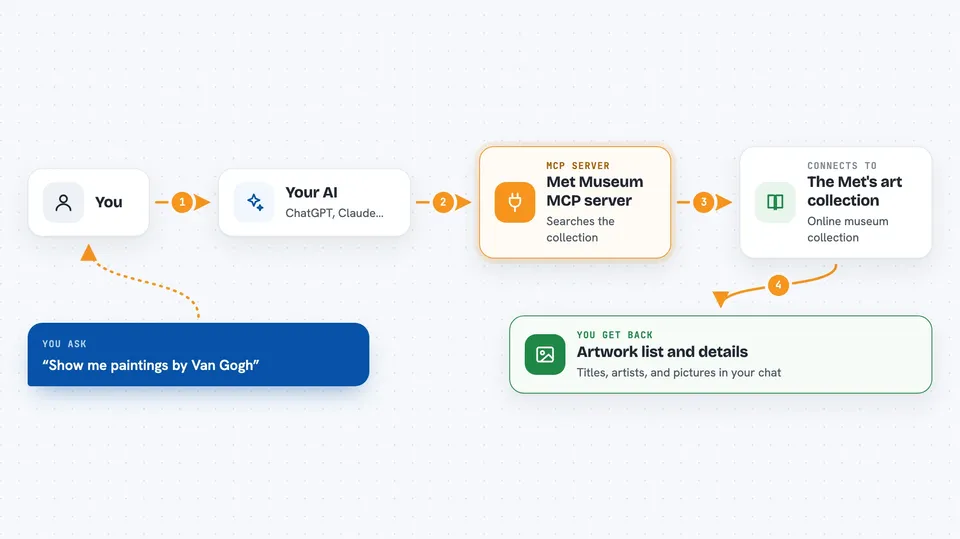
This is a small helper that connects your AI assistant to the online collection of the Metropolitan Museum of Art in New York. Once it is set up, you can just ask your AI in normal words about paintings, artists, or departments, and it will look things up for you. It is handy for anyone who likes art, is doing research, or just wants to browse the museum from their chat window.
What is an MCP server? The 30-second version
On its own, your AI can only chat with you using what it already learned. An MCP server is a small helper program that gives your AI a new skill or a connection to an app or service. This one connects your AI to The Met's art collection, so it can search artworks and pull up details and images when you ask. You do not need to understand how it works inside. You just talk to your AI like always.
What this MCP server does
You ask your AI something like "show me paintings by Van Gogh." Your AI passes that request to this helper program. The helper then talks to The Met's collection service and looks for matching artworks. It brings back a list of results, and if you pick one, it can fetch the full details and even the picture. Then your AI shows all of that to you right in the chat.
 Click to zoom
What you can do with it
- Search The Met's collection by keyword, artist, or title
- List all the museum departments so you can browse by area
- Find only artworks that have images available
- Pull up full details for a specific artwork, like artist, date, medium, and size
- Show you the picture of an artwork when one is available
- Open an interactive explorer to browse and filter search results
Try asking your AI
- “Can you help me explore the works of Vincent Van Gogh?”
- “Show me a few paintings from the Asian Art department.”
- “Find the painting titled Corridor in the Asylum.”
- “Find any art that has cat in the title.”
What it gives back to you
You get back plain text answers in your chat: lists of matching artworks, department names, and full details for a single piece such as title, artist, medium, dimensions, and credit line. When an image is available, it can show up as a picture right in the conversation. If you use the explorer app, you get an interactive view where you can search and filter results yourself.
Before you start
What you need
- Node.js version 18 or newer on your computer
- An AI app that supports MCP servers, like the Claude desktop app
Good to know
This server only reads public information from The Met's collection, so it does not change or delete anything, but the images and details come from a third-party service and may occasionally be incomplete.
Install it with your AI
Add Met Museum MCP server to your AI, no technical skills needed
You don't install anything by hand. You copy one prompt, paste it into an AI that can work on your computer, and it checks, installs and connects the server for you, asking you when it needs something.
Sign in to get the install prompt
Members get a ready-made prompt that lets the Claude desktop app check Met Museum MCP server, install it and connect it for them, step by step. You don't need any technical skills: you copy, paste and answer a few questions. Your connected AI can also find and install any of the 4,609 MCP servers here for you.
Who it's for
Anyone who enjoys art, students and teachers, or people doing light research who want to browse The Met's collection without leaving their chat.