
MCP server · Social media
Instagram & Threads MCP server
by mikusnuz
Lets your AI post to Instagram and Threads, read comments and DMs, and pull your analytics.
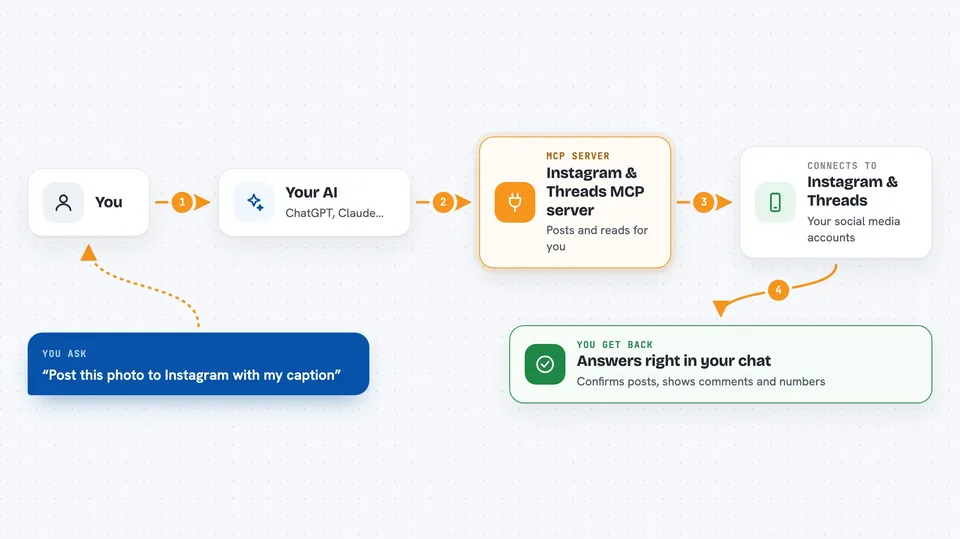
This is a helper that connects your AI assistant to Instagram and Threads. Once it is set up, you can just ask your AI in plain words to publish a post, reply to a comment, or show your follower count. It is handy for anyone who runs social media accounts for a living or as a side project.
What is an MCP server? The 30-second version
On its own, your AI can only chat with you. An MCP server is a small helper program that gives your AI a new skill, in this case a connection to Instagram and Threads. You install this helper once, and from then on your AI can look things up and do things on those platforms when you ask. You stay in charge: the AI only acts when you tell it to.
What this MCP server does
You type a request in your AI chat, like asking it to post a photo to Instagram. The AI passes that request to this helper program. The helper then talks to Instagram or Threads using your account details and carries out the action. When it is done, it tells the AI what happened, and the AI shows you the result in the chat. You never have to touch the Instagram or Threads apps yourself.
 Click to zoom
What you can do with it
- Publish photos, videos, reels, stories, and carousels to Instagram
- Publish text, image, video, and carousel posts to Threads
- Read and reply to comments on both platforms
- Check your follower count and post analytics
- List and reply to Instagram direct messages
- Search hashtags and see top or recent posts for them
- Look up public Threads profiles and search public posts
Try asking your AI
- “Post this photo to Instagram with the caption I just wrote”
- “Publish a text post on Threads asking people to vote in a poll”
- “Show me the insights for my last Instagram post”
- “Reply to the newest comment on my Threads post with a thank you”
What it gives back to you
You get answers in the chat, like a list of comments, a summary of your views and likes, or a confirmation that a post went live. For analytics, it gives you numbers such as views, reach, followers, and clicks. When it changes something, like posting or replying, it tells you what it did. Everything shows up as normal chat text you can read and copy.
Before you start
What you need
- An Instagram Business or Creator account (free to switch in Instagram settings)
- A Threads account if you want to use Threads features
- A Meta Developer App (you create it for free at developers.facebook.com)
- Access tokens and account IDs from Meta for the platforms you use
Good to know
This helper can post, reply, and delete things on your real accounts, so check what your AI is about to do before you say yes.
Install it with your AI
Add Instagram & Threads MCP server to your AI, no technical skills needed
You don't install anything by hand. You copy one prompt, paste it into an AI that can work on your computer, and it checks, installs and connects the server for you, asking you when it needs something.
Sign in to get the install prompt
Members get a ready-made prompt that lets the Claude desktop app check Instagram & Threads MCP server, install it and connect it for them, step by step. You don't need any technical skills: you copy, paste and answer a few questions. Your connected AI can also find and install any of the 4,361 MCP servers here for you.
Who it's for
Social media managers, small business owners, and creators who post to Instagram or Threads regularly and want to do it from their AI chat.





