
MCP server · Social media
QQ MCP server (Xadeus)
by mouse114514
Let your AI read and send QQ messages, manage groups, and wake itself when a message arrives.
This is a helper that connects your AI assistant to QQ, the popular Chinese chat app. Once it is set up, your AI can send and read messages, look after group chats, and even wake itself up when someone messages you. It is handy if you run a QQ group or want your AI to keep an eye on chats for you.
What is an MCP server? The 30-second version
On its own, your AI can only chat with you in its own window. An MCP server is a small helper program that gives your AI a new skill or a connection to another app. This one connects your AI to QQ, so it can look things up there and do things for you when you ask. You install it on your own computer, and it talks to QQ through a tool called NapCat.
What this MCP server does
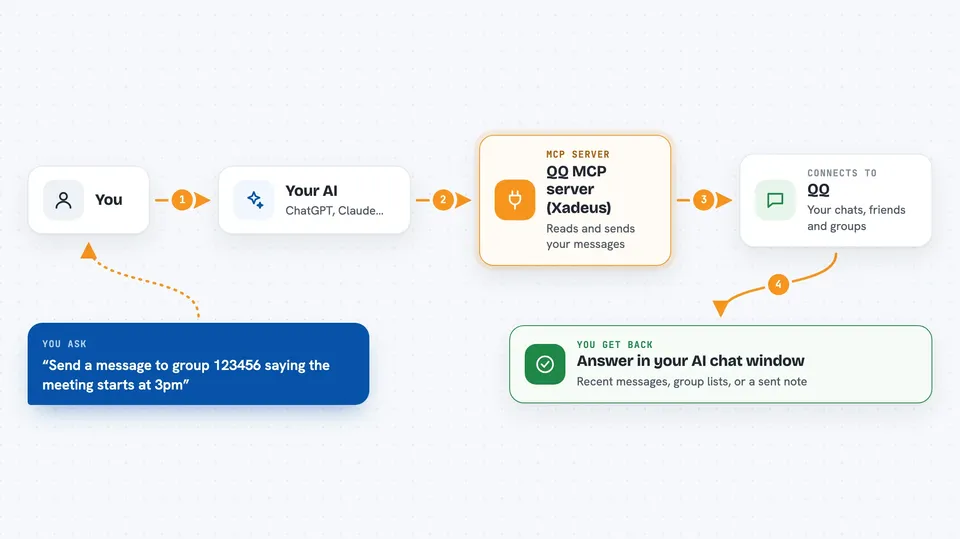
You ask your AI something like send a message to this group or show me the last messages in this chat. Your AI passes the request to this helper program. The helper talks to QQ through NapCat, which is a small bridge that lets outside programs use your QQ account. Then you get the answer or the action back in your AI chat window, for example the recent messages or a note that your message was sent.
 Click to zoom
What you can do with it
- Send a text message to a QQ friend or group
- Read the recent messages in a chat
- List your groups, friends, and group members
- Mute, unmute, or remove a group member
- Set a group nickname or send a group notice
- Set up a rule so your AI wakes up when a certain message arrives
- Schedule a wake at a set time with a timer
Try asking your AI
- “Send a message to group 123456 saying the meeting starts at 3pm”
- “Show me the last 20 messages from my friend Xiao Ming”
- “List all the groups I am in”
- “Wake me up whenever someone in group 123456 says the word urgent”
What it gives back to you
You get answers right in your AI chat window. For example, a list of groups, a summary of recent messages, or a short note that a message was sent or a member was muted. Some tools also give you a chat screenshot or a compressed summary of older messages.
Before you start
What you need
- A QQ account
- NapCat.Shell installed and running, with OneBot v11 set to WebSocket port 3001 and HTTP port 3000
- Python 3.12 or newer
- The uv tool for Python, or a similar way to run Python packages
Good to know
This helper can send messages, mute or remove people, and wake your AI on its own, so be careful with wake rules and group actions, and keep your QQ account safe.
Install it with your AI
Add QQ MCP server (Xadeus) to your AI, no technical skills needed
You don't install anything by hand. You copy one prompt, paste it into an AI that can work on your computer, and it checks, installs and connects the server for you, asking you when it needs something.
Sign in to get the install prompt
Members get a ready-made prompt that lets the Claude desktop app check QQ MCP server (Xadeus), install it and connect it for them, step by step. You don't need any technical skills: you copy, paste and answer a few questions. Your connected AI can also find and install any of the 4,361 MCP servers here for you.
Who it's for
People who run QQ groups or want their AI to watch and reply to QQ chats for them, especially on Windows.


