
MCP server · Finance and crypto
Xendit MCP server
by mrslbt
Lets your AI check Xendit balances, invoices, transactions, and stage payouts for you.
This is a helper for Xendit, a payment service used in Indonesia, the Philippines, Thailand, Vietnam, and Malaysia. Once it is connected, your AI assistant can look up your Xendit balance, list invoices, and check payments without you logging into the dashboard. It is handy if you handle payments or payouts for a small business and want to ask questions in plain words.
What is an MCP server? The 30-second version
On its own, your AI can only chat. An MCP server is a small helper program that gives your AI a new skill or a connection to an app or service. This one connects your AI to Xendit, so when you ask about your balance or your invoices, the AI can actually go and look it up. You stay in the chat, and the helper does the fetching.
What this MCP server does
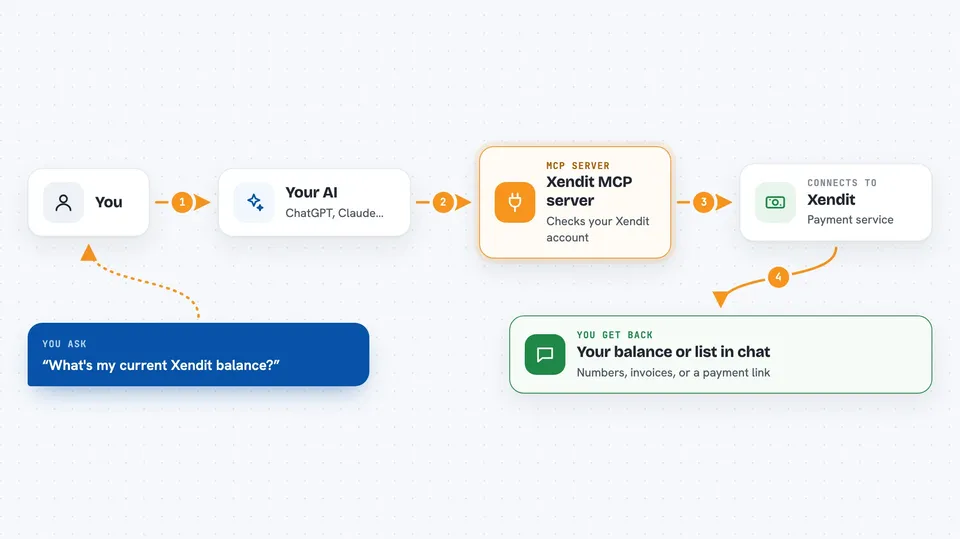
You ask your AI something like what is my Xendit balance, or show me unpaid invoices. The AI passes your request to this helper program. The helper talks to the Xendit payment service using your API key. Xendit sends back the numbers or the list, and the AI shows it to you in the chat. For payouts, the helper can stage a payment first and only send it after you confirm with a separate approval code.
 Click to zoom
What you can do with it
- Check your Xendit account balance by type (cash, holding, tax)
- List invoices filtered by status, date, or currency
- Look up a single invoice and see its details
- List payments, payouts, refunds, and transfers
- Create a payment invoice and get a payment link (off by default)
- Expire an active invoice (off by default)
- Stage a payout and confirm it later with an approval code (off by default)
Try asking your AI
- “What's my current Xendit balance?”
- “Show me all unpaid invoices.”
- “List payments received in the last 7 days.”
- “Prepare a Rp 1,000,000 payout to Ahmad at BCA, then wait for my confirmation.”
What it gives back to you
You get answers in the chat: numbers for your balance, a list of invoices with statuses and amounts, a list of transactions, or a payment link you can copy. For payouts, it returns a staged token first, and only after you confirm, it returns the payout status. Payout statuses can change over time, so you may need to ask again later to see the final result.
Before you start
What you need
- A Xendit account (sign up at dashboard.xendit.co)
- An API key from the Xendit Dashboard under Settings, then API Keys (a kind of password for apps; Xendit gives you one)
- Node.js 18 or newer if you install it yourself
- The Claude desktop app or Claude Code if you want to use it there
Good to know
This server can move real money through Xendit, so keep it in read-only mode unless you really need payouts, test with a development key first, and always review a payout before approving it.
Install it with your AI
Add Xendit MCP server to your AI, no technical skills needed
You don't install anything by hand. You copy one prompt, paste it into an AI that can work on your computer, and it checks, installs and connects the server for you, asking you when it needs something.
Sign in to get the install prompt
Members get a ready-made prompt that lets the Claude desktop app check Xendit MCP server, install it and connect it for them, step by step. You don't need any technical skills: you copy, paste and answer a few questions. Your connected AI can also find and install any of the 4,609 MCP servers here for you.
Who it's for
Small business owners, finance staff, and operations people in Southeast Asia who handle Xendit payments and want to ask questions in plain words.



