MCP server · Apple, iOS and Mac
Swift MCP GUI server
by NakaokaRei
Lets your AI move the mouse, type keys, scroll, and take screenshots on your Mac.
This is a small helper program that lets your AI actually control your Mac. Instead of only writing text back to you, it can move the mouse, click, type, scroll, and take screenshots when you ask. It is handy for people who want to automate boring clicking and typing on a Mac, and who are comfortable giving an AI some control over their screen.
What is an MCP server? The 30-second version
On its own, your AI can only chat with you. An MCP server is a small helper program that gives your AI a new skill or a connection to something. This one connects your AI to your Mac's mouse and keyboard, so it can look at the screen and do things there for you. You ask in normal words, and the helper carries out the action on your computer.
What this MCP server does
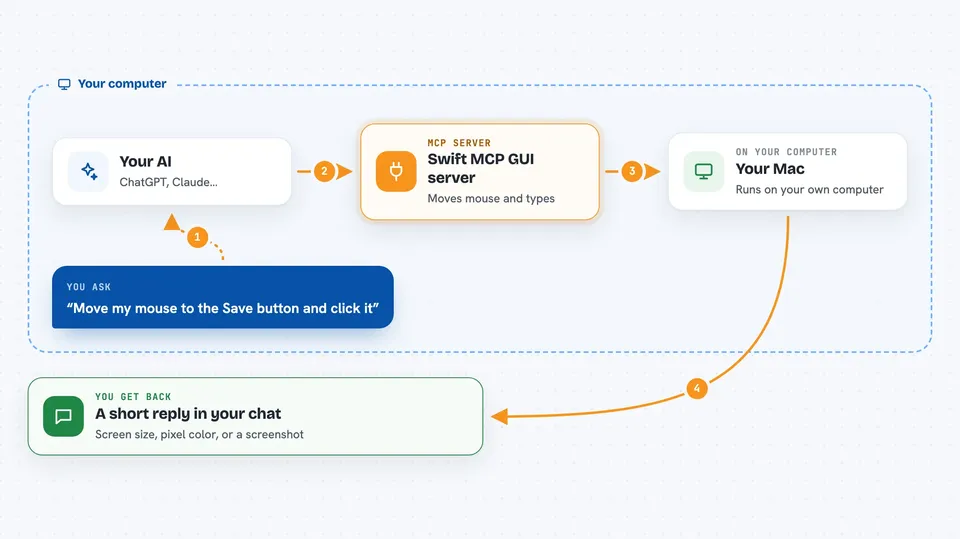
You tell your AI what you want done on your Mac, like moving the mouse to a spot or typing a shortcut. The AI sends that request to this helper program running on your Mac. The helper uses a Mac tool called SwiftAutoGUI to actually move the cursor, click, type keys, scroll, or take a picture of the screen. Then it sends the result back, so you see what happened right in the chat. It can also run AppleScript, which is a way to give your Mac written instructions.
 Click to zoom
What you can do with it
- Move the mouse cursor to a spot on the screen
- Click the left or right mouse button
- Type keys and keyboard shortcuts
- Scroll up, down, left, or right
- Take a screenshot of the whole screen or just one area
- Check the screen size and the color of a pixel
- Run AppleScript to make your Mac do other things
Try asking your AI
- “Move the mouse to 500, 300 and then click the left button”
- “Type command space to open Spotlight, then type Safari and press return”
- “Scroll down 5 clicks on this page”
- “Take a screenshot of the top left 800 by 600 area and save it as shot.png”
What it gives back to you
You get short answers in the chat, like the screen size, the color of a pixel, or a note that the action was done. Screenshots can come back as a file path with the image size, or as a picture your AI can look at. AppleScript results come back as text. Everything shows up as a normal reply from your AI.
Before you start
What you need
- A Mac running macOS 15.0 or later
- Accessibility permission turned on for this app in System Settings
- Homebrew if you want the easy install, or Swift 6.0 and Xcode 16.0 to build from source
- An MCP client like Claude Desktop to connect it to
Good to know
This helper can move your mouse, type, click, and run AppleScript on your Mac, so it can change or delete things and act on whatever is on screen; only connect it to an AI you trust and watch what it does.
Install it with your AI
Add Swift MCP GUI server to your AI, no technical skills needed
You don't install anything by hand. You copy one prompt, paste it into an AI that can work on your computer, and it checks, installs and connects the server for you, asking you when it needs something.
Sign in to get the install prompt
Members get a ready-made prompt that lets the Claude desktop app check Swift MCP GUI server, install it and connect it for them, step by step. You don't need any technical skills: you copy, paste and answer a few questions. Your connected AI can also find and install any of the 4,361 MCP servers here for you.
Who it's for
Mac users who want to automate clicking, typing, and screenshots, and who are okay giving an AI control over their mouse and keyboard.