
MCP server · Research
touch-browser MCP server
Lets your AI open web pages, check whether they support a claim, and hand back quotes with sources.
touch-browser is a helper that lets your AI open a web page and check whether that page actually backs up a claim you care about. Instead of just dumping the page text, it tells you if the page supports the claim, contradicts it, or needs more browsing. It is handy for anyone doing research, fact-checking, or writing that needs real sources.
What is an MCP server? The 30-second version
On its own, your AI can only chat with what it already knows. An MCP server is a small helper program that gives your AI a new skill, in this case the ability to open web pages and check claims against them. Once touch-browser is connected, your AI can look things up on public pages and bring back quotes and links for you. You just ask in normal words, and the helper does the browsing part.
What this MCP server does
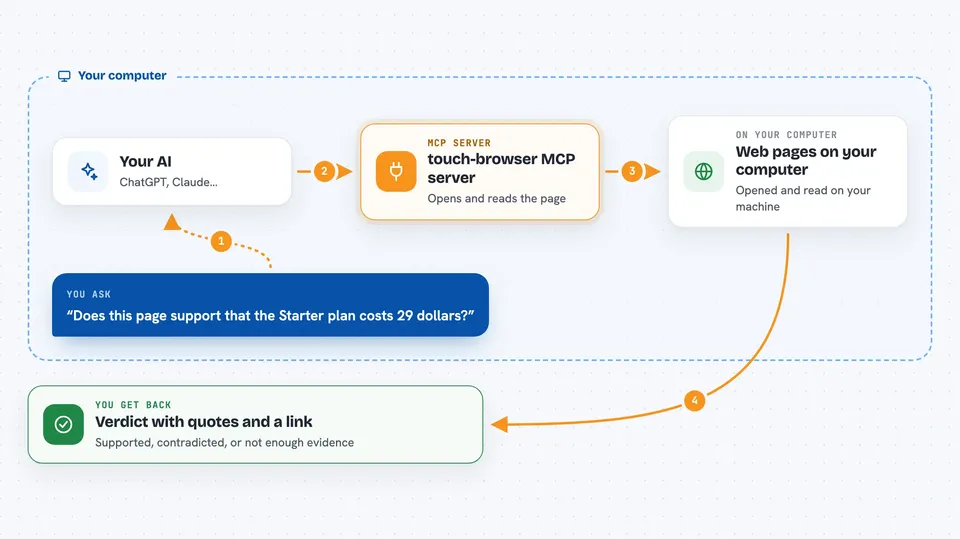
You ask your AI something like whether a page supports a certain statement. The AI passes that claim to touch-browser, which opens the page and reads it in a structured way. touch-browser then compares the claim to what is on the page and gives a verdict: supported, contradicted, not enough evidence, or needs more browsing. It also attaches short quote snippets and the page link so you can check for yourself. You get a clear answer with sources instead of a wall of raw text.
 Click to zoom
What you can do with it
- Check whether a web page supports a specific claim
- Get short quote snippets as evidence for each claim
- See a confidence level and a note on whether a human should review
- Collect evidence across several pages in one research session
- Get a Markdown or JSON summary of a multi-page session with citations
- Search the web for candidate pages before opening them
- Classify pages and actions as allowed, needing review, or blocked
Try asking your AI
- “Does this page support the claim that the Starter plan costs 29 dollars per month?”
- “Open this IANA page and check whether it says example.com is reserved for documentation.”
- “Search for pages about this topic, open the top result, and tell me if it backs up my statement.”
- “Summarize the evidence from the pages we opened today, with links, as a Markdown report.”
What it gives back to you
You get back a short verdict for each claim, like evidence-supported or contradicted, plus a confidence level. Each verdict comes with one or more quote snippets from the page and a link to where it came from. For longer sessions, you can also get a combined summary in Markdown or JSON with all the citations. It reads like a small evidence report in your chat, not a raw page dump.
Before you start
What you need
- Node.js 18 or newer (for the npx install path)
- The Claude desktop app, Cursor, or another app that supports MCP servers
- An internet connection, since it opens public web pages
Good to know
It only reports what a page says, so a supported verdict is not proof that the claim is true in the wider world, and you should still review anything it flags as needing review.
Install it with your AI
Add touch-browser MCP server to your AI, no technical skills needed
You don't install anything by hand. You copy one prompt, paste it into an AI that can work on your computer, and it checks, installs and connects the server for you, asking you when it needs something.
Sign in to get the install prompt
Members get a ready-made prompt that lets the Claude desktop app check touch-browser MCP server, install it and connect it for them, step by step. You don't need any technical skills: you copy, paste and answer a few questions. Your connected AI can also find and install any of the 4,609 MCP servers here for you.
Who it's for
Researchers, analysts, writers, and anyone who fact-checks claims and needs sources they can point to.




