MCP server · Design tools
Mermaid MCP server
Turn a plain sentence into a ready-to-use diagram like a flowchart or architecture picture.
This is a small helper that lets your AI draw diagrams for you. You describe what you want in normal words, and it creates a proper picture file you can drop into a document or a slide. It is handy for anyone who needs to explain how something works but does not want to drag boxes around by hand.
What is an MCP server? The 30-second version
On its own, your AI can only chat with you. An MCP server is a small helper program that gives your AI one extra skill. This helper gives your AI the skill of drawing Mermaid diagrams, which are simple text descriptions that turn into pictures. So when you ask for a flowchart or an architecture picture, your AI hands the job to this helper, and the helper builds the image for you.
What this MCP server does
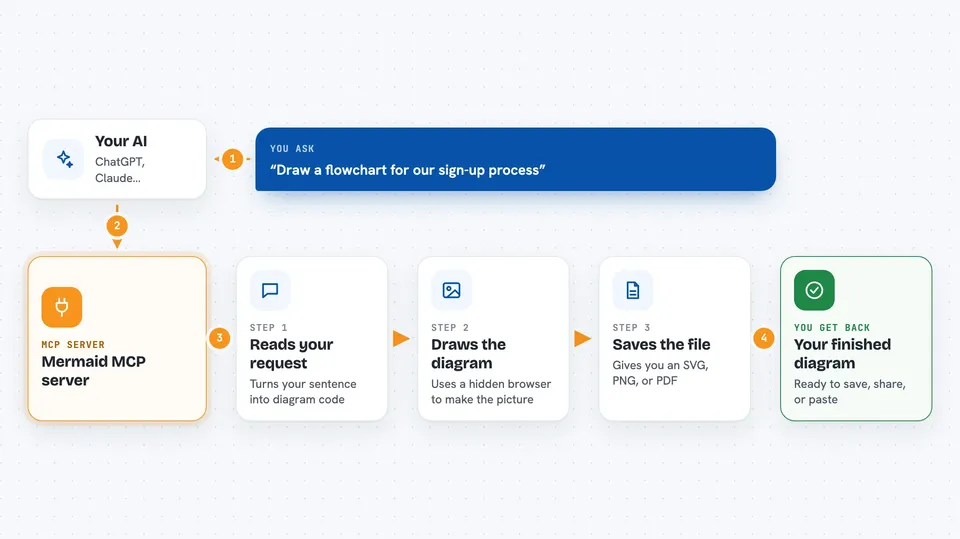
You type a request like "draw a flowchart for our sign-up process" into your AI chat. Your AI passes that request to this helper. The helper turns your words into Mermaid diagram code, then uses a hidden browser to render that code into a real picture file, usually an SVG. You get the finished diagram back, ready to save, share, or paste into your documentation.
 Click to zoom
What you can do with it
- Create flowcharts from a plain description of steps
- Draw sequence diagrams that show who talks to whom and in what order
- Build architecture and cloud infrastructure pictures
- Generate ER diagrams that show how data tables relate
- Make state diagrams that show how something moves between states
- Produce Gantt charts for project timelines
- Export the finished diagram as SVG, PNG, or PDF
Try asking your AI
- “Create a microservices architecture diagram for an e-commerce platform”
- “Generate a CI/CD pipeline flowchart showing a GitHub Actions workflow”
- “Show me a sequence diagram for user authentication with OAuth”
- “Draw an ER diagram for a simple online store with customers, orders, and products”
What it gives back to you
You get a diagram file back, usually an SVG picture that opens in any browser and stays sharp at any size. The chat also shows you the Mermaid text behind the picture, so you can tweak it yourself later. If you asked for PNG or PDF, you get that format instead. The diagram is saved as a file you can download or copy into your document.
Before you start
What you need
- Node.js 18 or newer installed on your computer
- npm (comes with Node.js)
- GitHub Copilot in VS Code or the Claude desktop app to talk to the helper
Good to know
The helper runs a hidden browser on your machine to draw the pictures, so the first run may take a little longer while it starts up.
Install it with your AI
Add Mermaid MCP server to your AI, no technical skills needed
You don't install anything by hand. You copy one prompt, paste it into an AI that can work on your computer, and it checks, installs and connects the server for you, asking you when it needs something.
Sign in to get the install prompt
Members get a ready-made prompt that lets the Claude desktop app check Mermaid MCP server, install it and connect it for them, step by step. You don't need any technical skills: you copy, paste and answer a few questions. Your connected AI can also find and install any of the 4,361 MCP servers here for you.
Who it's for
Anyone who has to explain a process or a system in a picture, like developers, architects, technical writers, and project managers.