
MCP server · Developer tools
Redcon MCP server
by natiixnt
Helps your AI pick only the files a coding task needs, so it uses fewer tokens and answers faster.
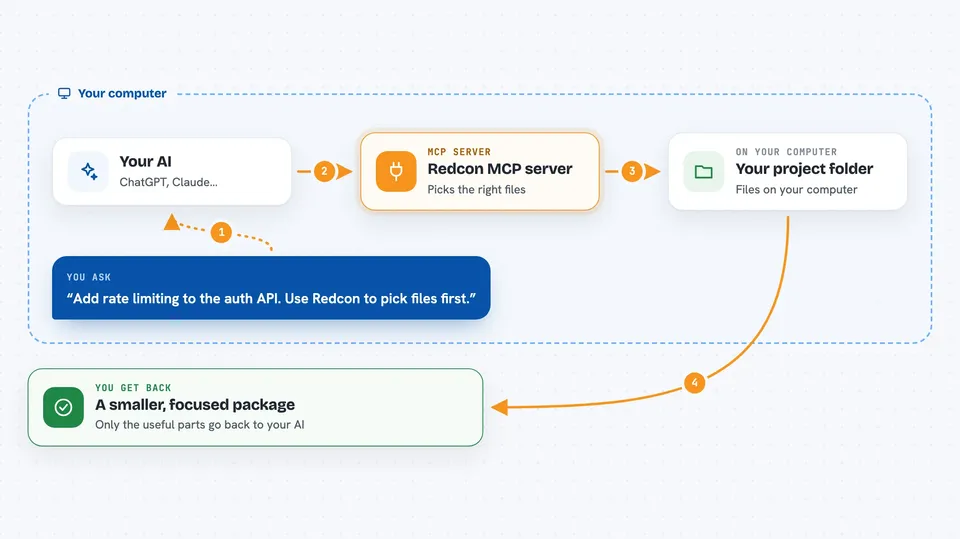
Redcon is a helper for AI coding assistants. When you ask your AI to change some code, Redcon finds the files that matter for that task and sends a trimmed-down version of them instead of the whole project. It is handy if you use tools like Claude Code, Cursor, Windsurf, Cline or Zed and keep running into usage limits.
What is an MCP server? The 30-second version
On its own, your AI can only chat with you. An MCP server is a small helper program that gives your AI a new skill or a connection to something else. This one connects your AI to Redcon, a tool that lives on your computer and knows how to look through your code folder. When you ask your AI to work on your code, it can call on Redcon to find and shrink the right files before it starts.
What this MCP server does
You ask your AI something like "add rate limiting to the auth API". The AI calls Redcon, and Redcon scans your project folder, scores each file by how relevant it looks for that task, and compresses the top ones. It then packs them under a token budget you set, so only the useful parts go back to the AI. Your AI reads that smaller package instead of the whole project, and you get your answer with far fewer tokens spent.
 Click to zoom
What you can do with it
- Find the files most relevant to a task you describe
- Shrink long files into short snippets or summaries
- Fit the chosen files under a token limit you set
- Search your project with plain text or code patterns
- Compress command output like git diff or test results
- Show a quick map of your project grouped by folder
- Check how much a pull request grows your context
Try asking your AI
- “Add rate limiting to the auth API. Use Redcon to pick the files first.”
- “Refactor the payment flow and keep the context under 30000 tokens.”
- “Search the ranked files for where the login token is created.”
- “Run the test suite and give me a short summary of the failures.”
What it gives back to you
You get back a short list of files with a score and a reason for each one, plus a compressed version of their contents. Command output comes back trimmed, for example a git diff with the important lines kept and the noise removed. Everything is written to a run.json file and a run.md file you can read or reuse. In the chat, your AI just shows you the answer it built from that smaller package.
Before you start
What you need
- Python installed on your computer (the setup page tells you which version)
- A terminal or command prompt to run the install command
- An AI coding tool that supports MCP, like Claude Code, Cursor, Windsurf, Cline or Zed
Good to know
Redcon reads files in the project folder you point it at and can run shell commands on your computer, so only use it on projects you are comfortable sharing with your AI tool.
Install it with your AI
Add Redcon MCP server to your AI, no technical skills needed
You don't install anything by hand. You copy one prompt, paste it into an AI that can work on your computer, and it checks, installs and connects the server for you, asking you when it needs something.
Sign in to get the install prompt
Members get a ready-made prompt that lets the Claude desktop app check Redcon MCP server, install it and connect it for them, step by step. You don't need any technical skills: you copy, paste and answer a few questions. Your connected AI can also find and install any of the 4,361 MCP servers here for you.
Who it's for
Developers and anyone who uses an AI coding assistant on a real project and wants to stay under their plan's usage limit.



