
MCP server · Browser automation
Browser Kit MCP server
by ndthanhdev
Lets your AI look at and click around in the browser tabs you already have open.
Browser Kit is a small helper that lets your AI assistant work with the browser on your own computer. You install it once, add a browser extension, and then you can ask your AI things like "star that GitHub repo I have open." It is handy if you keep a lot of tabs open and want your AI to read or act on them for you.
What is an MCP server? The 30-second version
On its own, your AI can only chat with you. An MCP server is a small helper program that gives your AI a new skill or a connection to something else. This one connects your AI to the browsers on your own machine, so it can see your open tabs and do simple things in them when you ask. Think of it as giving your AI a pair of hands for your browser.
What this MCP server does
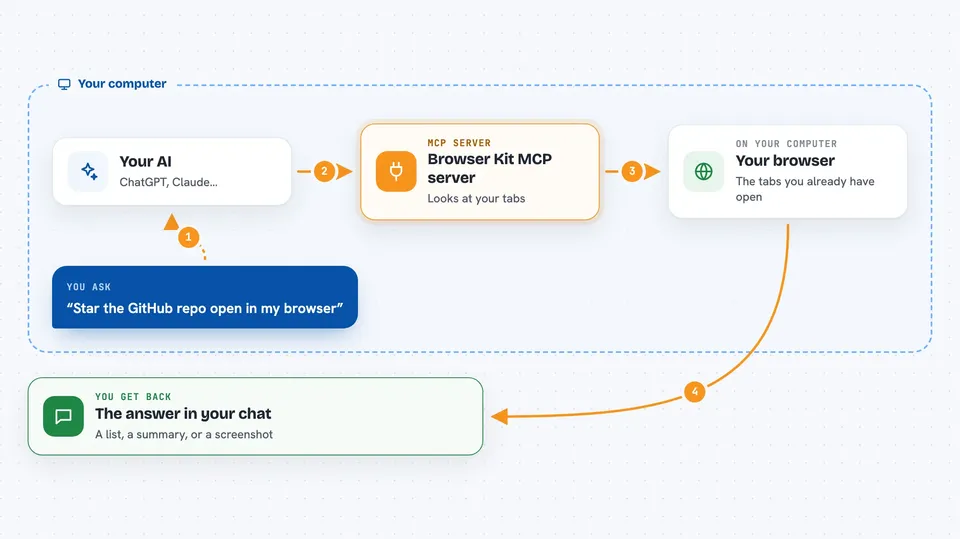
You ask your AI to do something in your browser, like star a repo or check a page. Your AI passes that request to Browser Kit, which is running quietly on your computer. Browser Kit talks to a small extension you added to your browser. The extension looks at your open tabs or performs the action you asked for. Then the result comes back to your AI, and your AI tells you what happened.
 Click to zoom
What you can do with it
- Look at which tabs you have open right now
- Read the page you are currently on
- Click buttons and links on a page
- Fill in simple forms on a page
- Star or bookmark a page you have open
- Take a screenshot of a tab
- Navigate a tab to a different page
Try asking your AI
- “Use browser-kit, star the last open GitHub repo on my browser”
- “Use browser-kit to tell me what tabs I have open right now”
- “Use browser-kit to read the page I am on and summarize it”
- “Use browser-kit to click the Sign in button on the tab I have open”
What it gives back to you
You get answers in your normal chat with your AI. It might list your open tabs, summarize the page you are looking at, or confirm that it clicked something or starred a repo. If it takes a screenshot, you get the image in the chat. Nothing is saved anywhere else; it just comes back to you.
Before you start
What you need
- The Claude desktop app or another app that supports MCP servers
- Node.js installed on your computer (the free program that runs the helper)
- The Browser Kit extension added to your browser (download it from the project's releases page)
- A browser that the extension supports, like Chrome, Brave, Edge, Firefox, or Safari
Good to know
It can click, type, and change things in your browser, and it has no login protection yet, so only run it on your own computer and use a separate browser profile if you have sensitive data.
Install it with your AI
Add Browser Kit MCP server to your AI, no technical skills needed
You don't install anything by hand. You copy one prompt, paste it into an AI that can work on your computer, and it checks, installs and connects the server for you, asking you when it needs something.
Sign in to get the install prompt
Members get a ready-made prompt that lets the Claude desktop app check Browser Kit MCP server, install it and connect it for them, step by step. You don't need any technical skills: you copy, paste and answer a few questions. Your connected AI can also find and install any of the 4,361 MCP servers here for you.
Who it's for
People who keep many browser tabs open and want their AI to read or act on them, like researchers, writers, and anyone doing repetitive web tasks.


