MCP server · Chat
Rubber Duck MCP server
by nesquikm
Ask one question to several AI models at once and compare their answers side by side.
This is a helper that lets your AI talk to more than one AI model at the same time. You explain a problem once, and several different AI "ducks" each give you their own take. It is handy if you want a second, third, or fourth opinion before you decide something.
What is an MCP server? The 30-second version
On its own, your AI can only chat with you using the one model behind it. An MCP server is a small helper program that gives your AI a new skill or a connection to another service. This one connects your AI to other AI models and to coding tools that run on your computer, so it can send your question out and bring answers back. You just ask in normal words, and the helper does the running around.
What this MCP server does
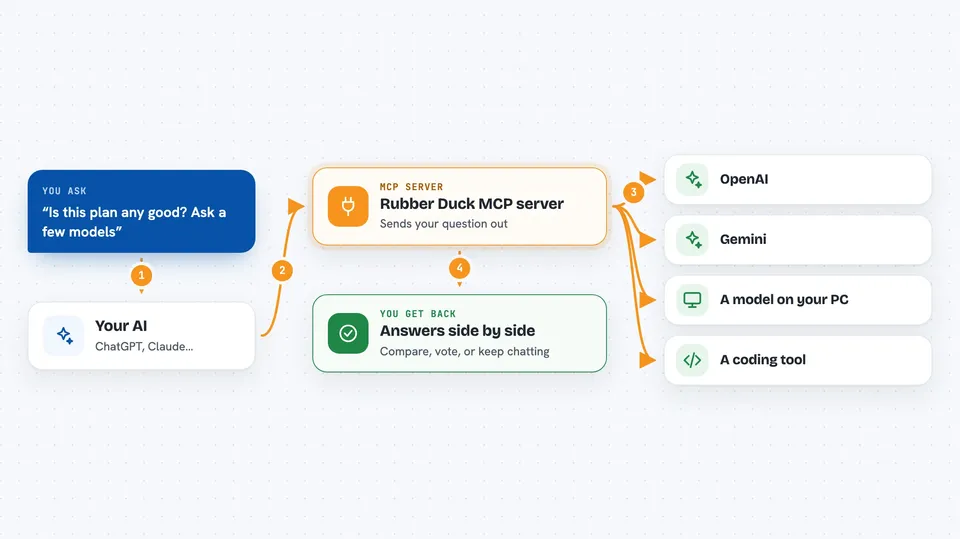
You ask your AI a question, like "is this plan any good?" The AI passes that question to this helper, which sends it to the models you set up, such as OpenAI, Gemini, or a coding tool on your machine. Each model answers on its own, and the helper collects everything. Then your AI shows you the answers, either one at a time or side by side, so you can compare. It can also keep a conversation going with one model, so you can go back and forth.
 Click to zoom
What you can do with it
- Ask the same question to several AI models and compare their answers
- Have a back and forth chat with one model while keeping the earlier context
- Run a vote where several models pick an option and give their reasoning
- Have one model judge and rank the answers the others gave
- Set up a short debate between models and read a summary at the end
- See how many requests and tokens you have used and the rough cost
- Check which models are set up and whether they are working right now
What it gives back to you
You get the answers back in your chat, usually as text you can read right away. When you compare or vote, you get the responses grouped together, often with which model said what. Some setups show a nicer visual panel with the answers side by side, a vote tally, or a usage summary. If a model fails, you still get the other answers and a note about what went wrong.
Before you start
What you need
- Node.js 20 or higher
- At least one API key for a model provider, or a coding tool installed on your computer
- The Claude desktop app or another tool that supports MCP servers
Good to know
Each question you send goes out to the model providers you set up, and those calls can cost money, so keep an eye on your usage.
Install it with your AI
Add Rubber Duck MCP server to your AI, no technical skills needed
You don't install anything by hand. You copy one prompt, paste it into an AI that can work on your computer, and it checks, installs and connects the server for you, asking you when it needs something.
Sign in to get the install prompt
Members get a ready-made prompt that lets the Claude desktop app check Rubber Duck MCP server, install it and connect it for them, step by step. You don't need any technical skills: you copy, paste and answer a few questions. Your connected AI can also find and install any of the 4,361 MCP servers here for you.
Who it's for
People who want a second opinion on their work, like writers, planners, and anyone who likes to check an idea from more than one angle.